

Vamitul
Legend
August 19, 2013
Question

How to find a footnote's number?

  • August 19, 2013
  • 2 replies
  • 1667 views

more specificaly:

how can i get the TEXT (string) that is displayed in a footnote reference (in the example * and **):
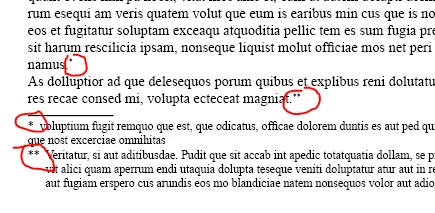
and... how can i get it's number in the parent story? (i select a footnote, and i want to know if it's the 5'th, 10'th etc in it's parent story).

The index property does not work, because the "containing object" is the document, and if the document has more stories with more footnotes it gives wrong results.

indexnumberreadonlyThe index of the Footnote within its containing object.
This topic has been closed for replies.

2 replies

Jump_Over
Legend
August 19, 2013

Hi,

If some footnote is selected

myFoot = app.selection[0].footnotes[0];

whichOne = myFoot.index - myFoot.parent.footnotes[0].index;

whichOne should be a "relative" index in a current story.

A "visible representation" is a bigger effort since you should iterate through "FootnoteNumberingStyle" content checking other footnoteOptions, i.e. restartNumbering.

If you will check a footnote.texts[0].charCodeAt(0) ==> is 4 - it means EOT - so some kind of magic have been done here

Jarek

Vamitul
VamitulAuthor
Legend
August 19, 2013

jarek, are you sure? I can't test now, but in my earlier tests myFoot.index returned it's number in the document, not the story and now as i am writing this i realize it doesn't matter because myFoot.parent.footnotes[0].index also returns the document relative numer and the difference is what i need for story based numbering but what if the restartNumbering is set on "Section" or "Page".. gggghhh....

Community Expert
August 19, 2013

@Vamitul – just tested…
Yes! The "relative" index in the current story is working.

chsrCodeAt(0) does not bring any new value to the game.
Btw. it's:

app.selection[0].footnotes[0].texts[0].contents.charCodeAt(0); //returns always 4

Now we have to work out the situation for restartNumbering and the other options:

1. Numbering format: 9 different options


2. Starting at …

3. Restart numbering:

3.1 By document (options in the UI un-checked!)

3.2 By page

3.3 By spread

3.4 By section

Ok. We can look up the parentTextFrames[0] and determine from its parent or parentPage on what spread or exact page the frame is sitting.

The case is getting complicated now ;-)

I'd say "Arrgh!" instead of "gggghhh...."

See the following screen shots.
"restartNumbering" is set to "Page" on all.

Screen 1, threaded story in 3 parts on the same page:

All fine. Footnotes from 1 to 6 in a geometrical order.

Screen 2, threaded story in 3 parts, 2 parts on the same page, 1 (the middle one) on the pasteboard:

Now look at this: despite the same story, three times the same footnote numbers!

Screen 3, you can expand this example in a zick-zack way:

Only no 1s in every footnote…

Screen 4, now I moved the 3rd text frame of the thread to the pasteboard:

Screen 5, and now it's getting very nasty with the numbering! :

The numbering isn't logically any more. At least I cannot see the logic here :-(
It should be:
TF1 => 1 (on the page)
TF2 => 1 (1st on the pasteboard)
TF3 => 2 (2nd on the pasteboard)
TF4 should be 3, but it's 1 again! (3rd on the pasteboard)
TF5 => 1 (on the page again)

TF6 => 1 (in the pasteboard again)

Moving TF5 to the pasteboard will reorder the numbering:

Like I said. It's more "Arrrrgh!!!"

Uwe

Message was edited by: Laubender

Community Expert
August 19, 2013

@Vamitul – hm. This is a little "toughy"…

But let's see:
The character in the story, that represents the footnote number or sign (in your example the * or **) has a contents property.


And this contents property has the value of: "FOOTNOTE_SYMBOL".


You should be able to count thiese FOOTNOTE_SYMBOLs in a particular story. A TEXT search should do.
What you cannot get in a direct way is the "visible contents" or "visible representation" of that symbol (the * or the particular number)!

If you want that, you need to analyze the footnote options. From that you should be able to determine what kind of symbol it might be (amongst other properties) and calculate the symbol's content from that…

Just an outline of my thoughts here.

Uwe

Vamitul
VamitulAuthor
Legend
August 19, 2013

so..

1) select the footnote reference (myFnRef)

2)  seach myFnRef.parentStory for "~F" (array: myFound)

3) compare myFound.what?? to myFnRef.what (index? does it work? "The index of the text in the collection or parent object". what is the parent object. is it always a story?)

considering i have to do this two times a day for documents ranging in 2000 pages, 100+ stories and between 5000 and 12000 footnotes... http://www.youtube.com/watch?v=8gciFoEbOA8