
Sam A.
Inspiring
September 8, 2020
Answered

how to find and delete "~l"

  • September 8, 2020
  • 2 replies
  • 1460 views

I've come across a few blue dots in my file that I fail to interpret. Maybe it's not crucial to delete them but I'd like to get rid of them anyway, just to make sure they do not do something I'm not aware of.


If I select the last few characters of this story (with the blue dots are included) and copy and paste them, this is what the Find/Change dialog looks like:
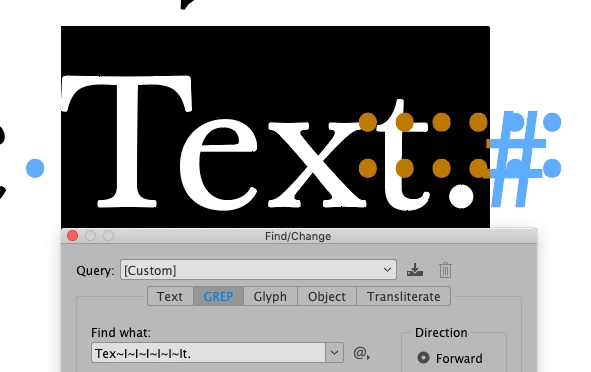


So there are six occurrences of "~l" between the "x" and the "t" here. The problem is if I search for "~l" (without quotes), InDesign tells me "Cannot find match" although they are right there.


What is "~l", and how do I find and delete it from the files?

This topic has been closed for replies.
Correct answer vladan saveljic

text search:

Find

<feff>

change to:

leave empty

2 replies

vladan saveljic
vladan saveljicCorrect answer
Inspiring
September 8, 2020

text search:

Find

<feff>

change to:

leave empty

Peter Kahrel
Community Expert
Community Expert
September 8, 2020

Deleting <FEFF> is dangerous, as it's used for index page references, text anchors, and several other things as well.

Sam A.
Sam A.Author
Inspiring
September 8, 2020

Ah, thank you Peter. In this case I think deleting U+FEFF is harmless since there are no index marks, text anchors or the like in my files. But good to know to be careful next time!

Community Expert
September 8, 2020

I can find ~I just fine in my sample document. Can you share a sample document that has this issue, also please tell which version of InDesign are you using, I tested it on the version 15.1.2 on a MAC.

-Manan

-Manan
Sam A.
Sam A.Author
Inspiring
September 8, 2020

Hi Manan


Thanks for your reply.


InDesign CC 2020 15.1.2
macOS Mojave 10.14.6


Please note it's "~l" (not " I").


I've prepared a sample document to share, but I fail to save it (both the commands "Save" and "Save As …" are greyed out):


So my next question is how to save this file ...


Update: If I simply close the document, I am asked whether I want to save this file, and after trying to do, I am told "Cannot save [filename]".

Community Expert
September 8, 2020