


Participating Frequently
September 24, 2024
Question

How to Fix Color Discrepancies Between Text and SVG Blacks in InDesign

  • September 24, 2024
  • 1 reply
  • 188 views

Hello,
I have created a document with 2 kind of objects.
1. Text
2. SVG

Both are supposed to be in the same black. However,
the although the SVG are in the desired black, the text is not.
The SVG inherits the Black from the File and the text is set to Black (C = 0, M=0, Y=0, K=100)
It looks like this...
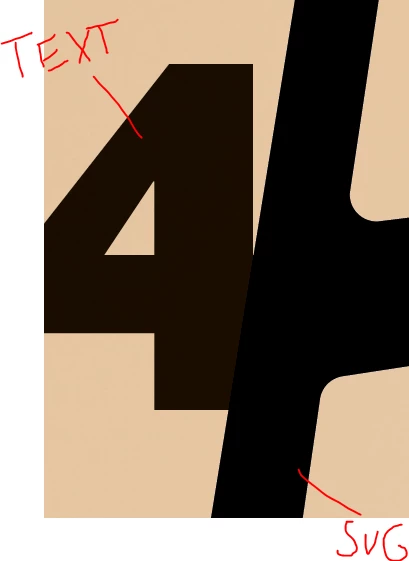

What is the Problem here and how to solve this?
And why is INdesign handling the blacks differently?


<Title renamed by MOD>


This topic has been closed for replies.

1 reply

Community Expert
September 24, 2024

Hi @juliush84370597 ,

I assume that the black from the SVG is set to RGB values 0,0,0.

The black of the text could be [Black]. If you did not change preferences in InDesign, [Black] will overprint your background color, so that components of Cyan, Magenta and Yellow of the background will be added to the 100% K of [Black].


SVG files are in RGB and cannot be in CMYK.

That's for the "why".


The best thing you could do is to open the SVG file in Adobe Illustrator, convert the file to CMYK, change the fill of the object to [Black], save as Adobe Illustrator file and place the *.ai file instead of the SVG one so that both blacks will always match.


Regards,
Uwe Laubender
( Adobe Community Expert )