
Participating Frequently
October 25, 2024
Answered

How to Fix Duplicated Pages in InDesign When Exporting to Reflowable EPUB

  • October 25, 2024
  • 1 reply
  • 2181 views

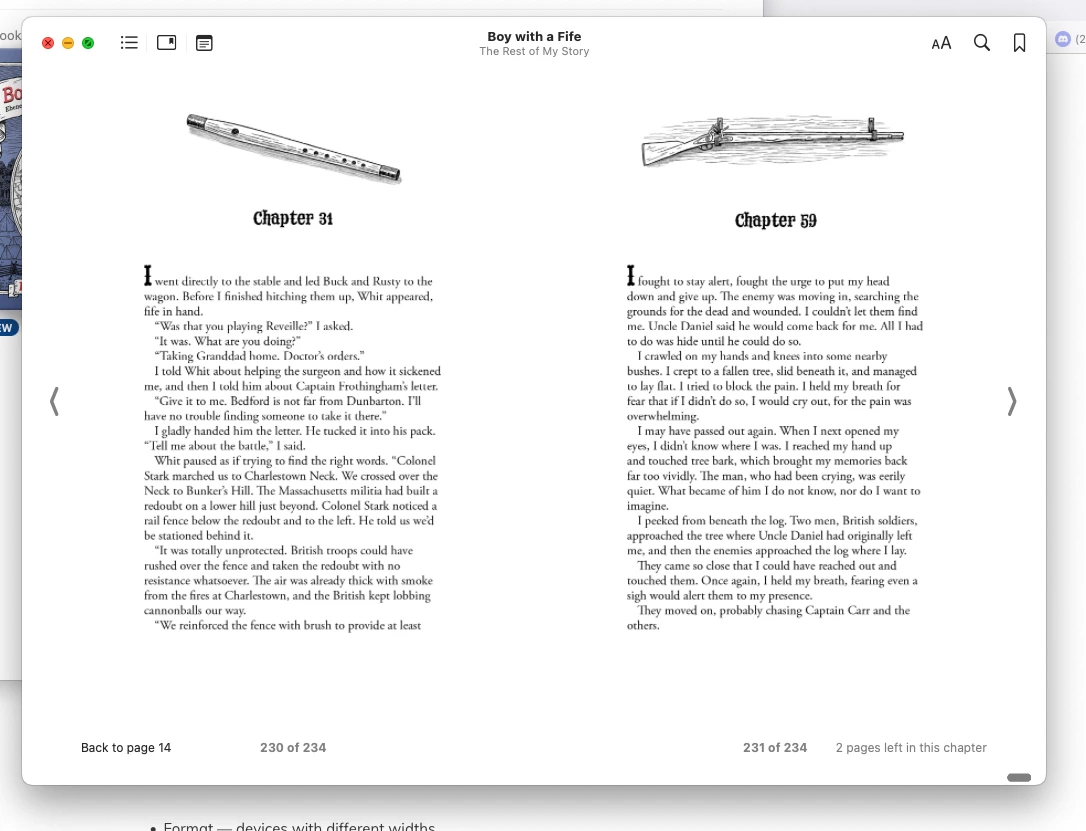
I've got a perfect ecxport from INDD to Epub except for the fact that two pages, the first page of chapter 31 and the first page of chapter 59 have been duplicated and inserted at the end of the EPUB. There is nothing different about these pages concerning layout or paragraph style from all the other chapters. There are no blank pages in the document. Has anyone run into this problem before and HOW do I fix it?! I have done all the things I know to do and nothing is helping.
 

<Title renamed by MOD>

Correct answer helen_72

And — I'm a dummy, here. This tutorial will probably help a bit —


Thanks for your help, I got it to work by inserting this CSS code:

ul {
margin-top: 0 !important;
}

ul {

margin-bottom: 0 !important;
}


1 reply

James Gifford—NitroPress
Legend
October 25, 2024

Okay, I think two factors are in play here. First, I've never seen an EPUB export duplicate contents; if it's in the INDD, it goes into the EPUB, and if it shows up in the EPUB, it's in the work file somewhere. So those two pages are real artifacts somewhere in your file.


Second, junk that ends up at the end of an export is elements that were not anchored anywhere, so they are exported last, as secondary flow elements. (It's really common for novices to have their TOC end up at the end, because the TOC frame has to be anchored to text somewhere near the beginning to stay there.)


So I think you've accidentally duplicated those pages somehow, possibly by inadverently hitting Alt-arrow to copy+move a text frame. Two ways to check —

  • Go to each of those pages and drag the text frame an inch or so out of position. Does a duplicate magically appear? Delete it.
  • If not, the duplicate material may be hiding somewhere off the pages, out on the artboard. You can zoom out in Normal mode and page through, looking for junk frames out there in the wastelands. Or, maybe easier, search ("Document") for unique text on each page. Bet you find a hit somewhere odd. Again, delete that duplicated frame. (Note that if the frames are aligned, you'll get what appears to be a double hit on the same page; watch for that.)


And if not, there might not be any way to guess what's up without seeing your file. Report back with details of success or failure. 🙂

Participating Frequently
October 25, 2024

Hi James,

so I followed your instructions--I pulled the text fram off a bit and no duplicate.

Then I searched the document for a unique text phrase--no luck.

So I zoomed out and looked for errant frames--again, no luck!

If you want to scour my file I would be eternally grateful if you can puzzle this out! I have spent so many hours already trying to figure it out!

Here's a link to the file.

Thank you in advance.

https://drive.google.com/file/d/1Zml2bq9f_e4_jKaAyXnF40rVZdy-TGNh/view?usp=drive_link

James Gifford—NitroPress
Legend
October 25, 2024

Happy to take a look. It's usually one simple thing, pretending to be complicated. 🙂