
Known Participant
March 21, 2023
Answered

How to fix misaligned columns in a text document in InDesign?

  • March 21, 2023
  • 3 replies
  • 1818 views

i have 3 seperate collums of text and i tried to delete one line from the colluum on the left it leaves a space where that text was, when i press backspace to try to remove that space the text from the collumn in the middle comes, essentially it is one line straight accross instead of up and down in 3 collums as i wanted it to. 


<Title renamed by moderator>
 

This topic has been closed for replies.
Correct answer Steve Werner

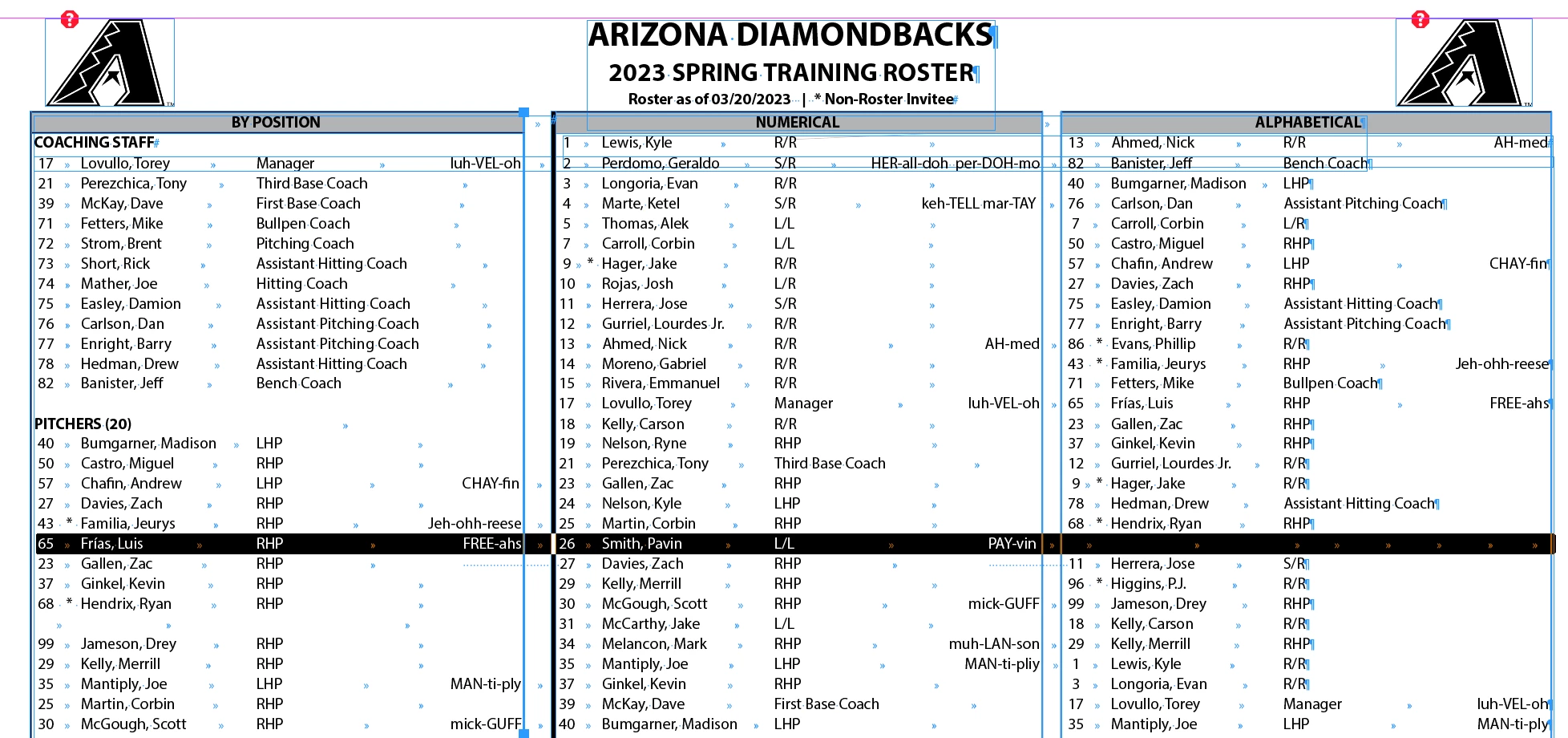
Now I understand. You have set up the three separate "columns" using tabular text. But the rows extend from left to right across parts of ALL THREE of the "columns".


In other words the "columns" aren't really columns.


See this screen capture:


When you're using tabular text you should have set each "column" separately from the other "columns". The rows should extend across ALL of the "columns". That makes extremely hard to edit accurately.


It would be even better if it were set up as a table (or three tables) but you may not use how to use tables.

3 replies

Known Participant
March 29, 2023

Is there a setting that can be changed to fix the issue without having to remake the whole document?

Peter Spier
Community Expert
Community Expert
March 29, 2023

Unfortunately, no.

Steve Werner
Community Expert
Community Expert
March 29, 2023

Sadly, it works like construction. If you don't fix it now, you'll continually be running into problems until you do fix it. (Like a bad plumbing job.)

Steve Werner
Community Expert
Steve WernerCommunity ExpertCorrect answer
Community Expert
March 21, 2023

Now I understand. You have set up the three separate "columns" using tabular text. But the rows extend from left to right across parts of ALL THREE of the "columns".


In other words the "columns" aren't really columns.


See this screen capture:


When you're using tabular text you should have set each "column" separately from the other "columns". The rows should extend across ALL of the "columns". That makes extremely hard to edit accurately.


It would be even better if it were set up as a table (or three tables) but you may not use how to use tables.

Steve Werner
Community Expert
Community Expert
March 21, 2023

To be clearer: If you're using tabular text, the "column" with the header "BY POSITION" should be separate from the "columns" headed "NUMERICAL" and "ALPHABETICAL". You shouldn't be able to tab between the three "columns". They should be separated.

Known Participant
March 21, 2023

Thank you for the feedback, I am new to Indesign. Is it possible to edit the document so it flows properly or does it need to be remade?

Steve Werner
Community Expert
Community Expert
March 21, 2023

Make a screen capture which shows the tabular material in Normal Mode, turn on Type > Hidden Characters so we have a better idea of how you have structured the table(s).

Known Participant
March 21, 2023

Attached

Steve Werner
Community Expert
Community Expert
March 21, 2023

There's something unusual in the way those tables are set up. At first it looks like three separate tables. But with hidden characters turned on I see some what looks like tab characters in the spaces between the three tables. I think I'd have to look at the INDD file to figure out how that was done. Can you post it?