


Answered
How to Fix Table Misalignment in a Two-Column Text Frame with Spanning Paragraph
Hello,
I have a two-column text frame containing a paragraph that spans columns. Below that, within the same text frame, is a table that is single-column in terms of paragraph settings, so the rows go down the first column of the text frame and then continue on the second.
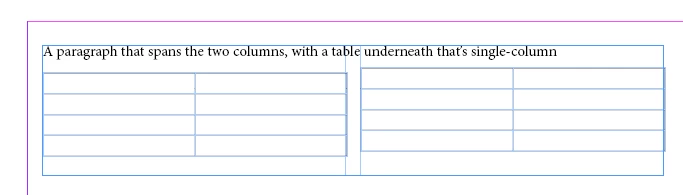
But the right column of the table looks higher than the left column. This happens regardless of the space after the top paragraph, and it seems specific to tables; I can put single-column text under the spanned paragraph, and the columns line up just fine.
Am I missing something? How do I get the two text-frame columns of the table to start at the same height?
<Title renamed by MOD>


 AdChoices