
Answered
How to format the numbering number in a paragraph style via script?
I'd like to create a paragraph style with numbering, however, I'd like to change the Number option in the Numbering style from default ^#^t to ^#. I could not find any class here that would help me to accomplish this.
It is quite simple to do via GUI, see the screenshot below.
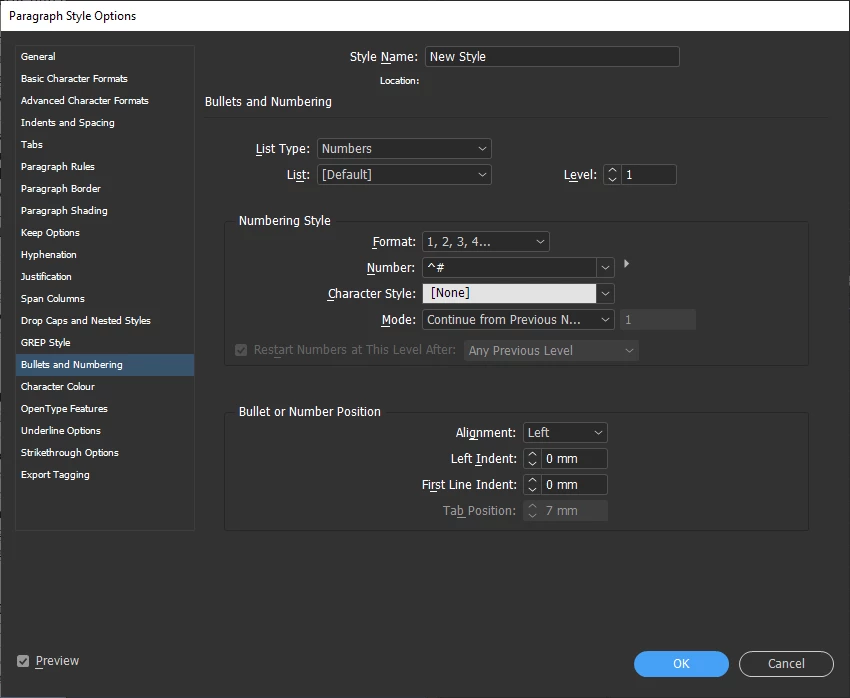
Currently, my script looks like this:
var doc = app.activeDocument;
var newStyleName = 'New Style';
var newStyle = doc.paragraphStyles.itemByName(newStyleName);
var footnotesStartAt = 5;

// Create `newStyleName` paragraph style if missing
if (! newStyle.isValid) {
   newStyle = app.documents[0].paragraphStyles.add();
   newStyle.name = newStyleName;
   newStyle.bulletsAndNumberingListType = ListType.NUMBERED_LIST;
   newStyle.numberingFormat = NumberingStyle.ARABIC;
   // ??? newStyle.??? = '^#';
   newStyle.numberingStartAt = footnotesStartAt;
} AdChoices