
Participant
May 1, 2023
Question

How to get each line in InDesign to automatically have a different styling

  • May 1, 2023
  • 2 replies
  • 392 views

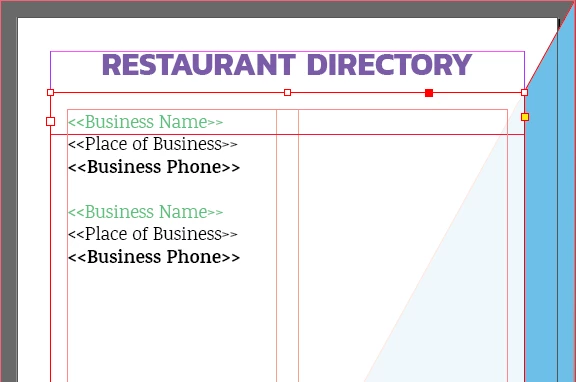
I am working on a project. I want to highlight each section and have the paragraph style apply a different style to each line as pictured. 
It would save me so much time if I could click on each entry and apply the style so that the name is one color and the address is another, and the Phone is bold Is this possible with paragraph styles? Right now it just changes all of the text to the green.
This topic has been closed for replies.

2 replies

Willi Adelberger
Community Expert
Community Expert
May 1, 2023

I would work with 3 different paragraph styles, each defined properly and succeeding with next paragraph in the paragraph style.

ANother method could be 1 Paragraph with forced line breaks and the paragraph style has line styles in nested styles defined, each line, or at least 2 of them woith appropriate character style.


Choose what is best for your situation.

jmlevy
Community Expert
Community Expert
May 1, 2023

It seems that you use data merge in your document, so I guess that there is a hard return between each entry. The easiest way is to build 3 different paragraph styles: one with regular green, the other with regular black and the last with bold green. If the 3 lines are in the same paragraph (but I am quite sure it is not), you could use nested line styles or nested styles with different character styles.