
Kasyan Servetsky
Legend
January 4, 2017
Answered

How to get reference to the first body row on page in a long table?

  • January 4, 2017
  • 2 replies
  • 18558 views

Dear forum,

I have a long table which is threaded among several text frames (pages). I want to get the reference to the first body row in each frame so that to check if it contains a product name. (I can do this by checking if all the cells in the row have been merged.)
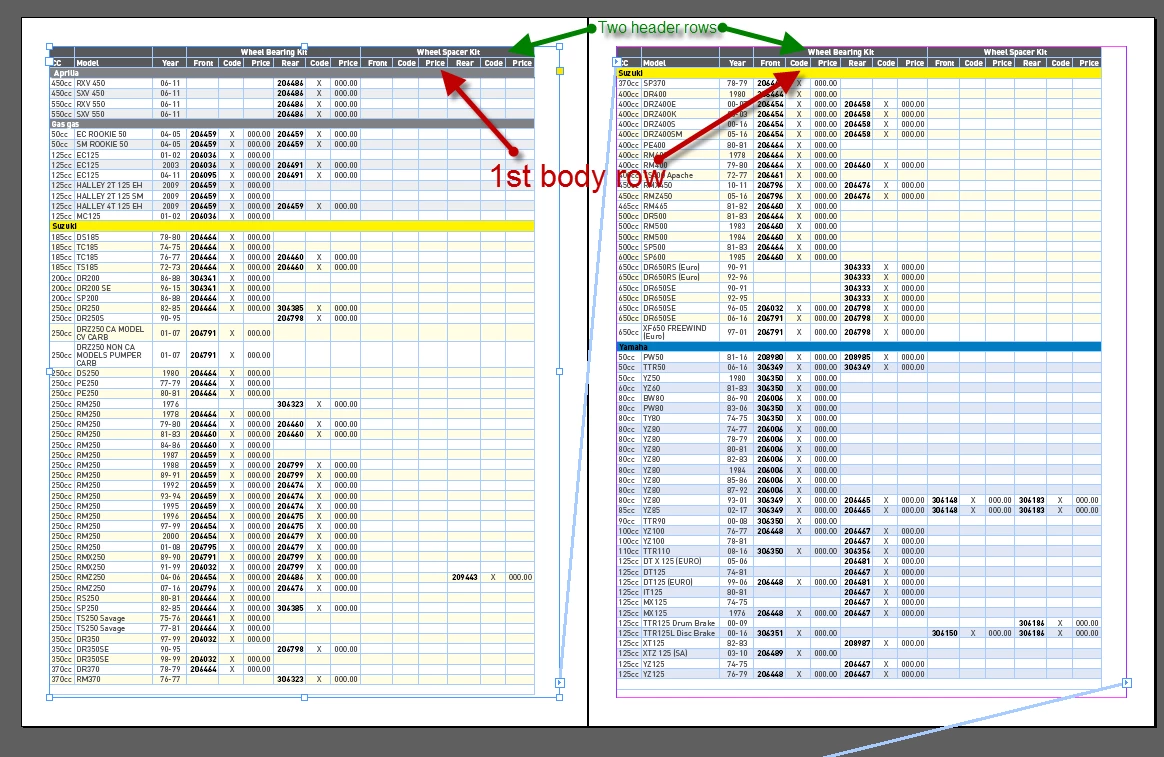
Since a table looks like a single character for script, I don’t see a straightforward way to achieve my goal.

So far, I solved it in a sloppy way: I check the baseline of the 1st insertion point of the 1st cell in the row.

else if (RoundString(row.cells[0].insertionPoints[0].baseline, 1) == firstRowBaseline && mainRow != null) {

Is there a more elegant solution?

Thank you in advance!

Regards,
Kasyan

This topic has been closed for replies.

2 replies

Liphou
Inspiring
December 13, 2017

Merci

I'm on Mac, I do not know the command in Termibal.

For the error, it signals me that 'r' is 'undefined'.

I am especially curious to be able to use the 'Compare Functions.jsx' script

//---------------------------

Je suis sur Mac, je ne connais pas la commande en Termibal.

Pour l'erreur, il me signal que 'r' est 'undefined'.

Je suis surtout curieux de pouvoir réutilisé le script 'Compare Functions.jsx'

Trevor:
Trevor:Correct answer
Legend
January 4, 2017
Kasyan Servetsky
Legend
January 6, 2017

Hi Trevor,

Thank you very much for pointing me in the right direction!

I used the approach you used in your second script.

Here's the code in case someone is interested:

main();

function main() {

    var doc = app.activeDocument,

    table = doc.stories[1].tables[0];

    tableTest(table);

}

function tableTest(table) {

    var textFrame, previousTextFrame, currentTextFrame,

    rows = table.rows;


    previousTextFrame = rows[0].cells[0].insertionPoints[0].parentTextFrames[0];

    for (var i = 0; i < rows.length; i++) {

        row = rows;

        if (row.rowType != RowTypes.BODY_ROW) continue; // skip headers & footers


        currentTextFrame = row.cells[0].insertionPoints[0].parentTextFrames[0];

        // the first body row in the first frame, or text frame has changed

        if ((i - table.headerRowCount == 0 && currentTextFrame == previousTextFrame) || currentTextFrame != previousTextFrame) {

            row.fillColor = "Yellow";

        }

        else {

            row.fillColor = "Magenta";

        }


        previousTextFrame = currentTextFrame;

    }

}

Regards,
Kasyan

Community Expert
January 6, 2017

Hi Kasyan,

also prepare for the case where a row has no cells at all.

So test for:

row.cells.length

Could be that the value of length is: 0

How could that happen?

1. Copy a range R of rows from table A

2. Paste the range to a new text frame => that will become table B

3. Add a column at the right edge of table B

4. Merge the cells in table B columnwise, but not the new added column

5. Select and copy the merged cells of table B only

6. Select the first cell in R of table A

7. Paste the copied cells

Now table A has rows where the length of cells is zero.

Here a screenshot from a sample where I set the contents of each cell to its name:

The Table panel is showing 10 rows and is obviously following: table.rows.length

The Story Editor panel is showing 7 rows. That's the ones with cells that can be edited.

If you run a snippet like that on the table where I loop through all the rows of the table:

// Select textFrame and run this script:

var rows = app.selection[0].tables[0].rows.everyItem().getElements();

var rowsLength = rows.length;

for(var n=0;n<rowsLength;n++)

{

    $.writeln("row"+"\t"+n+"\t"+"cells.length:"+"\t"+rows.cells.length);

};

The result of cells.length is that:

/*

row    0    cells.length:    6

row    1    cells.length:    6

row    2    cells.length:    0

row    3    cells.length:    0

row    4    cells.length:    0

row    5    cells.length:    6

row    6    cells.length:    6

row    7    cells.length:    6

row    8    cells.length:    6

row    9    cells.length:    6


*/

Regards,
Uwe