
Participant
February 17, 2021
Answered

How to get text to neatly sit flush against diagonal margin

  • February 17, 2021
  • 1 reply
  • 4751 views

Hi All,


I'm busy with label design and as the packaging is slightly wider at the top and narrower at the bottom, I have had to design the label with both ends at a slight diagonal to make the two ends of the label appear straight where they meet. Essentially, while it is skew onscreen, once the label is applied it will visually appear straight.


What I'm struggling with is getting the text to neatly sit flush against the skew marign. You can see what I mean in the image below:
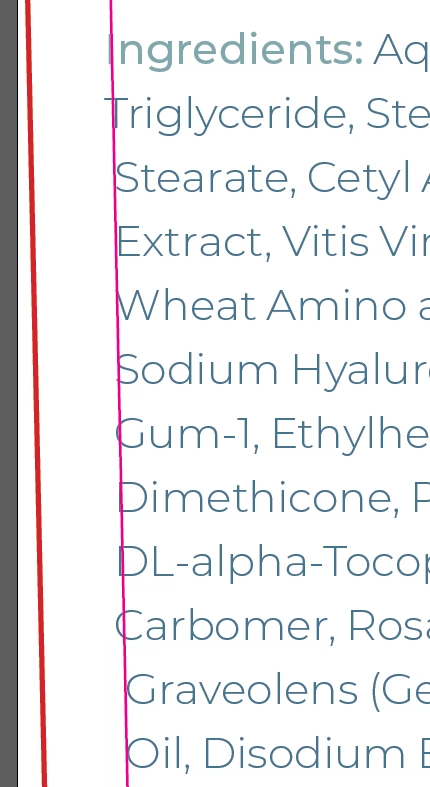
 

I have tried optical margin alignment, but it didn't really do much.


Any ideas would be greatly appreciated!

This topic has been closed for replies.
Correct answer Randy Hagan

Sometimes you just need to cheat.


Since we're talking about one-time deals to set specific type in specific ways for a specific job, there are a few ways to make this work.


  1. You can adjust the text frame to account for your type, using the direct-selection arrows to set anchor points on the left margin for each offending line. Adjusting the anchor points in and out to "bump" the type alignment to your will. You can learn more about this through this link; realizing that when they talk about generic shapes, those "shapes" can also be your text frame.
  2. You can use combinations of spacing from the Type>Insert White Space options to bump the type off the established left edge of your type frame, then use your kerning function between the space character and your first character to move the line to your will. Check out this link to learn more about how fine your cheats can be.
  3. Finally, the worst case scenario where you set the text, line by line, and move the text frames to get your desired effect.


You can use any of these options, or any combination of them, to move type to get things the way you want them. It's a lot easier if your really zoom in tight (200-400% display size) to see your fine adjustments in detail. It'll take a little bit of work, which hopefully you can bill for, to get your client the results desired.


Hope this helps,


Randy

1 reply

Randy Hagan
Community Expert
Randy HaganCommunity ExpertCorrect answer
Community Expert
February 17, 2021

Sometimes you just need to cheat.


Since we're talking about one-time deals to set specific type in specific ways for a specific job, there are a few ways to make this work.


  1. You can adjust the text frame to account for your type, using the direct-selection arrows to set anchor points on the left margin for each offending line. Adjusting the anchor points in and out to "bump" the type alignment to your will. You can learn more about this through this link; realizing that when they talk about generic shapes, those "shapes" can also be your text frame.
  2. You can use combinations of spacing from the Type>Insert White Space options to bump the type off the established left edge of your type frame, then use your kerning function between the space character and your first character to move the line to your will. Check out this link to learn more about how fine your cheats can be.
  3. Finally, the worst case scenario where you set the text, line by line, and move the text frames to get your desired effect.


You can use any of these options, or any combination of them, to move type to get things the way you want them. It's a lot easier if your really zoom in tight (200-400% display size) to see your fine adjustments in detail. It'll take a little bit of work, which hopefully you can bill for, to get your client the results desired.


Hope this helps,


Randy

Participant
February 17, 2021

Thanks Randy, I'll give those suggestions a try and hopefully they do the trick. It's only 6 labels, so it could be worse I suppose.

Randy Hagan
Community Expert
Community Expert
February 17, 2021

Cool. I'm confident that these are the tools which let you "mess things up" until they work exactly like you expect them to.


I like to think I'm a finesse player, but sometimes you've just got to beat a problem into submission to make things work like you want them to.


And if you have any other issues in the future, please feel free to come back here and sound the alarm. There are lots of sharp folks around here who are happy to help you past your problems.


Good luck,


Randy