

Chris  P.  Bacon
Inspiring
August 26, 2022
Question

How to get the closest CMYK color in inDesign?
  • August 26, 2022
  • 2 replies
  • 3465 views

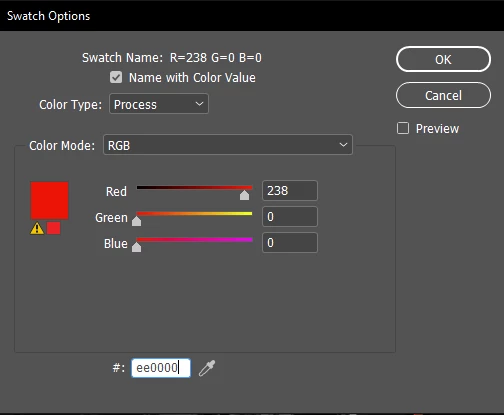
InDesign indicates with the yellow sign that my choosen RGB color cannot be reproduced in the CMYK color mode for print.

My RGB color #ee0000 according to this article

is the red shade that has the highest contrast with both black and white.

But the color that InDesign chooses to replace it:  #ed1c24 (shown in the small square beside the yellow sign, as a comparison):
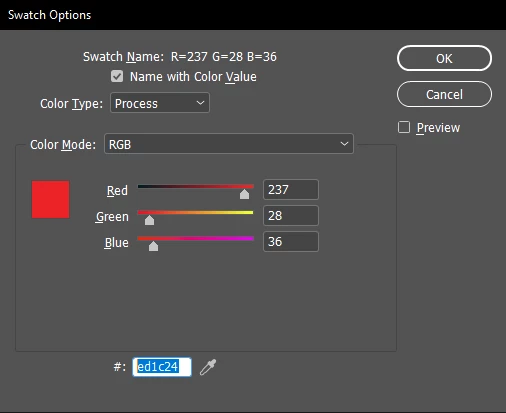
is a much more pale red.

Is this really the closest RGB color to #ee0000 that can be used in CMYK, or I should recalculate the highest contrast shade red (with both black and white) using some other, CMYK scheme?


This topic has been closed for replies.

2 replies

rob day
Community Expert
Community Expert
August 26, 2022

Hi @Chris P. Bacon ,

The article you linked to is referring to web viewing where the RGB color profile is assumed to always be sRGB.


The Adobe print apps allow you to work in any RGB or CMYK space, so the appearance of color is dependent on the assigned color profiles.


Here I have a document with sRGB as its RGB assignment, and Coated GRACoL 2006 as its CMYK assignment. The fill on the left is sRGB 238|0|0 and the fill on the right is GRACoL CMYK 0|100|100|0. If I change the document profile assignments the color appearances change:


sRGB and Coated GRACoL:


sRGB and US Newprint SNAP


Prophoto RGB and US Newprint SNAP


Also, HEX color is simply a different notation for RGB colors, so if I check the 0|100|100|0 CMYK value in the Color Picker, the listed hex value is the conversion from the document CMYK profile to the document RGB profile—Coated GRACoL to sRGB in this case.


Chris  P.  Bacon
Inspiring
August 26, 2022

In lack of a highest contrast (with black and white) calculator specificaly for the CMYK color mode, the only thing I can try to do is to find the closest CMYK color to #ee0000.

My question is if the color suggested by InDesign is really the closest to that sRGB color that can be reproduced in print?

Or should I use some other tool to find the closest CMYK color?


rob day
Community Expert
Community Expert
August 26, 2022

Or should I use some other tool to find the closest CMYK color?


No, 238|0|0 sRGB would out-of -gamut any typical offset press CMYK space, and in a larger RGB space like AdobeRGB or ProphotoRGB would be even further out.


James Gifford—NitroPress
Legend
August 26, 2022

ETA: This is not an InDesign issue. It is a fundamental design issue, one of the most fundamental. It needs to be understood independently of how any one app might manage it.


Working to digital display and working to print are two very different things. That you can be casual about it and convert colors and so forth at several stages is not really an excuse to do so; if a project is, in particular, intended for printing, you have to make every design choice for that end right from the start.


Back up and choose your colors using CMYK. Don't try to "fix" an RGB document designed around (usually brighter) colors print can't replicate.


You might also want to study a tutorial or two on the differences between RGB and CMYK gamuts, so that you have a better grasp of the why and the limitations, especially for print.