Oh.I see.
That "if condition" only determines that the table only takes up one page
But can't differentiate, that the table only takes up 1 page but spans 2 columns.
4th version:
/*
    _FRIdNGE-0778_TablePageExtraction.jsx
    Script written by FRIdNGE, Michel Allio [08/01/25]
*/

// I suppose an .indd document open with Tables! ...
var myDoc = app.activeDocument;
var myTables = myDoc.stories.everyItem().tables.everyItem().getElements();
var T = myTables.length,  t;
var myTablePages = [];
for ( t = 0; t < T; t++ ) {
    var myTable = myTables[t];
    if ( myTable.storyOffset.parentTextFrames[0].parentPage === myTable.storyOffset.parentStory.insertionPoints[myTable.storyOffset.index+1].parentTextFrames[0].parentPage ) {
        if ( myTable.storyOffset.textColumns[0] === myTable.storyOffset.parentStory.insertionPoints[myTable.storyOffset.index+1].textColumns[0] ) myTablePages.push( myTable.storyOffset.parentTextFrames[0].parentPage.name );
        else myTablePages.push( myTable.storyOffset.parentTextFrames[0].parentPage.name + "*" );
    }
    else myTablePages.push( myTable.storyOffset.parentTextFrames[0].parentPage.name + "-" + myTable.storyOffset.parentStory.insertionPoints[myTable.storyOffset.index+1].parentTextFrames[0].parentPage.name );
}
if ( T === 0 ) alert( "No Table! ..." ) // DEBUGGING - To be removed!
else if ( T === 1 ) alert( "Pre-Control, Table on Page:\r" + myTablePages.sort(function(a,b) {return parseFloat(a)-parseFloat(b)}).join("\r") ) // DEBUGGING - To be removed!
else alert( "Pre-Control, Tables on Pages:\r" + myTablePages.sort(function(a,b) {return parseFloat(a)-parseFloat(b)}).join("\r") ) // DEBUGGING - To be removed!

var myFile = new File(myDoc.fullName.toString().replace(".indd",".txt"));
myFile.open('w');
myFile.write(myTablePages.sort(function(a,b) {return parseFloat(a)-parseFloat(b)}).join("\r"));
myFile.close();
alert( "Done! ..." )
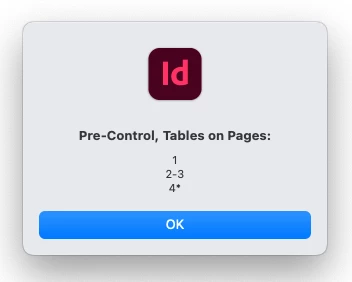
if a table is on a page but on 2 columns, it's identified by a "*" after the page number!
Considering all the scripts you have asked for for some time, it might be a good idea for all to hire a scripter! …
But it's just a comment.
(^/)



 AdChoices