

dublove
Legend
August 8, 2025
Answered

How to identify the first and last pages?

  • August 8, 2025
  • 3 replies
  • 194 views

My code.:

var sel = app.documents[0].selection;
pp = sel[j].parentPage;

Now there are three conditions that can identify left and right pages, as well as single pages

pp.side == PageSideOptions.RIGHT_HAND
pp.side == PageSideOptions.SINGLE_SIDED
pp.side == PageSideOptions.LEFT_HAND

I now want to handle the first and last pages separately. It would be helpful if I could determine whether the current page is a spread.
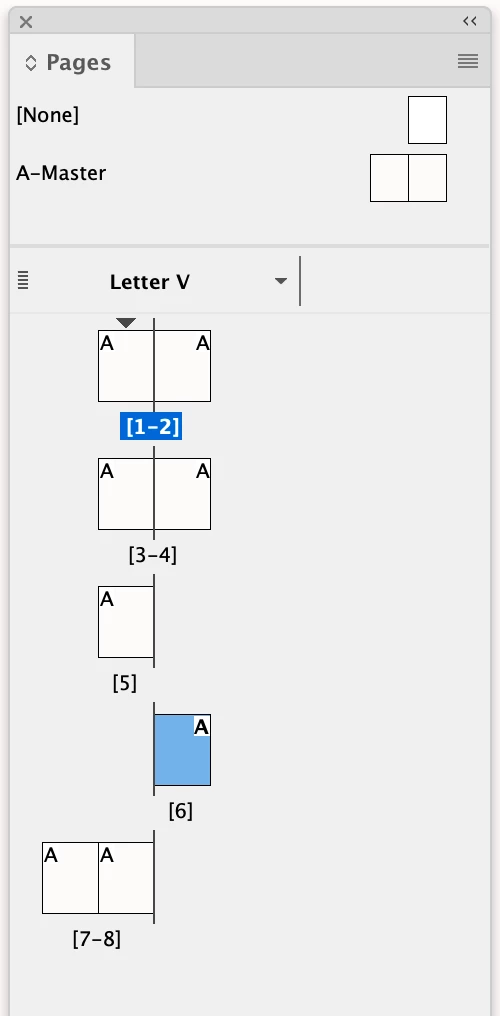
Correct answer rob day

Testing the side doesn’t tell you if it’s a first or last page—the document could be setup like this:


You can use the page’s document offset to test for first or last like this:


var sel = app.documents[0].selection[0];

if (sel.parentPage.documentOffset == 0) {
	$.writeln("Selection is on first page")
} 
if (sel.parentPage.documentOffset == app.documents[0].pages.length-1) {
	$.writeln("Selection is on last page")
} 

3 replies

rob day
Community Expert
rob dayCommunity ExpertCorrect answer
Community Expert
August 9, 2025

Testing the side doesn’t tell you if it’s a first or last page—the document could be setup like this:


You can use the page’s document offset to test for first or last like this:


var sel = app.documents[0].selection[0];

if (sel.parentPage.documentOffset == 0) {
	$.writeln("Selection is on first page")
} 
if (sel.parentPage.documentOffset == app.documents[0].pages.length-1) {
	$.writeln("Selection is on last page")
} 
Community Expert
August 9, 2025

A page is not a spread ever afaik. Spread contains pages. A page's parent will give you the spread. So if you want to know if a page is the only one in the spread then something like the following would work

if(pp.parent.pages.length == 1)
   alert("PP is the single page in its spread.")

If you want the first and last page of a spread you can use the following. Do note that if the spread has only 1 page then both these pages would be same

var firstPageOfSpread = pp.parent.pages[0]
var lastPageOfSpread = pp.parent.pages[-1]

-Manan

-Manan
rob day
Community Expert
Community Expert
August 8, 2025

You can check the number of pages in the parentPage’s parent (the spread)


var sel = app.documents[0].selection[0];
$.writeln("The selection’s spread contains " + sel.parentPage.parent.pages.length + " pages")