

Answered
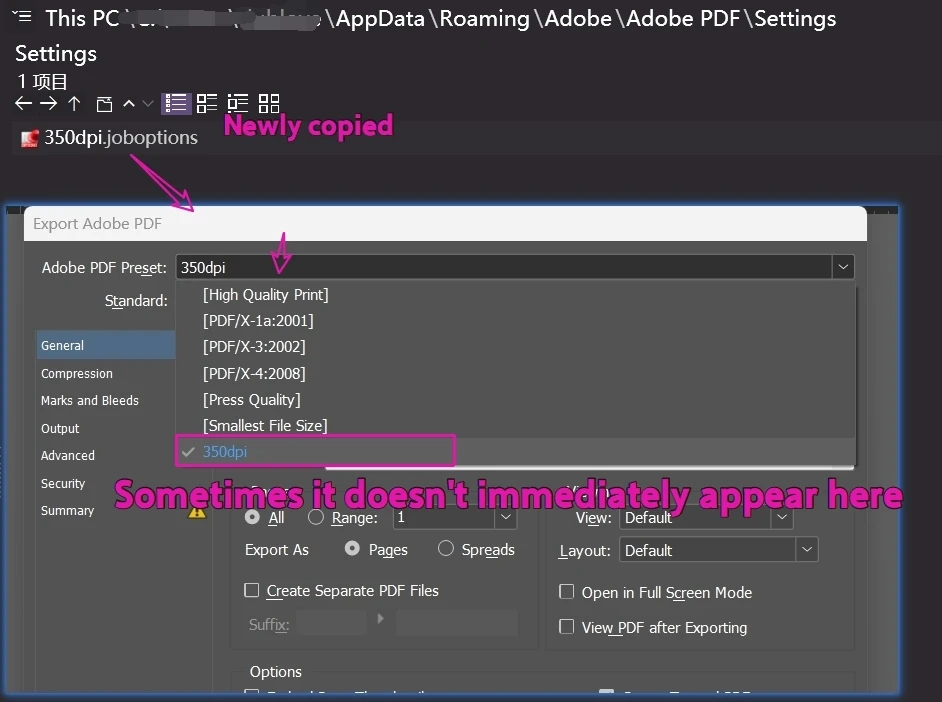
How to immediately refresh the 'Adobe PDF \ Settings' directory to make the newly copied". joboptions" file display in the list?
Hello everyone.
I have some PDF export settings, and when I use a script to copy these files to the "C: \ Users \ ooloo \ AppData \ Roaming \ Adobe \ Adobe PDF \ Settings" directory.
I find that sometimes they appear immediately in the list, but sometimes they are not immediately in the list, sometimes they need to be opened a second time to display, and sometimes even need to restart InDesign software to display.
There is a script that can refresh the "Adobe PDF \ Settings" directory to make these files take effect immediately.
Thanks.

 AdChoices