
Participant
April 30, 2022
Question

How to implement humbly shifted text (側書)

  • April 30, 2022
  • 2 replies
  • 330 views

It's kinda common in Chinese to shift text to right with a smaller font size while characters shifted to the right side while self-referring. This is to show humility and is often called "側書".

Show as "敝處"(here) and "鄙"(me)  in the following picture.
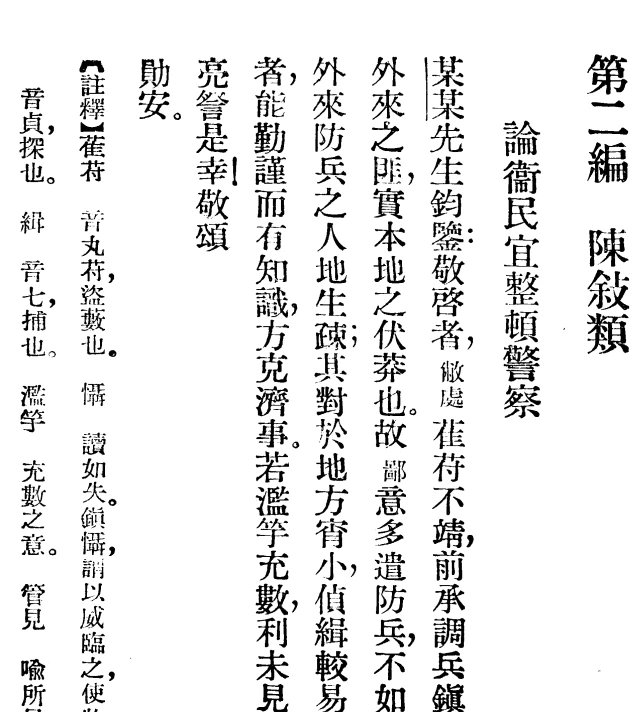
As we observe, the word with the smaller font size will still take the same amount of character grid and the characters in the word will align center with character shifted to the top.


Is there a suggested way to do so in InDesign?


This topic has been closed for replies.

2 replies

James Gifford—NitroPress
Legend
April 30, 2022

An aside, but thanks for the small cultural lesson here. I know enough about Asian languages to know that there is often a hierarchy of address, with self typically being the lowest rank, but I didn't know it extended to layout/typography.


Participant
May 1, 2022

Thanks, And more to address, there are a lot more things to notice about the layout change made by the rank of address. Such as lift head(挪抬), and these things have been described well in Wikipedia(https://en.wikipedia.org/wiki/Tai_tou).


As for InDesign, these features can be easily done by setting the Aki before char or adding a newline character.

Participant
April 30, 2022

I can easily set the font size smaller, the "Character Alignment" set to IFCTop, and then use Jidori to let the word take the correct number of character grids. But the character in the word will be distributed to the far end of the 2 grid. Picture as follows.

Is there any way to make an "in-jidori align-center/left/right" instead of always "distributed"?