Hi @SHY.John, given that you (or someone else reading this) may need to include text frame(s) here is an implementation of @Peter Kahrel's code. For help I've included the various values at the bottom of script so you can adjust the "props" object.
This script grabs the selected page items and groups them (if more than one) and adds that group to the first insertion point of the 3rd cell of the first table in the active document. It sets the anchored object settings such that the group aligns with the top left of the cell (doesn't allow for the borders though!) and then the script adjust the width and height of the cell to match the anchored item's size. Just for learning—take what you want from it. I wrote it for myself, but you never know... it might be helpful to others.
- Mark
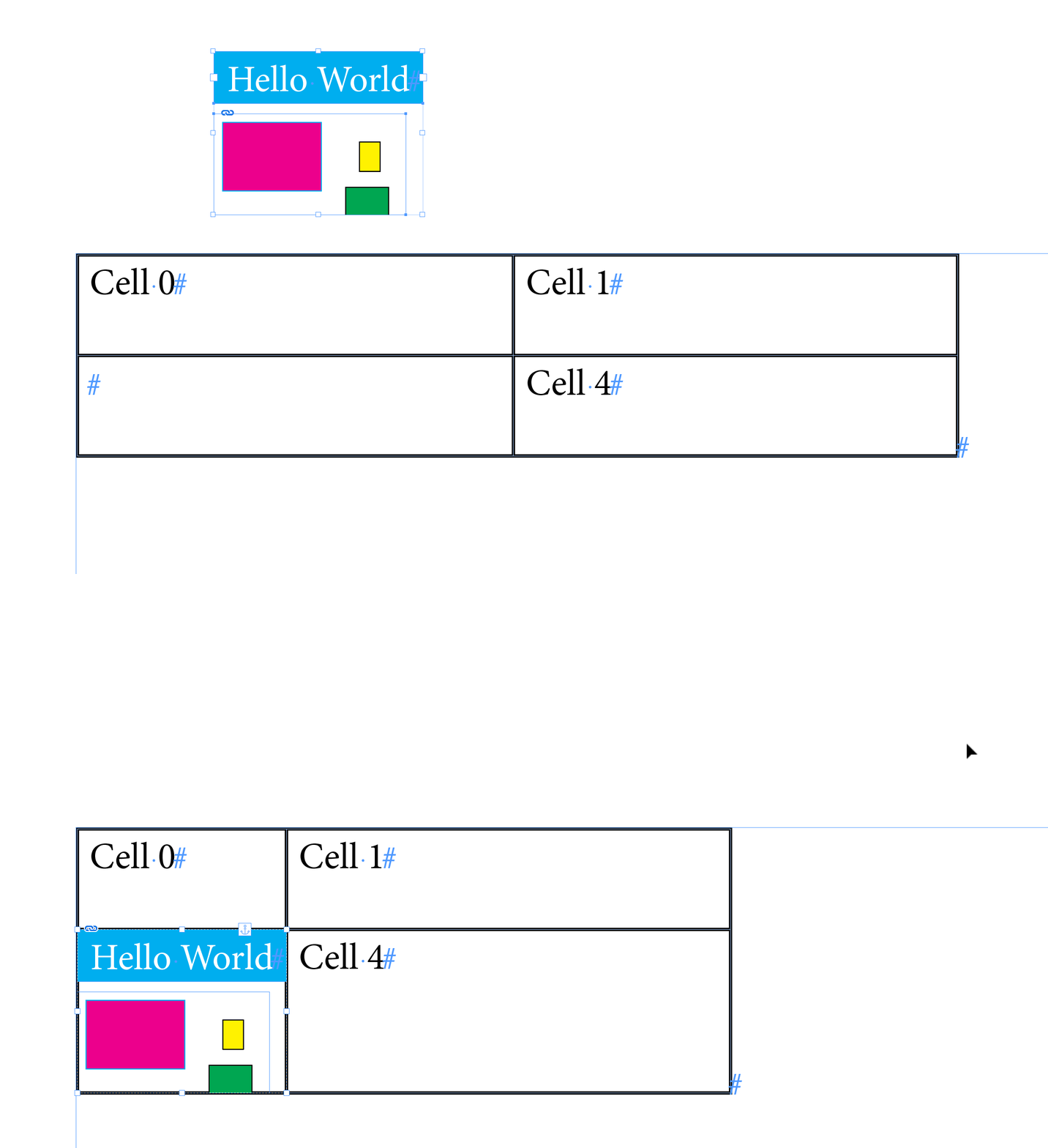
/**
 * Anchor Selected Items To Insertion Point
 * @discussion https://community.adobe.com/t5/indesign-discussions/how-to-insert-a-group-within-a-table-cell-using-script/m-p/13540380
 */
function main() {

    app.scriptPreferences.measurementUnit = MeasurementUnits.POINTS;

    var doc = app.activeDocument;

    // get the first table
    var table = doc.stories.everyItem().tables.item(0);

    // target the 3rd cell
    var targetCell = table.cells[2];
    var insertionPoint = targetCell.insertionPoints[0];

    // choose your items to anchor
    var items = doc.selection;
    // var  items = doc.groups[0];
    // var  items = [doc.pageItems[0],doc.pageItems[1]];

    // anchoredObjectSettings properties
    // see bottom of script for enums
    var props = {
        anchorPoint: AnchorPoint.TOP_LEFT_ANCHOR,
        anchorSpaceAbove: 0,
        anchorXoffset: Number(targetCell.leftInset),
        anchorYoffset: -Number(targetCell.topInset),
        anchoredPosition: AnchorPosition.ANCHORED,
        horizontalAlignment: HorizontalAlignment.LEFT_ALIGN,
        horizontalReferencePoint: AnchoredRelativeTo.COLUMN_EDGE,
        lockPosition: false,
        pinPosition: true,
        spineRelative: false,
        verticalAlignment: VerticalAlignment.TOP_ALIGN,
        verticalReferencePoint: VerticallyRelativeTo.COLUMN_EDGE,
    };

    // this will return a Group or page item, anchored to the insertion point
    var myAnchoredItem = anchorItemsToInsertionPoint(items, insertionPoint, props);

    // match cell size to anchored item
    targetCell.width = myAnchoredItem.visibleBounds[3] - myAnchoredItem.visibleBounds[1];
    targetCell.height = myAnchoredItem.visibleBounds[2] - myAnchoredItem.visibleBounds[0];


    /**
     * Anchors page item(s) to an insertionPoint.
     * @author m1b and Peter Kahrel
     * @version 2023-01-31
     * @param {Array<PageItem>|PageItem} items - an array of page items, or single pageItem.
     * @param {InsertionPoint} insertionPoint - where to insert the anchored group.
     * @param {Object} [anchoredObjectSettings] - properties that will be applied to the item's anchoredObjectSettings property (default: empty).
     * @returns {PageItem|Group} - the anchored item.
     */
    function anchorItemsToInsertionPoint(items, insertionPoint, anchoredObjectSettings) {

        if (items == undefined)
            throw error('anchorItemsToInsertionPoint failed: no `items` supplied.');

        if (insertionPoint == undefined)
            throw error('anchorItemsToInsertionPoint failed: no `insertionPoint` supplied.');

        var anchorMe;

        if (
            items.constructor.name == 'Group'
            || items.constructor.name == 'PageItem'
        ) {

            // a single group or page item
            anchorMe = items;

        }

        else if (
            items.constructor.name == 'Array'
            || items.constructor.name == 'PageItems'
        ) {

            if (items.length == 1)

                // a single page item
                anchorMe = items[0];

            else

                // array of page items
                anchorMe = app.documents[0].pages[0].groups.add(items);

        }

        if (
            anchorMe != undefined
            && anchorMe.isValid
        ) {

            // do the insertion
            anchorMe.anchoredObjectSettings.insertAnchoredObject(insertionPoint);

            if (anchoredObjectSettings != undefined)

                // apply supplied properties
                anchorMe.anchoredObjectSettings.properties = anchoredObjectSettings;

        }

        return anchorMe;

    };

}

app.doScript(main, ScriptLanguage.JAVASCRIPT, undefined, UndoModes.ENTIRE_SCRIPT, 'Anchor Items');


/*

from: https://www.indesignjs.de/extendscriptAPI/indesign-latest/#AnchoredObjectSetting.html

anchorPoint:
    AnchorPoint.BOTTOM_CENTER_ANCHOR
    AnchorPoint.BOTTOM_LEFT_ANCHOR
    AnchorPoint.BOTTOM_RIGHT_ANCHOR
    AnchorPoint.CENTER_ANCHOR
    AnchorPoint.LEFT_CENTER_ANCHOR
    AnchorPoint.RIGHT_CENTER_ANCHOR
    AnchorPoint.TOP_CENTER_ANCHOR
    AnchorPoint.TOP_LEFT_ANCHOR
    AnchorPoint.TOP_RIGHT_ANCHOR

anchoredPosition:
    AnchorPosition.ABOVE_LINE
    AnchorPosition.ANCHORED
    AnchorPosition.INLINE_POSITION

horizontalAlignment:
    HorizontalAlignment.CENTER_ALIGN
    HorizontalAlignment.LEFT_ALIGN
    HorizontalAlignment.RIGHT_ALIGN
    HorizontalAlignment.TEXT_ALIGN

horizontalReferencePoint:
    AnchoredRelativeTo.ANCHOR_LOCATION
    AnchoredRelativeTo.COLUMN_EDGE
    AnchoredRelativeTo.PAGE_EDGE
    AnchoredRelativeTo.PAGE_MARGINS
    AnchoredRelativeTo.TEXT_FRAME

verticalAlignment:
    VerticalAlignment.BOTTOM_ALIGN
    VerticalAlignment.CENTER_ALIGN
    VerticalAlignment.TOP_ALIGN

verticalReferencePoint:
    VerticallyRelativeTo.CAPHEIGHT
    VerticallyRelativeTo.COLUMN_EDGE
    VerticallyRelativeTo.EMBOX_BOTTOM
    VerticallyRelativeTo.EMBOX_MIDDLE
    VerticallyRelativeTo.EMBOX_TOP
    VerticallyRelativeTo.LINE_ASCENT
    VerticallyRelativeTo.LINE_BASELINE
    VerticallyRelativeTo.LINE_XHEIGHT
    VerticallyRelativeTo.PAGE_EDGE
    VerticallyRelativeTo.PAGE_MARGINS
    VerticallyRelativeTo.TEXT_FRAME
    VerticallyRelativeTo.TOP_OF_LEADING

*/

 AdChoices