good fery
Participant
Feb 12, 2019 2:13 AM UTC
Answered

how to instill RTL text direction, right to left

hello

i need help how to instill arabic text direction, right to left.

i use indesign cc2018

i set up in the CC app and change the App language. then i have restart the progrom. but i still dont see the RTL option.

THANKS
Zaid Al Hilali
Zaid Al HilaliCorrect answer
Community Expert
Feb 13, 2019 6:51 PM UTC

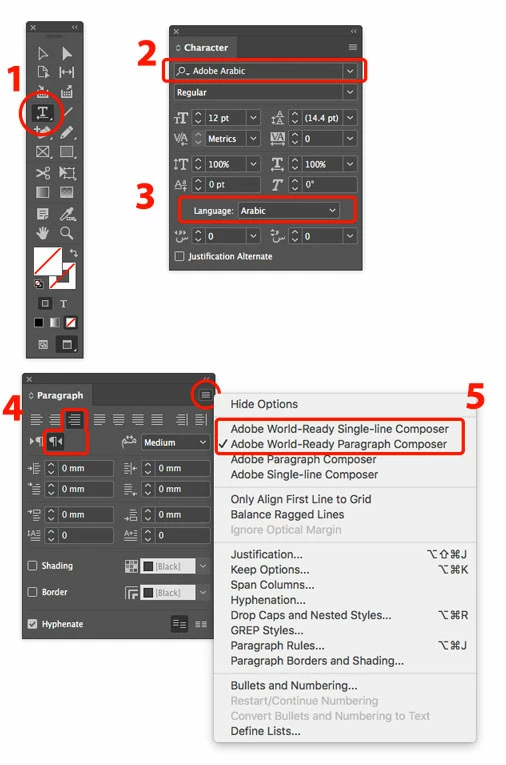
If you don't have below illustrated options including "Paragraph Directions" in your InDesign, then you basically don't have Middle Eastern version and you need to follow instructions found in the links below…

Here is an Arabic topic on how to remove and re-install your Adobe product and get full RTL features.

Here is an English discussion on the same.

9 replies

ericcarlson
Participating Frequently
Feb 13, 2019 4:16 AM UTC

It sounds like you changed the language but perhaps did not then install the Middle East version of InDesign. See Install Hebrew or Arabic versions of InDesign CC and Illustrator CC​. In particular, as noted in the final step on that page, after changing the language in the CC app you must then reinstall InDesign.

Translate
Participant
Mar 14, 2025 1:16 PM UTC

Hello! This feature is currently not available in version 2025. What do we need to do to make it appear?

Thank you.

Translate
Abhishek Rao
Community Manager
Community Manager
Mar 17, 2025 11:35 AM UTC

Hi @Mohammad.Halema,


Thanks for reaching out! If the RTL text direction options aren’t showing in InDesign 2025, could you confirm if you’ve installed the Middle Eastern version? If not, you’ll need to reinstall InDesign after setting your Creative Cloud app language to Arabic or Hebrew. 

Here’s how:Find and install Hebrew or Arabic editions of InDesign or Illustrator

Once installed, check Paragraph Direction under Window > Type & Tables > Paragraph. Let me know if that works!


^

Abhishek

Translate
maxwithdax
Community Expert
Community Expert
Feb 12, 2019 9:23 AM UTC

This page should help you switch the reading direction to RTL - Arabic and Hebrew features in InDesign

- Dax

Translate
good fery
good feryAuthor
Participant
Feb 13, 2019 2:10 AM UTC

the problem that i d'ont have this options on my inDesign.

Translate
Zaid Al Hilali
Community Expert
Zaid Al HilaliCommunity ExpertCorrect answer
Community Expert
Feb 13, 2019 6:51 PM UTC

If you don't have below illustrated options including "Paragraph Directions" in your InDesign, then you basically don't have Middle Eastern version and you need to follow instructions found in the links below…

Here is an Arabic topic on how to remove and re-install your Adobe product and get full RTL features.

Here is an English discussion on the same.

Translate