
How to launch a script using a script
Hi,
I am working on a User Interface that will act as a dashboard to launch scripts or tools. I want to link my buttons to the scripts I have. I have heard about "doscript", but not sure how to use it. Can any one help? One of the scripts that im trying to launch is "Fix Broken Links.jsx".
BTW (I'm new to Java programming so please be patient with my messy code!)
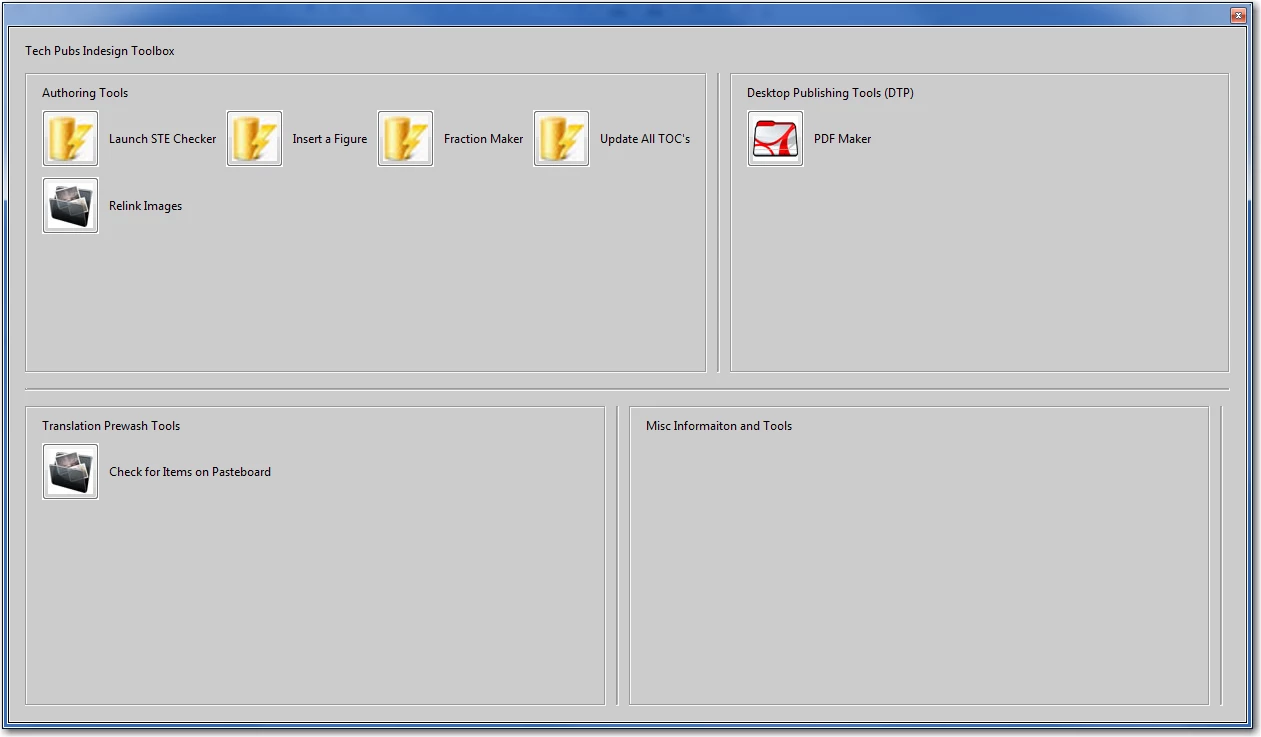
var w = new Window ("palette");
w.alignChildren = ["fill","fill"];
w.graphics.backgroundColor = w.graphics.newBrush (w.graphics.BrushType.SOLID_COLOR, [0.8, 0.8, 0.8]);
var myInstructGroup1 = w.add ("group");
myInstructGroup1.add ("statictext", undefined, "Tech Pubs Indesign Toolbox");
//this is the overall layout
var g1 = w.add ("group");
g1.alignChildren = ["left","fill"];
//panel 1
var p1 = g1.add ("panel");
p1.preferredSize = [500, 300]; // Use [100,100] to get the second scr. shot
g1.separator = g1.add ("panel"); // This shows as a vertical line
p1.orientation = "column";
p1.alignChildren = "left";
//text for panel 1
var myInstructGroup3 = p1.add ("group");
myInstructGroup3.add ("statictext", undefined, "Authoring Tools");
var myLaunch1 = p1.add ("group");
myLaunch1.orientation = "row";
myLaunch1.alignChildren = "left";
var f = File ("H:\Datasource.jpg")
myLaunch1.add ("iconbutton", undefined, f );
myLaunch1.add ("statictext", undefined, "Launch STE Checker");
var g = File ("H:\Datasource.jpg")
myLaunch1.add ("iconbutton", undefined, f );
myLaunch1.add ("statictext", undefined, "Insert a Figure");
var h = File ("H:\Datasource.jpg")
myLaunch1.add ("iconbutton", undefined, f );
myLaunch1.add ("statictext", undefined, "Fraction Maker");
var i = File ("H:\Datasource.jpg")
myLaunch1.add ("iconbutton", undefined, i );
myLaunch1.add ("statictext", undefined, "Update All TOC's");
var myLaunch2 = p1.add ("group");
myLaunch2.orientation = "row";
myLaunch2.alignChildren = "left";
var j = File ("H:\picture.jpg")
myLaunch2.add ("iconbutton", undefined, j );
myLaunch2.add ("statictext", undefined, "Relink Images");
// This is the line's width
g1.separator.minimumSize.width = g1.separator.maximumSize.width = 3;
var p2 = g1.add ("panel");
p2.preferredSize = [500, 300];
w.separator = w.add ("panel"); // This one shows as a horizontal line
p2.orientation = "column";
p2.alignChildren = "left";
var myInstructGroup4 = p2.add ("group");
myInstructGroup4.add ("statictext", undefined, "Desktop Publishing Tools (DTP)");
var myLaunch2 = p2.add ("group");
myLaunch1.orientation = "row";
myLaunch1.alignChildren = "left";
var f1 = File ("H:\pdf.jpg")
myLaunch2.add ("iconbutton", undefined, f1 );
myLaunch2.add ("statictext", undefined, "PDF Maker");
// It says "height", but is again the line's width!
w.separator.minimumSize.height = w.separator.maximumSize.height = 3;
var g2 = w.add ("group");
g2.alignChildren = ["fill","fill"];
var p3 = g2.add ("panel");
p3.preferredSize = [500, 300]; // Use [200,50] to get the second scr. shot
g2.separator = g2.add ("panel"); // This shows as vertical a line
g2.separator.minimumSize.width = g2.separator.maximumSize.width = 3;
p3.orientation = "column";
p3.alignChildren = "left";
var myInstructGroup5 = p3.add ("group");
myInstructGroup5.add ("statictext", undefined, "Translation Prewash Tools");
var myLaunch3 = p3.add ("group");
myLaunch1.orientation = "row";
myLaunch1.alignChildren = "left";
var myPic1 = File ("H:\picture.jpg")
myLaunch3.add ("iconbutton", undefined, myPic1 );
myLaunch3.add ("statictext", undefined, "Check for Items on Pasteboard");
var p4 = g2.add ("panel");
p4.preferredSize = [500, 300];
g2.separator = g2.add ("panel"); // This shows as vertical a line
g2.separator.minimumSize.width = g2.separator.maximumSize.width = 3;
p4.orientation = "column";
p4.alignChildren = "left";
var myInstructGroup5 = p4.add ("group");
myInstructGroup5.add ("statictext", undefined, "Misc Informaiton and Tools");
w.show ();
 AdChoices