@Robert at ID-Tasker I tried you method. Its great but the only problem would be when I make any update on the TOC. I will have to do the steps again. Any suggestions using post toc steps using script ? Thanks
@Bedazzled532
Not saying that I'm (very) good in JavaScript'ing 😉 but "yes, I can" 😉
app.changeTextPreferences = NothingEnum.nothing;
app.findTextPreferences = NothingEnum.nothing;
app.findTextPreferences.findWhat = "^p";
app.changeTextPreferences.changeTo = "^t";
app.findTextPreferences.appliedParagraphStyle  = "TOC Chapter";
app.selection[0].parentStory.changeText();
app.selection[0].parentStory.paragraphs.itemByRange(app.selection[0].parentStory.paragraphs[1],app.selection[0].parentStory.paragraphs[-1]).convertBulletsAndNumberingToText();
app.selection[0].parentStory.paragraphs.itemByRange(app.selection[0].parentStory.paragraphs[1],app.selection[0].parentStory.paragraphs[-1]).convertToTable();
After you refresh your TOC - you need to select its TextFrame and run the above script. It works on the ParentStory - so you don't have to reflow it in case there is an overset.
There is no error checking - code would be few times longer - but there aren't many trip hazards.
Attached is your INDD file with my modifications - so you can check TOC setting and get ParaStyles.
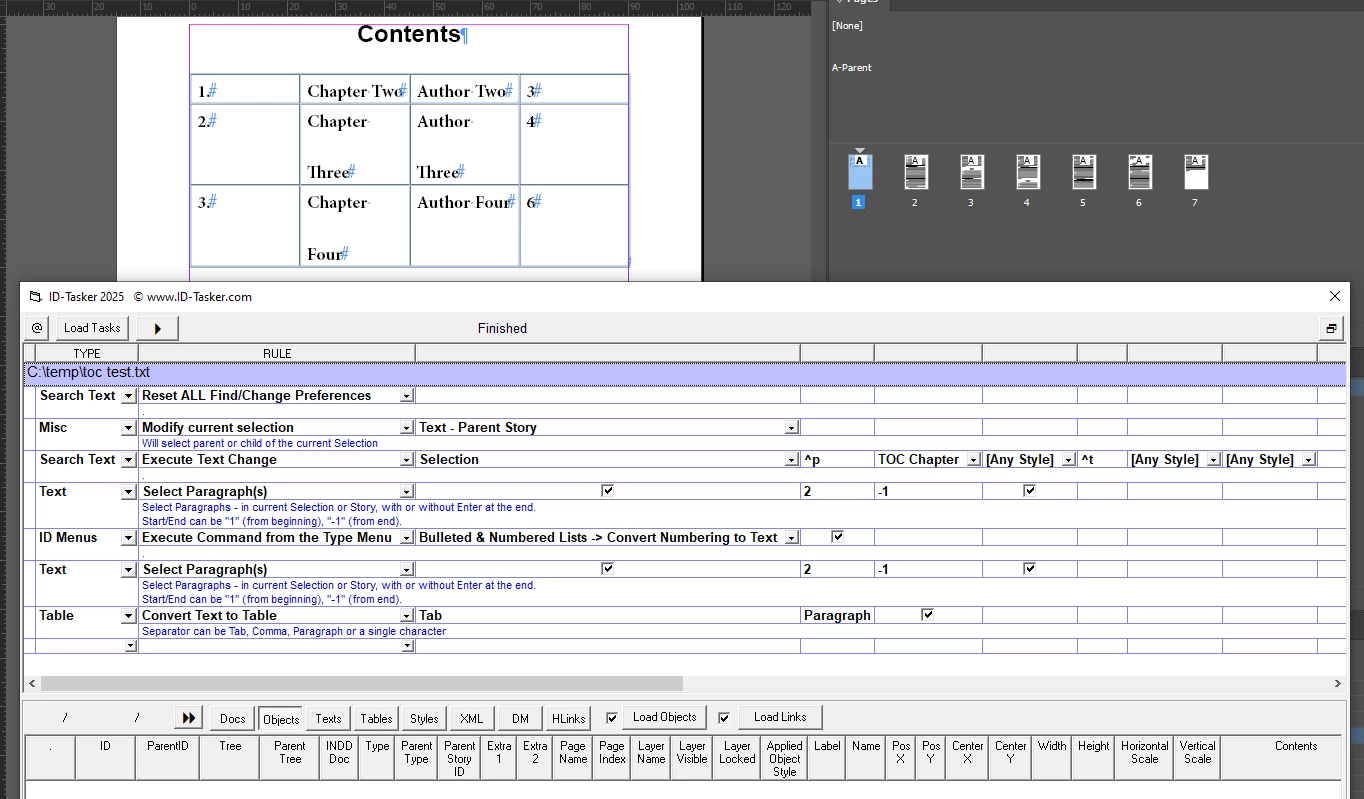
And here is a sample Task for my ID-Tasker - pretty much the same steps as you would've to do manually and what script above is doing - but you don't have to be a coder:





 AdChoices