
How to make object placement relative to margin?
I have a two-page master that has a header (chapter) and footer (document number and page number) that align right for odd pages and left for even pages. The master has a primary text box. On the pages where we add content, we have a combination of elements: the primary text box, images, secondary text boxes, etc. For now, the primary text box is centered, and all secondary elements are placed in relation to the boundaries of that text box.
We have been having some issues with content printed on the inside margin of the page getting "caught" in the binding when we print the books. I would like to adjust the masters so that the inside margins are moved out a bit, and I know how to do that.
We use the book build function to build multiple individual documents into one book. We sync the styles and it adjusts the position of the header/footer so that they're always on the correct side of the page.
My problem lies with the secondary text boxes and images. They seem to be locked to a specific x,y coordinate on the page. Is there a way to lock them to the margin? In the image below, could I lock the right side of this warning call out to the right margin? That way, if it ends up on the opposite hand page when the book is built, it will still be in the correct position?
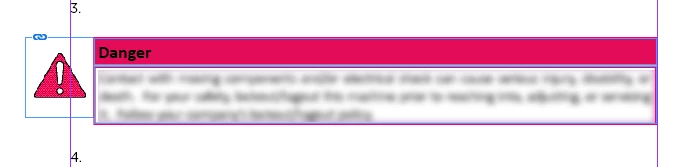
For example, that element may be on an odd (right hand) page when the individual document is created, but it may end up on an even (left hand) page when all of the individual documents are book built. Let's say I have the following documents that get built together into a book, and let's say this item is on page C1.
When the documents are created
A1
A2
B1
C1
C2 C3
When the book is built
A1
A2 B1
C1 C2
C3
C1 was originally a right hand page, but became a left hand page during the book building process. If the element's position is relative to the right hand margin, it will move along with the different margin positions for right v. left, I would think.
Is there a way to do this?
 AdChoices