


Participant
September 11, 2023
Question

How to make "Section Break" page in Indesign?

  • September 11, 2023
  • 2 replies
  • 3152 views

Hi, I'm currently working on a project in Adobe InDesign, and I've encountered a challenge that I could use some assistance with. I'm trying to create a document that includes both landscape and portrait page layouts, with the ability to switch between them as needed within the document.

I've tried following the usual steps for creating master pages and applying them to pages, but I couldn't find a specific "Section Break" option as seen in some other software like Microsoft Word. This has left me a bit confused about how to effectively manage the page orientation changes within my document.

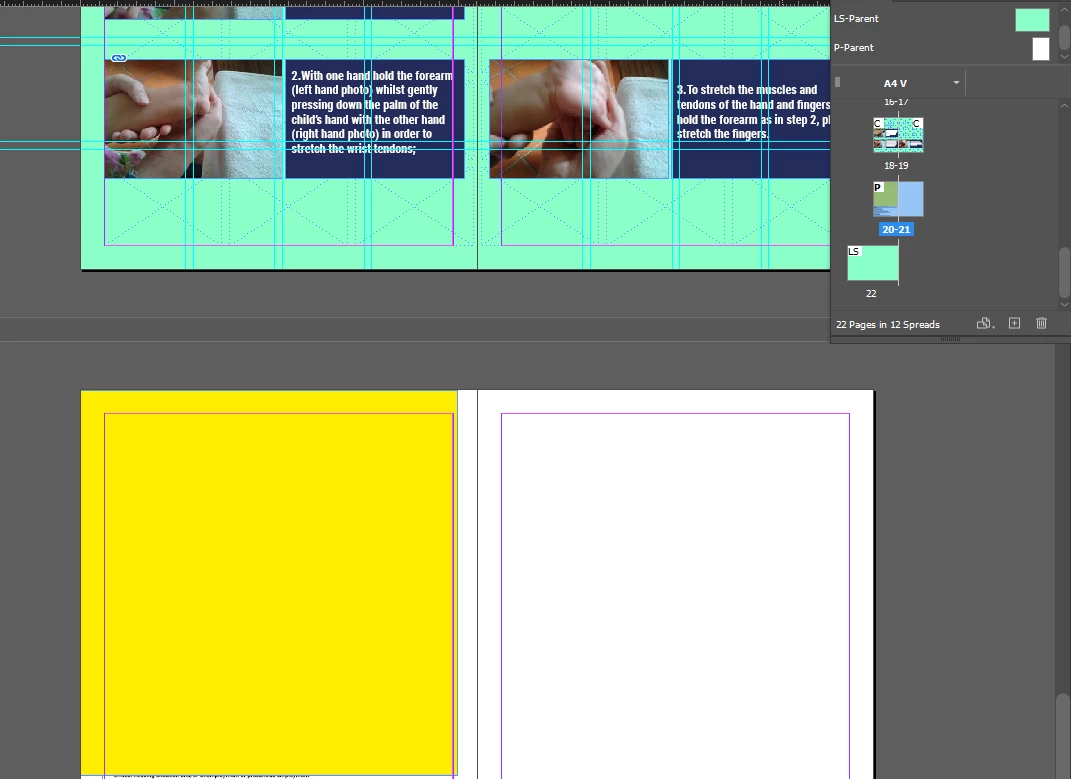
Could someone please provide guidance on how to achieve this mixed landscape and portrait page layout in Adobe InDesign? Any tips, tricks, or alternatve methods would be greatly appreciated. I`m adding screenshot for more clarity. I want page 20 to be portrait separetly and page 21 below it 


This topic has been closed for replies.

2 replies

Dave Creamer of IDEAS
Community Expert
Community Expert
August 28, 2024

You would create your "section break" in the Keep Options section of the paragraph style by starting the page on the next page, left page, or right page. 


You can be more animated with a third-party addon that applies parent pages based on paragraph styles.

https://www.id-extras.com/products/mastermatic/


David Creamer: Community Expert (ACI and ACE 1995-2023)
Willi Adelberger
Community Expert
Community Expert
September 12, 2023
  1. Sections are created in the page panel. Select a page and in the page panel men go to Numbering and Section Options.
  2. But if you want to print the project, I would strongly recomment NOT to turn pages, it is better to turn the spread view in the same Menu > Page Attributes > Turn Spreads > …
  3. If it is for screen view, you can turn spreads without problems. Take the Page Tool, and in the Control or Property Panel you find an icon to change between vertical or landscape
Inspiring
August 27, 2024

I would like to add: Is there any plug-in or something that would give us a genuine Section Break marker as we have in MS Word? It is annoying to have this only in the page panel – when text flows differently we have to fix the section breaks manually. This takes time and calls for errors.

Willi Adelberger
Community Expert
Community Expert
August 27, 2024

A section is indeed defined in the page panel. 
But what you really need are breaks. Those you find in the paragraph options and better to set up them in the paragraph styles in the keep options section. 
section breaks in the sense of MS Word don't exist.