
Inspiring
July 27, 2017
Answered

how to make table rows invisible

  • July 27, 2017
  • 2 replies
  • 1096 views

Im trying to make table rows invisible in the table set up, but I can still see them after applying zero weight, I didnt have problems with columns though.
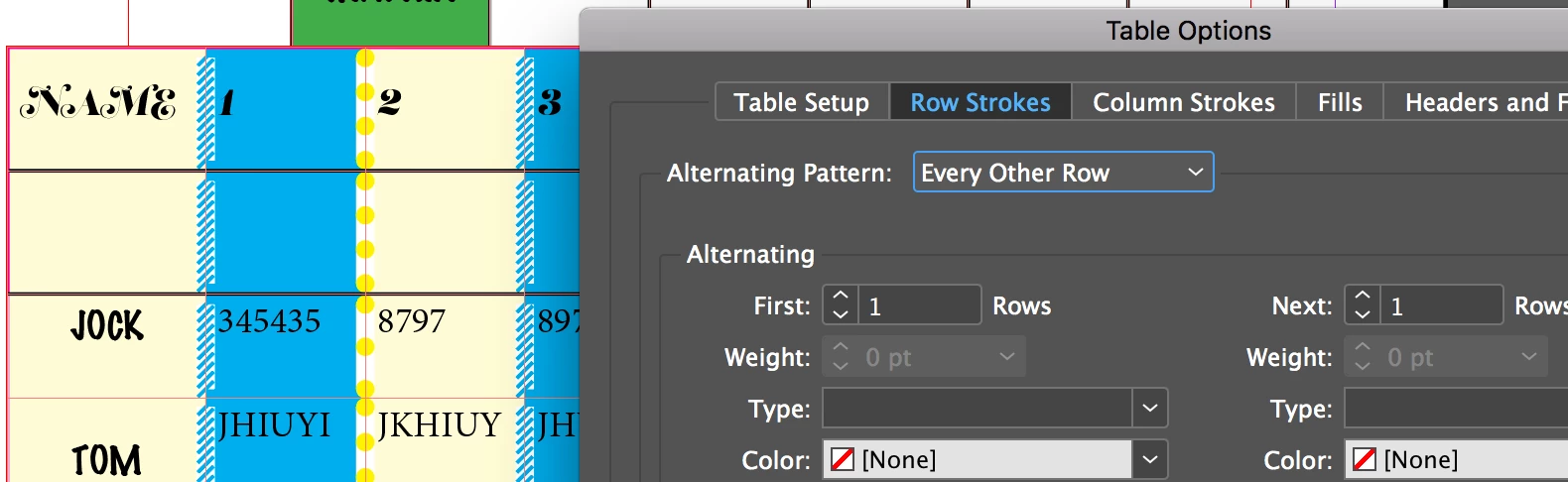
also if I change "Cell strokes and fills" weight..I lose the style I applied previously via the tables strokes and fills, whats the overriding relationship there?

thanks,

This topic has been closed for replies.
Correct answer Jeffrey_Smith

Top row is a header, 2nd row will start the alternating pattern.

2 replies

jane-e
Community Expert
Community Expert
July 27, 2017

Row strokes can be applied to an entire table or to selected cells in Cell Options. Cell formatting wins. Select your table and clear the cell formatting.

Inspiring
July 31, 2017

I dont understand how this works in general. Ive added a style to the first row and the next 2.

but i`m seeing the style on row 2 and 5...?

Jeffrey_SmithCommunity ExpertCorrect answer
Community Expert
July 31, 2017

Top row is a header, 2nd row will start the alternating pattern.

Community Expert
July 27, 2017

Did you manually apply row strokes, and also in the table options apply "Preserve Local Formatting"? If so, turn off "Preserve Local Formatting". Then you can set a global table option for row strokes. This may require switching the Alternating Pattern option back to None, and then reapplying the desired attribute options, insuring that each attribute is applied with a setting.