Inspiring
December 17, 2016
Question

How to make text and graphics flow together

  • December 17, 2016
  • 3 replies
  • 445 views

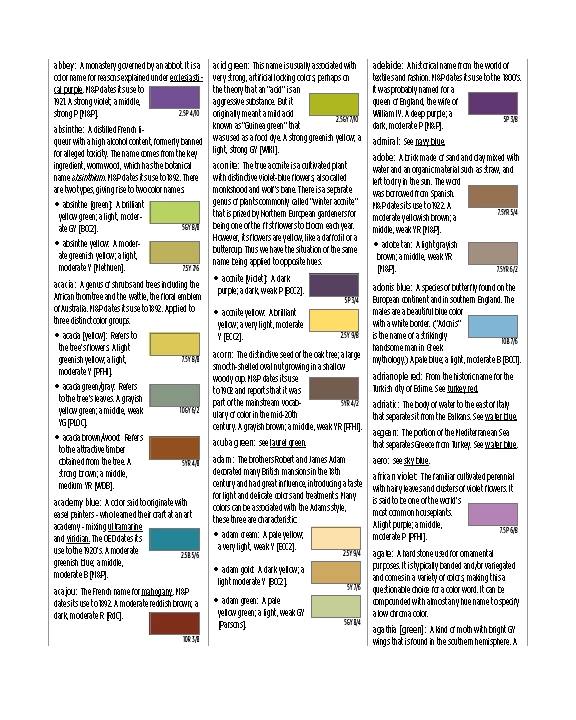
I'm working on an illustrated dictionary. There will be a few thousand entries, and a few thousand graphics. Attached is a draft. This required fairly heroic amounts of tweaking to get the swatches to all line up correctly with the appropriate bit of text. By "tweaking", I mean adjusting the space before and after each paragraph, 1 point at a time. If anyone has any ideas about how I could improve the design and the process, I'd love to hear them. But for now, my specific question is: how to get the images to flow along with the text?
    This topic has been closed for replies.

    3 replies

    macpawel
    Participating Frequently
    December 19, 2016

    Anchor object is a really good idea.

    You can Cut image from your document (CTRL+X) and then select line, paragraph or character you wish to put image inside and just Paste it there (CTRL+V).

    You can also use blue rectangle (right top corner of your image) to drag it (anchor) to desired place.

    finally you can use Anchored Object Options panel to set up it

    Pawel

    Barb Binder
    Community Expert
    Community Expert
    December 17, 2016

    The anchoring process is quite simple, but spend a little time on link in my previous answer to understand these controls—they handle the positioning, and will be the answer to your other question.

    ~Barb at Rocky Mountain Training
    Barb Binder
    Community Expert
    Community Expert
    December 17, 2016

    You will need to anchor the frames to the text.

    Work with anchored objects in InDesign

    ~Barb at Rocky Mountain Training