SiddheshK09
Known Participant
December 12, 2025
Answered

How to Modify/update paragraph style?

  • December 12, 2025
  • 4 replies
  • 562 views

Hi All,

I have to implement the functionality to modify/update paragraph style without text range selection.  Is there any other way to do this? 


Thanks in advance. 

Correct answer Dirk Becker

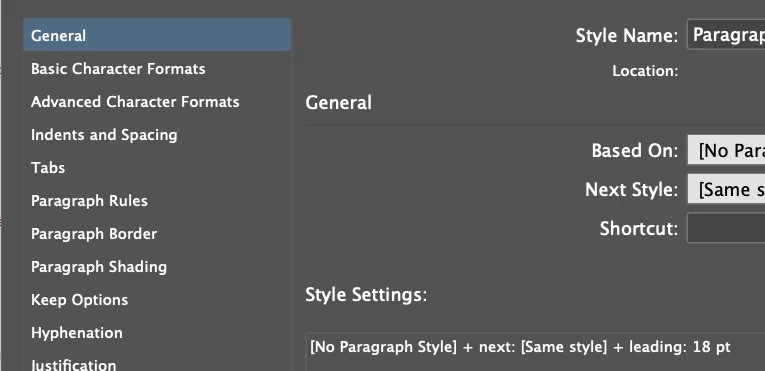
Open the style editor for the particular style.

Does it have a "leading:" entry in the General >> Style Settings?


DirkBecker_0-1765793762087.png


Otherwise the attribute is inherited from the based-on style.

For modifying, use ITextStylesFacade::EditTextStyle

4 replies

SiddheshK09
Known Participant
December 15, 2025
Thanks for the all responses.
Below is my sample code snippet, In the below code first I'm trying get the pragraph style properties like font size/leading and then I have to modity/update it based on some conditions in my project. But below code does not work for me. Interface "ITextAttrRealNumber" always retrns nil here. Have anyone tried this?
 
InterfacePtr<IDocument> doc(m_pDocument, UseDefaultIID());
if (doc == nil) {
break;
}
InterfacePtr<IWorkspace> iWorkspace(doc->GetDocWorkSpace(), IID_IWORKSPACE);
if (iWorkspace == nil) {
break;
}
InterfacePtr<ITextAttributes> textAttr(::GetDataBase(iWorkspace), paraStyleUID, UseDefaultIID());
if (textAttr == nil) {
break;
}
//get leading
InterfacePtr<ITextAttrRealNumber>LeadingAttr((ITextAttrRealNumber*)(textAttr->QueryByClassID(kTextAttrLeadBoss, IID_ITEXTATTRREALNUMBER)));
if (LeadingAttr != nil) {
PMReal rleading = LeadingAttr->GetRealNumber();
}
else
CAlert::InformationAlert("LeadingAttr == nil");
 
//get point size
InterfacePtr<ITextAttrRealNumber>PointSizeAttr((ITextAttrRealNumber*)(textAttr->QueryByClassID(kTextAttrPointSizeBoss, IID_ITEXTATTRREALNUMBER)));
if (PointSizeAttr != nil) {
PMReal rpointsize = PointSizeAttr->GetRealNumber();
}
else
CAlert::InformationAlert("PointSizeAttr == nil");
m1b
Community Expert
Community Expert
December 15, 2025

Ah, you are using the SDK. @Dirk Becker this might be in your wheelhouse?

rob day
Community Expert
Community Expert
December 13, 2025

to modify/update paragraph style without text range selection


Hi @SiddheshK09 , Is there a reason why you can’t simply edit the style definition via Paragraph Styles>Style Definition with no text selected?


Screen Shot 3.png


Screen Shot 4.png

SiddheshK09
Known Participant
December 15, 2025

Thanks for the reply. I am trying to do this programmatically using InDesign SDK/scripting.

m1b
Community Expert
Community Expert
December 13, 2025

@SiddheshK09 you have tagged scripting. Do you want to modify a paragraph style? You can do it like this:

var doc = app.activeDocument;
var paragraphStyle = doc.paragraphStyles.itemByName('Test Style');

if (!paragraphStyle.isValid)
    return alert('Paragraph style "Test Style" not found.');

// example setting some properties
paragraphStyle.properties = {
    pointSize: 11,
    fillTint: 50,
};

 If that isn't what you mean, please clarify.

- Mark

SiddheshK09
Known Participant
December 15, 2025

Thanks for the reply. I will try this at my end.

Willi Adelberger
Community Expert
Community Expert
December 12, 2025

 Select some text without any character style applied. There can be a character style used in the paragraph. 
Make all changes. 
in the paragraph panel menu select redifine style.