snegig
Known Participant
July 22, 2012
Answered

How to move marginalnote out in Structure

  • July 22, 2012
  • 3 replies
  • 1364 views

Hi Scripting guru,

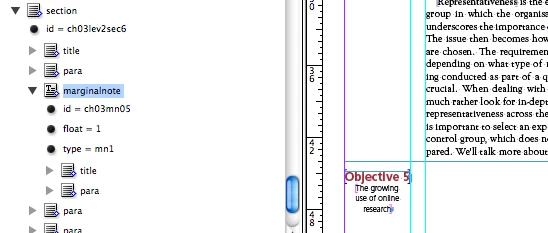
I want my all marginalnote move out in Structure. When marginalnote move in page margin my test from 11p text width. You have any script code. Please accept my sincere apology for take your golden time.

Thanks and have a nice day!

This topic has been closed for replies.
Correct answer csm_phil

Hi Sneig,

I have modifed the above JS code. Please try this.

If your document have only one marginal note then the script will through the error. So I have changed the reverse loop thats all.

var mydoc = app.activeDocument;

var rootElement = mydoc.xmlElements.item(0);

var linkElementList = rootElement.evaluateXPathExpression("//marginalnote[@type='mn1']");

for(var lp=linkElementList.length-1; lp>=0; lp--){

        var myElement = linkElementList[lp];

                var myTextframe = myElement.placeIntoInlineFrame(["21p9","5p"]);

               //you have create the object style in you active document the object style name is "MN";

                myTextframe.appliedObjectStyle= mydoc.objectStyles.item("MN");

    }

alert("Proces Completed");

thx

csm_phil

3 replies

csm_phil
csm_philCorrect answer
Legend
July 23, 2012

Hi Sneig,

I have modifed the above JS code. Please try this.

If your document have only one marginal note then the script will through the error. So I have changed the reverse loop thats all.

var mydoc = app.activeDocument;

var rootElement = mydoc.xmlElements.item(0);

var linkElementList = rootElement.evaluateXPathExpression("//marginalnote[@type='mn1']");

for(var lp=linkElementList.length-1; lp>=0; lp--){

        var myElement = linkElementList[lp];

                var myTextframe = myElement.placeIntoInlineFrame(["21p9","5p"]);

               //you have create the object style in you active document the object style name is "MN";

                myTextframe.appliedObjectStyle= mydoc.objectStyles.item("MN");

    }

alert("Proces Completed");

thx

csm_phil
snegig
snegigAuthor
Known Participant
July 23, 2012

Thank you soooooo much!!!

ramkumar_vp
Inspiring
July 23, 2012

Do you want to untag the "marginalnote" element from structure pane or move to the root element?

Requirement not clear...

snegig
snegigAuthor
Known Participant
July 23, 2012

Hi,

We want “marginalnote“ text (drag out of structure) move in new separate text fram in my .indd file in marginal column. And apply “MN” object style.

XML Structure as it only “marginalnote” text move new text frame with apply “MN“ object style.

thanks!!!

csm_phil
Legend
July 22, 2012

Hi,

I hope you need place the marginal note has an anchored object? If yes, you can use the below JS code.

If you post any requirements in the forum please post what you have tried in you end in Java script. Then only some one help to easily. Otherwise is so difficults. Your most of the post always simply shown the snapshots only please place the JS code in your future post.

var mydoc = app.activeDocument;

var rootElement = mydoc.xmlElements.item(0);
var linkElementList = rootElement.evaluateXPathExpression("//marginalnote[@type='mn1']");
for(var lp=0; lp=linkElementList.length; lp++){

        var myElement = linkElementList[lp];

                var myTextframe = myElement.placeIntoInlineFrame(["21p9","5p"]);

               //you have create the object style in you document name is "MN";

                myTextframe.appliedObjectStyle= mydoc.objectStyles.item("MN");

    }
alert("Proces Completed");

thx

csm_phil

snegig
snegigAuthor
Known Participant
July 23, 2012

Hi sir,

Please accept my sincere apology for this and I will make sure this will not happen again. I need your help once again, sir we want, marginal note place in simple text frame with apply “MN” object style in place miner column. When we have run script code show err. We have alredy creat “MN” Object style in .indd files.

Thanks !!!