

dublove
Legend
Oct 29, 2026 4:55 AM UTC
Answered

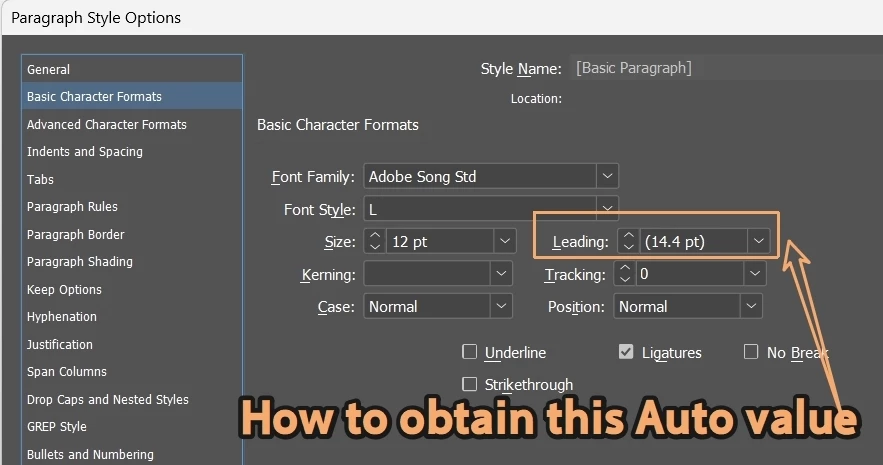
How to obtain the actual value of the leading "AUTO" for the paragraph without applying paragraph styles?


Hello every

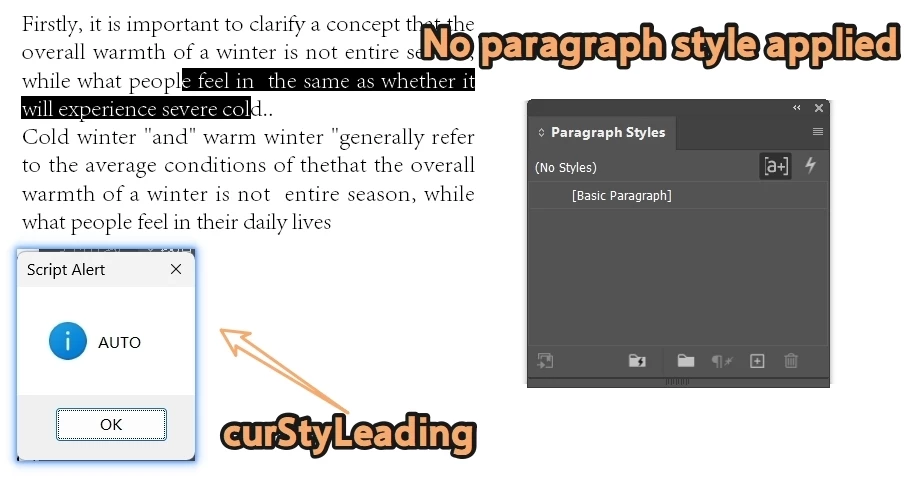
When the paragraph style is not applied, the following two sentences (Leading) return "AUTO", but I want to know the actual value. How to modify.
It seems that when applying the [Basic Paragraph] style, Leading also returns AUTO.

var item = app.selection[0];
var curFirLeading = item.textColumns[0].lines[0].leading;
var curStyLeading = item.lines[0].appliedParagraphStyle.leading;
alert(curFirLeading);
alert(curStyLeading);

I found a complicated method online to obtain the magnification of auto relative to the font size and calculate the Auto value in reverse.
 

    Manan JoshiCorrect answer
    Community Expert
    Oct 29, 2026 5:37 AM UTC

    Auto leading is 120% or the font size. But this is configurable. Try the following code

    var curFirLeading = item.textColumns[0].lines[0].leading;
    var curStyLeading = item.lines[0].appliedParagraphStyle.leading;
    var fontSize = item.lines[0].characters[0].pointSize;
    var autoLeadingPercent = item.textColumns[0].lines[0].autoLeading;
    var actualLeading;
    if (curFirLeading == Leading.AUTO)
    actualLeading = fontSize * autoLeadingPercent / 100;
    else
    actualLeading = curFirLeading;

    alert("Font size: " + fontSize + " pt");
    alert("Auto leading: " + autoLeadingPercent + "%");
    alert("Effective leading: " + actualLeading + " pt");


    -Manan

    5 replies

    rob day
    Community Expert
    Community Expert
    Oct 29, 2026 2:04 PM UTC

    How to obtain the actual value of the leading "AUTO" 


    Hi ​@dublove , We know AUTO leading equals 120% of the point size, so can‘t you do something like this?


    var d = app.activeDocument;
    var item = app.selection[0];
    if (item.leading == Leading.AUTO) {
    alert("Selected text’s leading is set to " + item.leading.toString() + " ("+ item.pointSize * 1.2 + " pt)")
    } else {
    alert("Selected text’s leading is set to " + item.leading)
    }


    Translate
    dublove
    dubloveAuthor
    Legend
    Oct 29, 2026 2:40 PM UTC

    Hi rob day.

    Not necessarily 1.2 times, this value should be re read.
    Manan Joshi’s will do.

    Translate
    Manan JoshiCommunity ExpertCorrect answer
    Community Expert
    Oct 29, 2026 5:37 AM UTC

    Auto leading is 120% or the font size. But this is configurable. Try the following code

    var curFirLeading = item.textColumns[0].lines[0].leading;
    var curStyLeading = item.lines[0].appliedParagraphStyle.leading;
    var fontSize = item.lines[0].characters[0].pointSize;
    var autoLeadingPercent = item.textColumns[0].lines[0].autoLeading;
    var actualLeading;
    if (curFirLeading == Leading.AUTO)
    actualLeading = fontSize * autoLeadingPercent / 100;
    else
    actualLeading = curFirLeading;

    alert("Font size: " + fontSize + " pt");
    alert("Auto leading: " + autoLeadingPercent + "%");
    alert("Effective leading: " + actualLeading + " pt");


    Translate
    -Manan
    dublove
    dubloveAuthor
    Legend
    Oct 29, 2026 7:49 AM UTC

    Hi ​@Manan Joshi 

    I found this, is this more accurate?
    His 120 doesn't seem to change


    var sel = app.selection[0];
    var autoPct = getAutoLeadingPercentage(sel);
    alert("LeadingPercentage: " + autoPct + "%");

    function getAutoLeadingPercentage(textObj) {
    var percentage = 120; // 默认值
    try {
    if (textObj.appliedParagraphStyle !== null) {

    if (textObj.leading > 0 && textObj.pointSize > 0) {
    percentage = Math.round((textObj.leading / textObj.pointSize) * 100);
    }
    } else {

    if (textObj.leading > 0 && textObj.pointSize > 0) {
    percentage = Math.round((textObj.leading / textObj.pointSize) * 100);
    }
    }
    } catch (e) {
    // 忽略错误
    }
    return percentage;
    }

    var item = app.selection[0];
    var curFirLeading = item.textColumns[0].lines[0].leading;
    var curStyLeading = item.lines[0].appliedParagraphStyle.leading;
    var fontSize = item.lines[0].characters[0].pointSize;
    var autoLeadingPercent = item.textColumns[0].lines[0].autoLeading;
    var actualLeading;
    if (curFirLeading == Leading.AUTO)
    actualLeading = fontSize * autoLeadingPercent / 100;
    else
    actualLeading = curFirLeading;
    alert("Font size: " + fontSize + " pt");
    alert("Auto leading: " + autoLeadingPercent + "%");
    alert("Effective leading: " + actualLeading + " pt");


    Translate
    Community Expert
    Oct 29, 2026 8:28 AM UTC

    By configurable i mean it can be changed in InDesign. I hope my code is working fine as you have marked it correct

    Translate
    -Manan