Lisa Hocking
Participating Frequently
March 18, 2017
Answered

How to 'Paste Into' text into a Shape without loosing the words around the edge of the shape?

  • March 18, 2017
  • 4 replies
  • 2602 views

I am trying to copy some text into a shape (kind of like a clipping mask) which I have done via 'Paste Into'. This has worked fine but I have now lost words that do not fit into the shape. Is there a way of formatting this so that all of the text can be read but still maintains the shape?

I have attached an image to better explain what I am trying to do.
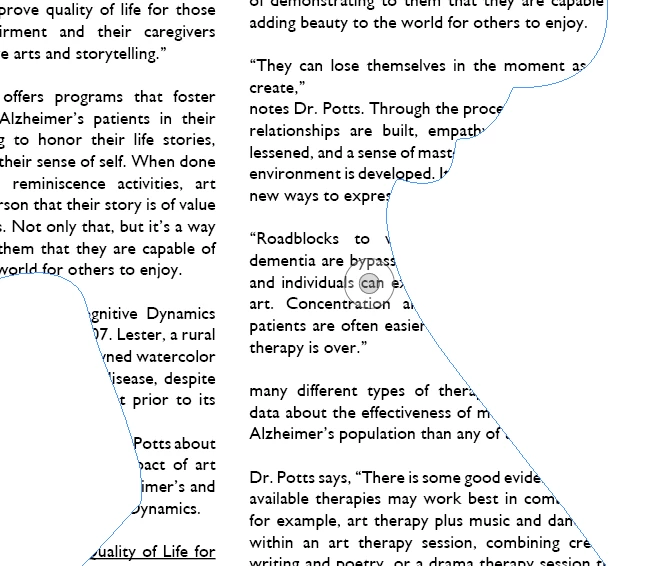
Any advice will be greatly appreciated! I've been struggling with this all day!
This topic has been closed for replies.
Correct answer winterm

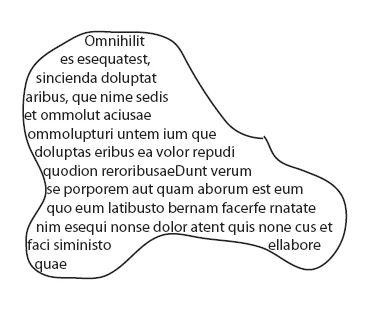
Convert your shape to Text Frame and fill with your text. No Paste Into required:

4 replies

Willi Adelberger
Community Expert
Community Expert
March 19, 2017

Instead of Paste into, copy the text, not the frame, and click with the text tool into the frame and paste it as text. The text will flow into this vector form.

winterm
wintermCorrect answer
Legend
March 18, 2017

Convert your shape to Text Frame and fill with your text. No Paste Into required:

Lisa Hocking
Participating Frequently
March 19, 2017

Ah brilliant thank you!

Is there a way of maintaining the two columns of text? I have done this but it has copied the text into one column like the below:

Willi Adelberger
Community Expert
Community Expert
March 19, 2017

Select the frame, cmd+B and change number of columns.

Just Shoot Me
Legend
March 18, 2017

Discussion successfully moved from The Lounge to InDesign.

John T Smith
Community Expert
Community Expert
March 18, 2017

The Lounge Forum is not for technical help, please provide the name of the program you are using so your message may be moved to the correct program forum... A program would be Photoshop or Dreamweaver or Muse or InDesign or ???

Lisa Hocking
Participating Frequently
March 18, 2017

Apologies, I thought I had written this but I obviously missed it. The program is InDesign.