
Answered
How to Prevent Renumbering Pages In a New Section From Changing the Layout
I have a print catalog which I'm converting to a single pdf. There is a 5 page introductory section numbered with lowercase Roman numerals. Then a large multi-page section numbered with Arabic numerals.
The layout defaults to the first page of the second section starting with page 6 on the left side of the spread.
I need this second section to begin with page 1 on the left side of the spread. When I change the page number, the layout moves the first page of the second section to the right side of the spread, breaking the layout, as shown here.
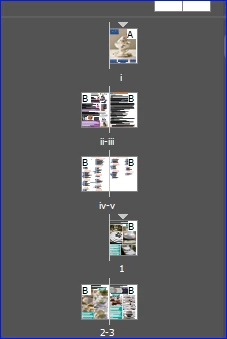
Is there a way to fix this? If I combine the sections into a single one, I can't use two different style of page numbers. Thanks for any ideas.



 AdChoices