michaelg56776519
Participant
February 9, 2018
Answered

How to prevent tables to split on two columns / pages

  • February 9, 2018
  • 3 replies
  • 833 views

Hello everybody,

I haven't been able to find an answer on the web after a few hours of research, so I come here and post my question. Sorry if it has already been answered.

I'm writing a new rulebook for dungeons & dragons, and my project has dozens of simple tables in the text. Since we are adding new illustrations frequently (when they are ready) the text is moving a lot. I'm looking for a process to prevent tables to be split so they only fit on one column.

Here's an example. The table is split two times. It should appear on the next page.
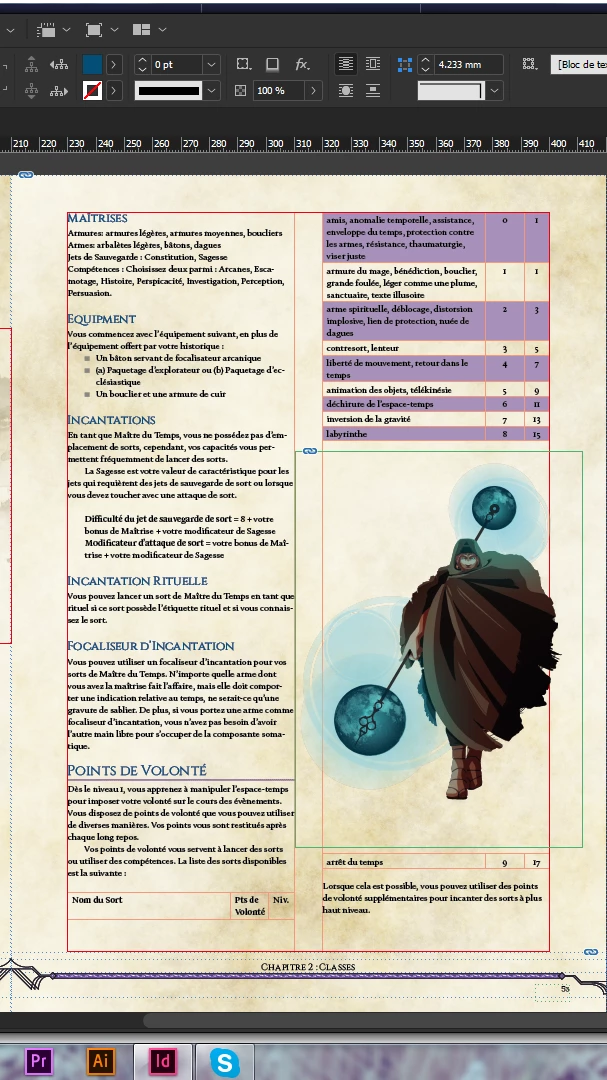
Thank you for your time.

This topic has been closed for replies.
Correct answer Jongware

A table resides inside its own "paragraph", just like a run of text. If you put the text cursor 'in' that paragraph but not inside the table itself (so to the immediate left or right of the entire table), you can set that paragraph's Keep Options to "Keep Lines Together: All Lines in Paragraph".

(Marvellous illustration, by the way.)

3 replies

michaelg56776519
Participant
February 9, 2018

Thank you so much ! It worked very well

I used Jongware's solution since I have many tables, but I keep your solution in mind for other difficulties I might encounter, Vinny.

I'm gonna pass the nice words to the illustrator, Jongware, she will be very pleased.

Have a nice day

vinny38
Legend
February 9, 2018

Alternatively, you could select the rows you want to keep together and then go Cell Options > Rows And Columns then check "Keep With Next Row".

The bad thing is (in CS6 at least, maybe it has changed in latest versions) you can not apply this setting to a cell style.

So, you would have to do it manually.

If you have a lot of tables, you would probably be better off choosing Jongware solution.

Jongware
Community Expert
JongwareCommunity ExpertCorrect answer
Community Expert
February 9, 2018

A table resides inside its own "paragraph", just like a run of text. If you put the text cursor 'in' that paragraph but not inside the table itself (so to the immediate left or right of the entire table), you can set that paragraph's Keep Options to "Keep Lines Together: All Lines in Paragraph".

(Marvellous illustration, by the way.)