
Participant
April 8, 2025
Question

How to Print Split A4 Pages (Top and Bottom) as Double-Sided Horizontal Layout in InDesign

  • April 8, 2025
  • 4 replies
  • 300 views

Hello Community,


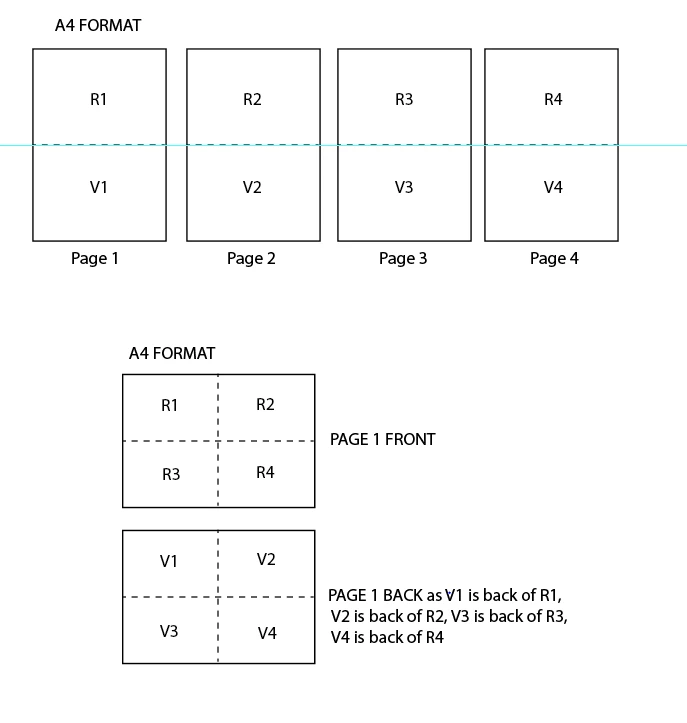
We edit an Indesign file with many pages in A4 vertical format. Each page can be divided in 2 (up part R1 and down part V1 for page 1 and so on for page 2, 3, 4,...)

I need to print R1/R2/R3/R4 in a front A4 page horizontal format, and V1/V2/V3/V4 at the back of same A4 page as V1 is at the back of R1, V2 is back of R2, V3 is back of R3, V4 is back of R4.

Does somebody have a solution with Indesign, Pdf file printing or else?


<Title renamed by MOD>


4 replies

Peter Spier
Community Expert
Community Expert
April 8, 2025

If you need more than one copy you might want to print half the number of copies for a reguar PDS, then simply flip the stack and print the ohter half on the back side.

Dave Creamer of IDEAS
Community Expert
Community Expert
April 8, 2025

I would consider building your document differently. Use two single-pages side-by-side and rotate the view. It won't affect the output.

Then you can make a copy of the file and re-arrange them for printing or use the Print Booklet menu.


David Creamer: Community Expert (ACI and ACE 1995-2023)
Robert at ID-Tasker
Legend
April 8, 2025

And, unfortunately, your bottom mockup - showing back - is wrong - it should be: 


V2 | V1

V4 | V3


Robert at ID-Tasker
Legend
April 8, 2025

You can place pages of the exported PDF - into a new INDD document. 


Or you've way more than 4x pages in your document? 


This cat can be skinned in more than one way 😉