dublove
Legend
Oct 31, 2026 5:29 PM UTC
Answered

How to read the original 'discussions' of an image that remain constant and unchanged?

The post a few days ago was messy and lost.


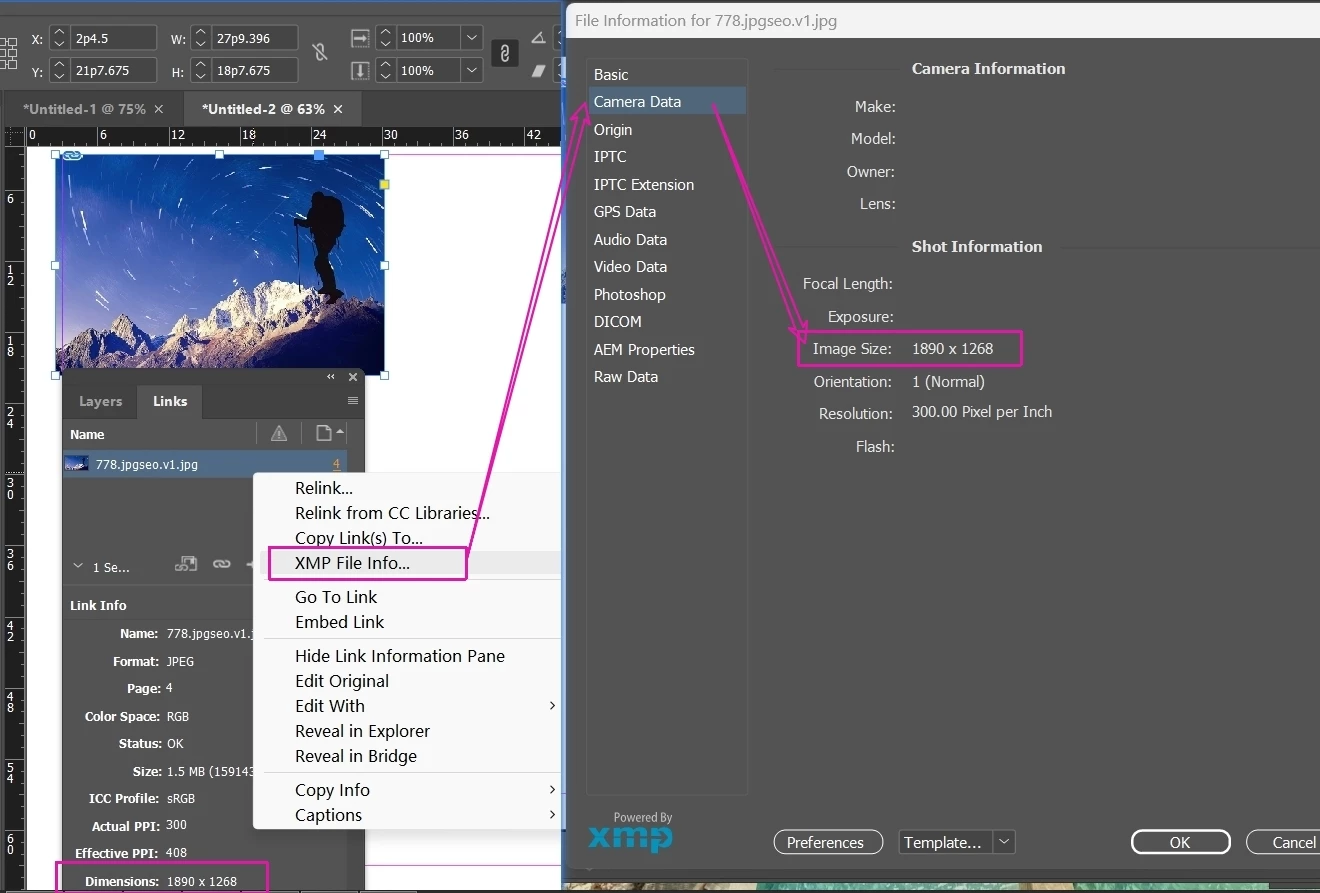
As shown in the picture, this is the source of constant and unchanging statements.

How to read it?
Previously, various statements obtained through geometricBounds conversion were not reliable.
Every image, even those made with Photoshop, has this value.

Hi ​@m1b ,Would you be willing to help me take a look?

 I remember in the code that generates static captions, you can read 'XMP File Info'.
 

    rob day
    rob dayCorrect answer
    Community Expert
    Nov 1, 2026 4:15 PM UTC

    Here? I can't understand all the English at all
    https://extendscript.docsforadobe.dev/scripting-xmp/xmpscript-object-reference/#xmpmeta -object

     
    That’s an external library, so you’ll have to load it. Something like this—assumes you have an image selected:


    var sel = app.selection[0];
    var d = getImageDim(sel)
    $.writeln(d[0] + " X " + d[1])

    /**
    * Gets a selected image’s dimensions
    * @ param a placed image
    * @ return an array of width and height
    */
    function getImageDim(s){
    if (ExternalObject.AdobeXMPScript == undefined) {
    ExternalObject.AdobeXMPScript = new ExternalObject("lib:AdobeXMPScript");
    }
    if (s.constructor.name == "Image") {
    var xmpFile = new XMPFile( File(s.itemLink.filePath).fsName, XMPConst.UNKNOWN, XMPConst.OPEN_FOR_UPDATE );
    var xmp = xmpFile.getXMP();
    var pw = xmp.getProperty( XMPConst.NS_EXIF, "PixelXDimension" )
    var ph = xmp.getProperty( XMPConst.NS_EXIF, "PixelYDimension" )
    return [pw,ph]
    }
    }


    16 replies

    dublove
    dubloveAuthor
    Legend
    Nov 1, 2026 2:14 PM UTC

    Has anyone provided feedback on that website called UserVioce?
    The website has been performing poorly, and I can't even remember the URL.

    Translate
    Community Expert
    Nov 1, 2026 3:55 AM UTC

    We have already discussed it. See 


    Translate
    -Manan
    dublove
    dubloveAuthor
    Legend
    Nov 1, 2026 4:18 AM UTC

    Hi ​@Manan Joshi 

    This method has been discussed multiple times, but it is inaccurate and cannot accurately obtain the original pixel ratio after image rotation and oblique deformation.
    The correct way is to directly obtain the XML File Info of the image (which will not change, every image has it)
    Here is a function from before m1b, but I don't know the real name of 'Image Size'.

    Here? I can't understand all the English at all
    https://extendscript.docsforadobe.dev/scripting-xmp/xmpscript-object-reference/#xmpmeta -object

    var item = app.selection[0];
    var dis = (
    // try to get the graphic's xmp "description"
    getXMPProperty(item, 'size')
    );
    function getXMPProperty(graphic, property) {
    if (!graphic.isValid)
    return;
    try {
    return graphic.itemLink.linkXmp[property];
    } catch (error) {
    /* metadata not available */
    }
    };
    alert(dis)
    Translate
    Community Expert
    Nov 1, 2026 4:22 AM UTC

    With your image, the function given by Rob gave correct results. Give some example where it does not work and then we can discuss. The XMP route you are trying to take is dependent upon that metdata being present in the first place so you can’t depend upon it as the sole source of truth

    Translate
    -Manan