
Known Participant
September 10, 2022
Answered

How to recreate block quotes, etc.

  • September 10, 2022
  • 8 replies
  • 1655 views

In my original document, I had block quotes set up so that they had colored backgrounds and padding on all four sides.


Similarly, I created some special divs with gray backgrounds that contained definitions.


After importing my document into InDesign, the colored backgrounds remain, but all the other styling is gone. All I have is ordinary paragraphs with colored backgrounds.


How do I recreate my block quotes and divs? Do I just create new paragraph styles with the appropriate padding and background colors? Or do I have to create some sort of box that contains the text and give the box padding and a background color?
Correct answer James Gifford—NitroPress

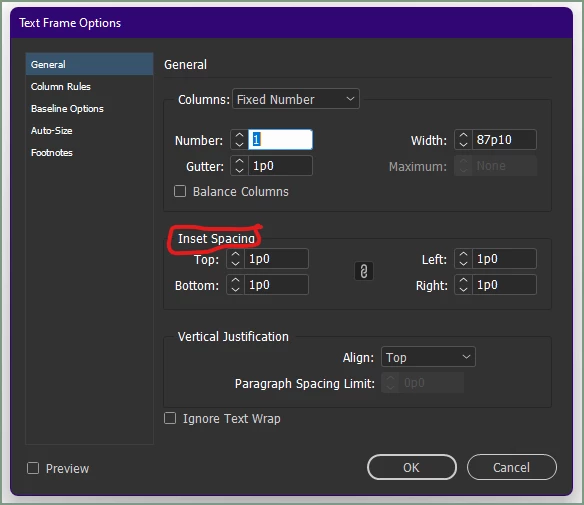
A more direct answer might be that you need to set the inside spacing — that inset spacing — using Text Frame options. Select the text frame and hit Ctrl-B:

...and there's your "padding" for the frame.


It's best, as Peter notes, to make this part of an Object Style so you can apply it consistently to multiple frames.


8 replies

James Gifford—NitroPress
Legend
September 10, 2022

Echoing Peter's question: what did you create your "original document" with? Import from one tool to another of styles this elaborate is by no means a standardized or simple thing.


The basic method for pull quotes and small sidebars is to use an anchored text frame, and then use an Object Style to format those frames consistently. (As well as text styles for their content, which can be embedded in the Object style.)


GeobopAuthor
Known Participant
September 18, 2022

I did this Object > Anchored Object > Insert > Basic Text Frame (Content = Text) > Position > Inline

I then inserted some text. Next, I need to give the text frame some padding, but I don't see any reference to padding in the Properties panel. How can I give it a particular padding value?

Peter Spier
Community Expert
Community Expert
September 18, 2022

InDesign refers to "padding" as Inset Spacing on a text frame. It's set in the Text Frame Options dialog or as part of an object style you should probably define for pull quotes.

Peter Spier
Community Expert
Community Expert
September 10, 2022

What program did you use to create the original document? Was this a document meant for screen or print?

GeobopAuthor
Known Participant
September 18, 2022

Sorry for the late reply. I created the files in Sigil, using CSS to format the blockquotes.

James Gifford—NitroPress
Legend
September 18, 2022

There is a considerable divide between formatting for EPUB that can be achieved in InDesign and that which can be achieved using CSS. Many elements export a bit oddly, and many parameters available in CSS can't be set from ID.


Either will produce a fine result, if you know the limitations and work within them. My approach is to use both.