
Participant
November 27, 2022
Answered

How to relink the images as it shows missing links in InDesign?

  • November 27, 2022
  • 2 replies
  • 5218 views

I am opening a document that had no errors last week. It is showing that +300 links are missing, however I have a folder with all the images. Is there a fast way to link the images, rather than one by one?
This topic has been closed for replies.
Correct answer Eugene Tyson

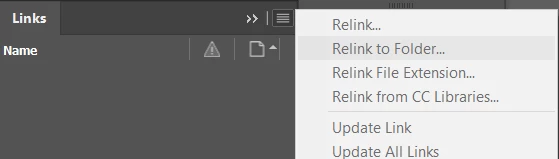
Submenu of the Links Panel

First select all the links in the links panel (click first and shift click last)

Then go to the sub menu and choose relink to folder


It will not be greyed out when you have Links selected in the panel.

2 replies

Jumpenjax
Community Expert
Community Expert
November 27, 2022

Have you tried to link one, then it should say would you like to link the rest. This sometimes happens when saving to the cloud.

Lee- Graphic Designer, Print Specialist, Photographer
Community Expert
November 27, 2022

True - when doing this you need to have Search for Missing Links ticked


Eugene TysonCommunity ExpertCorrect answer
Community Expert
November 27, 2022

Submenu of the Links Panel

First select all the links in the links panel (click first and shift click last)

Then go to the sub menu and choose relink to folder


It will not be greyed out when you have Links selected in the panel.

be.bnAuthor
Participant
November 27, 2022

Thank you so much!