



CjBischoff
Participating Frequently
August 26, 2024
Answered

How to Remove an Unselectable Stray Line in an InDesign Table

  • August 26, 2024
  • 2 replies
  • 449 views

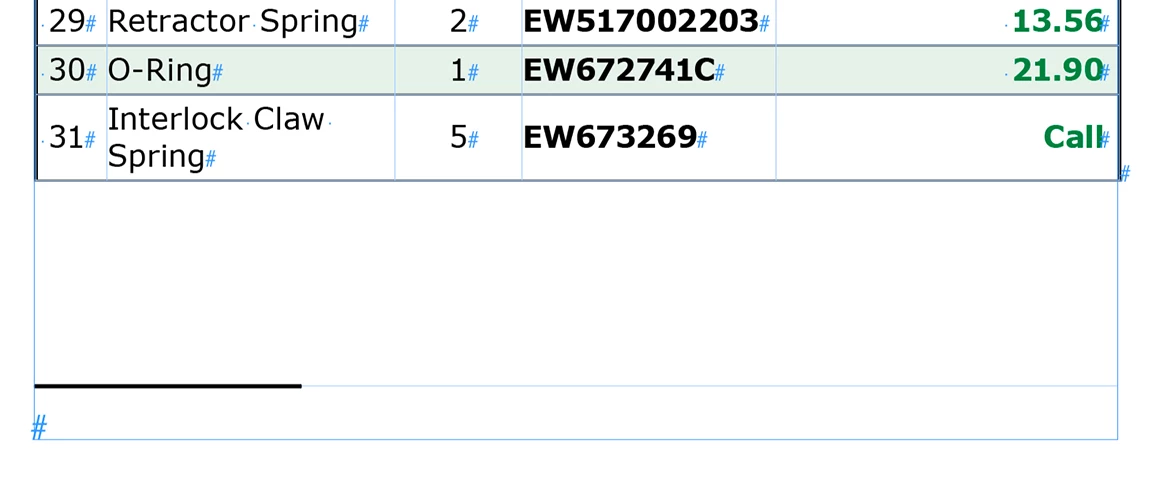
I have an ID document created by another. The stray line at the bottom of the table cannot be selected, dragging the bottom of the table will not hide it, but instead hides the table rows. It appears embedded. Does anyone know what is causing it and how I can remove it? 

Thanks much!


<Title renamed by MOD>

This topic has been closed for replies.
Correct answer Robert at ID-Tasker

It looks like a line above the Footnote? 


There is either Footnote marker in the Table - or in the text before the table. 


2 replies

Robert at ID-Tasker
Robert at ID-TaskerCorrect answer
Legend
August 26, 2024

It looks like a line above the Footnote? 


There is either Footnote marker in the Table - or in the text before the table. 


CjBischoff
Participating Frequently
August 26, 2024

Bingo! Thanks Robert, there was indeed a footnote in the table, I deleted the unneccessary footnote and the line is gone. I've never used footnotes before, your reply got me googling and now I've learned something. Much appreciated!


Robert at ID-Tasker
Legend
August 26, 2024

You are welcome.


Abhishek Rao
Community Manager
Community Manager
August 26, 2024

Hi @CjBischoff,


Thanks for reaching out and explaining the issue.


It sounds frustrating to deal with a line that won’t cooperate!

To help you better, could you please confirm a few details? Are you able to select or edit any part of the table, or is it just the stray line that's unresponsive? Also, which version of InDesign and operating system are you using? 


Looking forward to your response.


Thank you, 
Abhishek Rao

CjBischoff
Participating Frequently
August 26, 2024

Thanks Abhishek, everything else is fully editable, stray line is not. Indesign 19.5, MacOs 13.6.9