Answered
How to remove anti-aliasing on fill color?
Hi!
I've drawn a shape with the pen tool, and I want to fill it in with color. But the fill option is anti-aliasing by default. I want a hard edge on this shape. Any ideas?
thanks

Hi!
I've drawn a shape with the pen tool, and I want to fill it in with color. But the fill option is anti-aliasing by default. I want a hard edge on this shape. Any ideas?
thanks
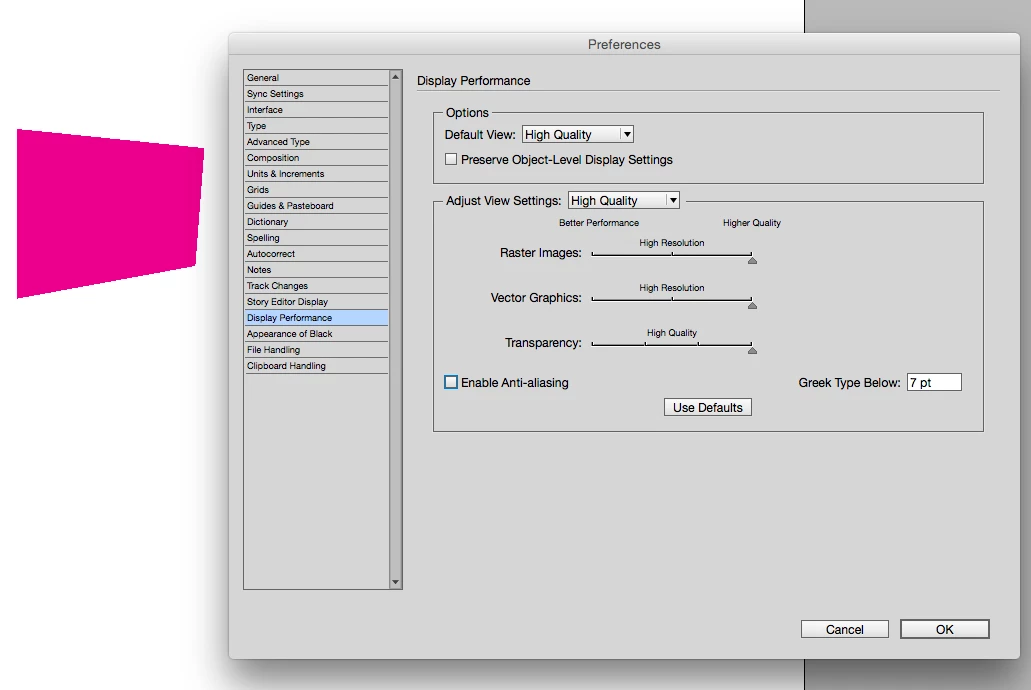
The Display setting you choose under View>Display Performance can be edited in Preferences>Display Performance where there is an Enable Anti-aliasing setting. Keep in mind this only affects the page preview in InDesign if you export the page as pixels the anti-aliasing would be set on export, and pen paths are vector shapes so anti-aliasing usually doesn't apply when you print.
Already have an account? Login
Enter your E-mail address. We'll send you an e-mail with instructions to reset your password.
 AdChoices