


Caedmom
Participating Frequently
October 15, 2024
Answered

How to Remove Fixed White Border Around InDesign Page

My indesign file has a fixed white border around the entire page and I cannot figure out how to remove it. It is not on the master page. Nothing is locked in the file.  Shown below, if I create a large pink banner and want it to bleed off the top/sides, it appears to go behind the border.  
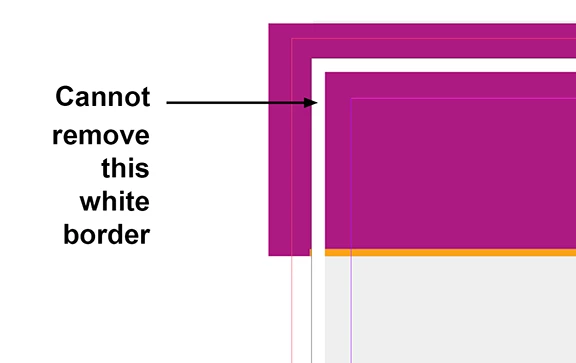


<Title renamed by MOD>

 

This topic is closed to new replies. Start a new post to keep the conversation going.
BobLevine
BobLevineCorrect answer
Community Expert
October 15, 2024

Unlock layer 2 and you'll be able to select it.

6 replies

Caedmom
CaedmomAuthor
Participating Frequently
October 15, 2024

Here is the Indesign File

Translate
BobLevine
Community Expert
BobLevineCommunity ExpertCorrect answer
Community Expert
October 15, 2024

Unlock layer 2 and you'll be able to select it.

Translate
rob day
Community Expert
Community Expert
October 15, 2024

Hi @Caedmom , Can you share the ID file? Attach it to a reply.

Translate
Caedmom
CaedmomAuthor
Participating Frequently
October 15, 2024

See attached.

Translate
Abhishek Rao
Community Manager
Community Manager
October 15, 2024

Hi @Caedmom,


Thank you for your patience! I reviewed your file and found that the white border was due to a locked layer named "Layer 2". After unlocking and deleting this layer, the white border was removed, and you should now be able to create your pink banner without any obstruction.


If you have any more questions or need further assistance, please let me know!


Best,
Abhishek Rao


Translate