Participant
August 22, 2018
Answered

How to remove linked images, but keep image frame?

  • August 22, 2018
  • 3 replies
  • 8813 views

I'd like to deliver a copy of my InDesign file to someone, but without the linked images.

Is there a way to break the links to all the images, but still keep the image frame, in such a way that the images could be re-linked later?

    This topic has been closed for replies.
    Correct answer Kasyan Servetsky

    Here I wrote a 'quick & dirty' script.

    I assume that all images were placed into rectangles: not ovals, polygons, etc. If this is not the case, remove lines 13 and 15.

    Before
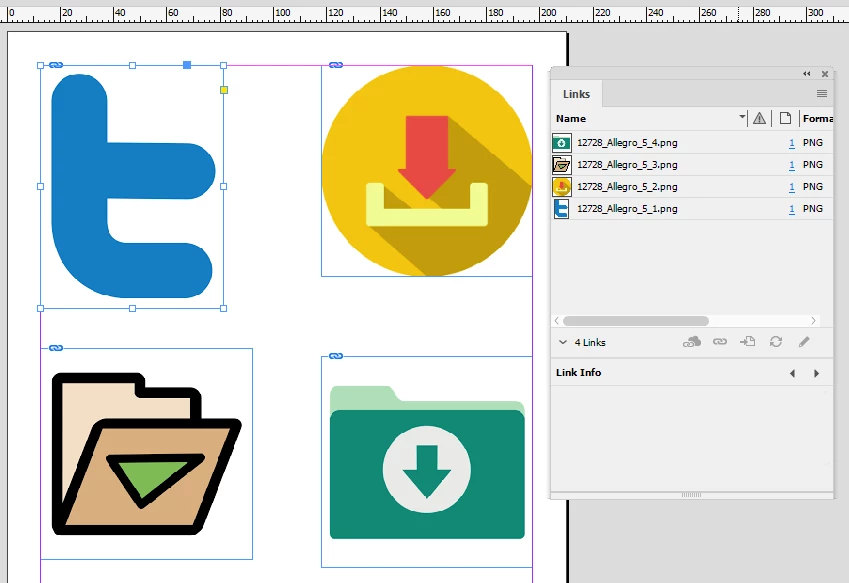
    After

    You can Undo/Redo the whole script
    var scriptName = "Remove links",

    doc;

    app.doScript(PreCheck, ScriptLanguage.JAVASCRIPT, undefined, UndoModes.ENTIRE_SCRIPT, "\"" + scriptName + "\" script");

    //===================================== FUNCTIONS ======================================

    function Main() {

        var links = doc.links;

        if (doc.links.length == 0) ErrorExit("The document has no links.", true);

        for (var i = links.length-1; i >= 0; i--) {

            try {

                if (links.parent.parent.constructor.name == "Rectangle") {

                    links.parent.remove();

                }

            }

            catch (err) {

                //$.writeln(i + " - " + err);

            }

        }

    }

    //--------------------------------------------------------------------------------------------------------------------------------------------------------

    function PreCheck() {

        if (app.documents.length == 0) ErrorExit("Please open a document and try again.", true);

        doc = app.activeDocument;

        if (doc.converted) ErrorExit("The current document has been modified by being converted from older version of InDesign. Please save the document and try again.", true);

        if (!doc.saved) ErrorExit("The current document has not been saved since it was created. Please save the document and try again.", true);

        Main();

    }

    //--------------------------------------------------------------------------------------------------------------------------------------------------------

    function ErrorExit(error, icon) {

        alert(error, scriptName, icon);

        exit();

    }

    //--------------------------------------------------------------------------------------------------------------------------------------------------------

    Here in the Links section I posted a similar script which removes only missing links.

    Hope it helps!

    — Kas

    3 replies

    Legend
    August 23, 2018

    If you export the file as IDML the link previews will be stripped out.

    Kasyan Servetsky
    Kasyan ServetskyCorrect answer
    Legend
    August 23, 2018

    Here I wrote a 'quick & dirty' script.

    I assume that all images were placed into rectangles: not ovals, polygons, etc. If this is not the case, remove lines 13 and 15.

    Before

    After

    You can Undo/Redo the whole script

    var scriptName = "Remove links",

    doc;

    app.doScript(PreCheck, ScriptLanguage.JAVASCRIPT, undefined, UndoModes.ENTIRE_SCRIPT, "\"" + scriptName + "\" script");

    //===================================== FUNCTIONS ======================================

    function Main() {

        var links = doc.links;

        if (doc.links.length == 0) ErrorExit("The document has no links.", true);

        for (var i = links.length-1; i >= 0; i--) {

            try {

                if (links.parent.parent.constructor.name == "Rectangle") {

                    links.parent.remove();

                }

            }

            catch (err) {

                //$.writeln(i + " - " + err);

            }

        }

    }

    //--------------------------------------------------------------------------------------------------------------------------------------------------------

    function PreCheck() {

        if (app.documents.length == 0) ErrorExit("Please open a document and try again.", true);

        doc = app.activeDocument;

        if (doc.converted) ErrorExit("The current document has been modified by being converted from older version of InDesign. Please save the document and try again.", true);

        if (!doc.saved) ErrorExit("The current document has not been saved since it was created. Please save the document and try again.", true);

        Main();

    }

    //--------------------------------------------------------------------------------------------------------------------------------------------------------

    function ErrorExit(error, icon) {

        alert(error, scriptName, icon);

        exit();

    }

    //--------------------------------------------------------------------------------------------------------------------------------------------------------

    Here in the Links section I posted a similar script which removes only missing links.

    Hope it helps!

    — Kas

    Community Expert
    August 23, 2018

    Hi Kasyan,

    and how should the links be retrieved when the document comes back?

    One could store the links as text string with a label in the frame with insertLabel( frame.id.toString() , link.filePath.toString() ) The information could be retrieved by another script that uses extractLabel( frame.id.toString() ) and linked again, but that would also mean we have to store some other information about the linked graphic like size and relative position in the frame.


    And one could hope, that the frame is never replaced with a different one.

    Regards,
    Uwe

    Kasyan Servetsky
    Legend
    August 23, 2018

    Hi Uwe,

    I failed to read (carefully) the last part. Sorry!

    I thought the OP would make a 'stripped of links' copy and send it to someone else keeping the original version with links.

    Of course, this can be implemented either by inserting-extracting labels containing the image path, or by creating a sort of database (csv/txt-file) with frame id and the relative file path.

    — Kas

    jmlevy
    Community Expert
    Community Expert
    August 22, 2018

    Just deliver the InDesign file. When the recipient of the file will open it, there will be an alert message telling that links are missing, but the preview will stay in the file.

    Maybe I did not fully understand the question…

    Participant
    August 22, 2018

    Sorry if my question was not clear enough.

    I would like the delivered file to NOT have the preview of the images, just blank image frames.

    Is this possible?