Participant
September 9, 2024
Answered

How to Remove the Annoying Square Grid in InDesign

  • September 9, 2024
  • 1 reply
  • 2296 views

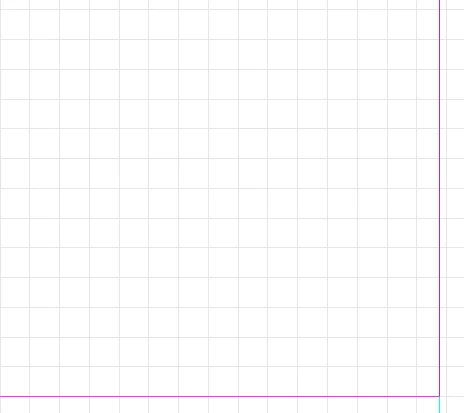
Hi everyone, does anyone know how to get rid of this square grid in InDesign?


I've tried every setting that has to do with grids but propably I'm not looking in the right spot.


Many thanks!


<Title renamed by MOD>

This topic has been closed for replies.
Correct answer Dave Creamer of IDEAS

Hi Dave, sorry, you're right, it is of course the Document grid. I only need to have my margins and columns visible but whatever I try, the Document grid is always there. 
Any idea what may cause that?
Thanks again!


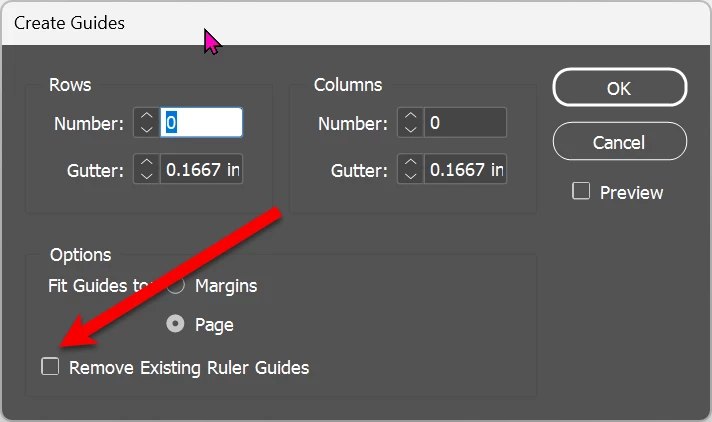
Perhaps someone made the grid with guidelines on the parent pages? Those would be on a per-layer basis, so make sure the layer is not locked. Then go to Layout>Create Guides, choose 0/0 for columns/row and click Remove Existing Ruler Guides. 

See what happens. 

1 reply

Dave Creamer of IDEAS
Community Expert
Community Expert
September 9, 2024

View > Grids & Guides > Show/Hide Document Grid menu.


David Creamer: Community Expert (ACI and ACE 1995-2023)
Participant
September 9, 2024

Hi Dave, thanks, but I need my Document Grid. It's the grey squares I don't want...

Dave Creamer of IDEAS
Community Expert
Community Expert
September 9, 2024

I'm not following... the document grid IS the gray squares.

You can:

Turn the grid off but keep snap to document grid on,

Turn the grid on but keep snap off,

Turn the both on or off.

Adjust the size spacing and color of the grid under the Grids preferences.


Just a thought: the document grid is not to be confused with the baseline grid.


David Creamer: Community Expert (ACI and ACE 1995-2023)