
Participant
Aug 29, 2024 5:00 PM UTC
Answered

How to remove Thin Line Appearing Around Text Blocks in InDesign

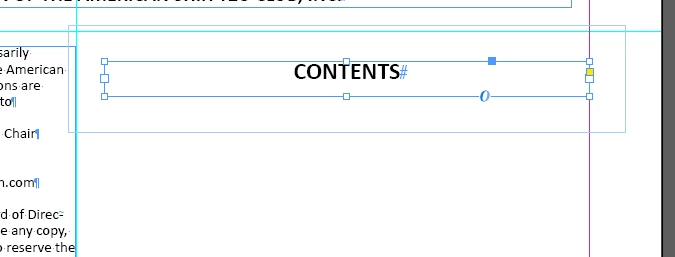
How do I get rid of a thin box that is appearing around my text blocks, interfering with other things on the page. If I move "Contents," everything else moves, too.


<Title renamed by MOD>

 

Mike Witherell
Mike WitherellCorrect answer
Community Expert
Aug 29, 2024 6:17 PM UTC

I agree. It looks like Text Wrap is turned on for that frame.

If you want to hide frame edges, try the View menu > Extras > Hide Frame Edges

Ctrl+Cmd+H on macOS

Mike Witherell

9 replies

Mike Witherell
Community Expert
Mike WitherellCommunity ExpertCorrect answer
Community Expert
Aug 29, 2024 6:17 PM UTC

I agree. It looks like Text Wrap is turned on for that frame.

If you want to hide frame edges, try the View menu > Extras > Hide Frame Edges

Ctrl+Cmd+H on macOS

Translate
Mike Witherell
Susan Culligan
Inspiring
Aug 29, 2024 5:29 PM UTC

It looks like you have "Show frame edges" on. See screenshot. For PC, press Ctl/H and they'll disappear.

Uh oh--I reread James's answer and see that he's right. It's a text wrap. Ignore my previous answer!

Translate
Susan Culligan
Inspiring
Aug 29, 2024 5:30 PM UTC

Sorry, I don't know the shortcut on Mac.

Translate
Robert at ID-Tasker
Legend
Aug 29, 2024 5:02 PM UTC
Participant
Aug 29, 2024 6:35 PM UTC

Yes!!! I didn't try that becasue I never set it to be a Text Wrap. Why in the world would it suddenly do that! Now I can fix all of them! (5 or 6)


Thank you!!!

Translate
rob day
Community Expert
Community Expert
Aug 29, 2024 8:29 PM UTC

Why in the world would it suddenly do that!


If you inadvertently set a wrap in the Text Wrap panel with nothing selected:


It would become the default for every new text frame you create:


So make sure with no text frames selected, you have the No text wrap icon set in the Text Wrap panel before creating new text frames


Translate