
shereen44149649
Participant
March 29, 2022
Answered

How to rename a Pantone Swatch color?

  • March 29, 2022
  • 1 reply
  • 771 views

This is what I'm trying to do in a nutshell:
1. I need to send a file to vinyl printer that includes a dieline.

2. The specifications for prepping the file calls for the dieline to be on a separate layer, be any Pantone color (but the color must be renamed to CutContour or it won't work.

3. Indesign won't let me rename the Pantone I have on my swatch unless I convert it to CMYK, but then CMYK won't be recognized as the dieline for the printer.


Any suggestions would be great!
This topic has been closed for replies.
Correct answer Brad @ Roaring Mouse

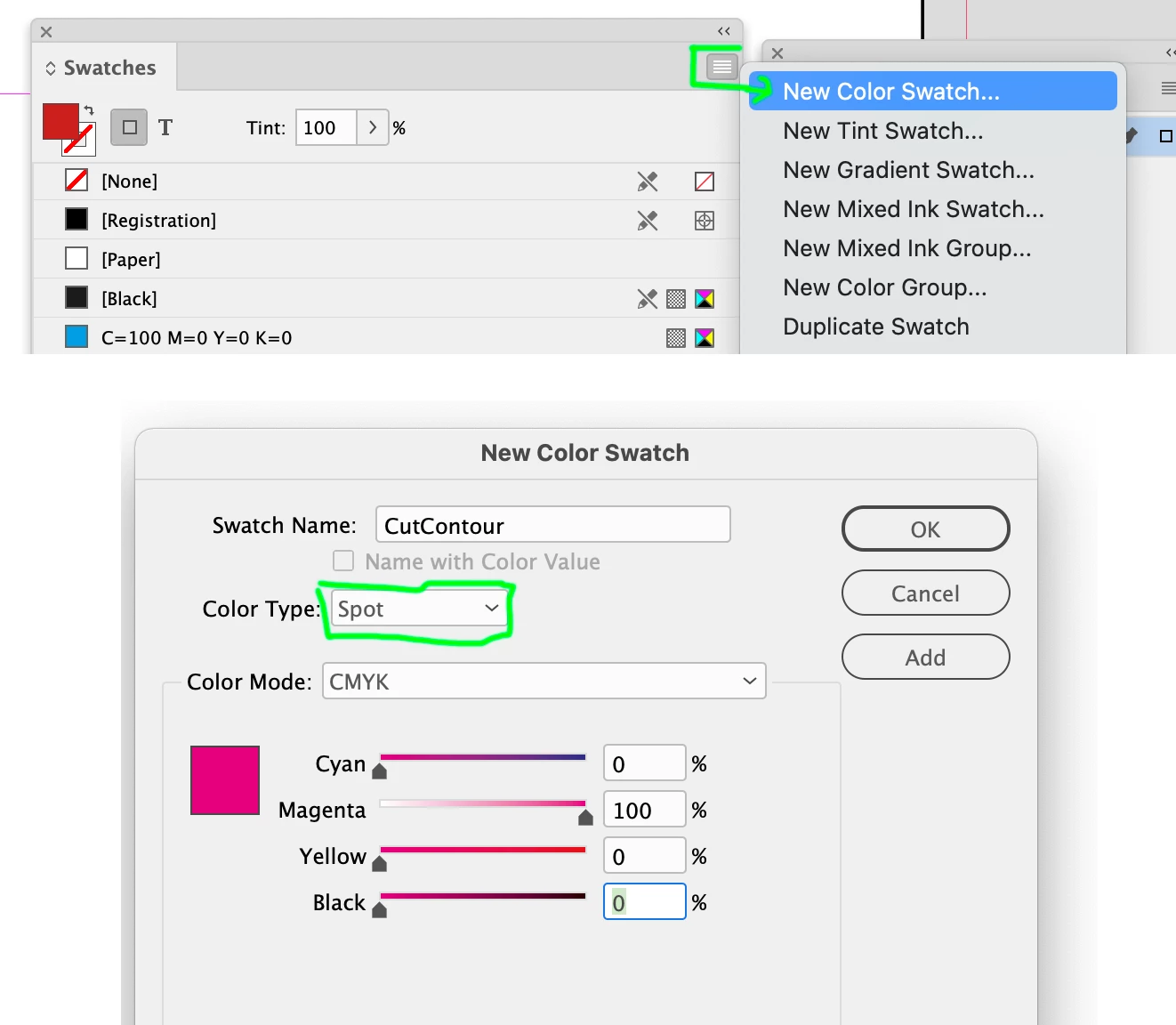
There's no need to use a Pantone swatch as a base for this. Create your OWN spot colour called CutContour and give it any definition you want (e.g. I tend to make my dielines 100M). It doesn't matter what colour mix you use, as long as it's defined as a Spot Colour.


 That being said, you can totally edit a Pantone swatch. Yes, you need to change the colour mode for the name to be editable, but the important thing is to keep the colour defined as a Spot.

1 reply

Brad @ Roaring Mouse
Community Expert
Brad @ Roaring MouseCommunity ExpertCorrect answer
Community Expert
March 29, 2022

There's no need to use a Pantone swatch as a base for this. Create your OWN spot colour called CutContour and give it any definition you want (e.g. I tend to make my dielines 100M). It doesn't matter what colour mix you use, as long as it's defined as a Spot Colour.


 That being said, you can totally edit a Pantone swatch. Yes, you need to change the colour mode for the name to be editable, but the important thing is to keep the colour defined as a Spot.

shereen44149649
Participant
March 29, 2022

Awesome! Thank you so much!