how to replace a Frame level XML element without deleting the child XML elements?
how to replace a Frame level XML element without deleting the child XML elements?
I have a XML element on frame (say having tag name as 'Tag1'), and also there in inline XML elements on text inside frame (say having tag name as 'Tag2' and 'Tag3'). Please see below snapshot for details:
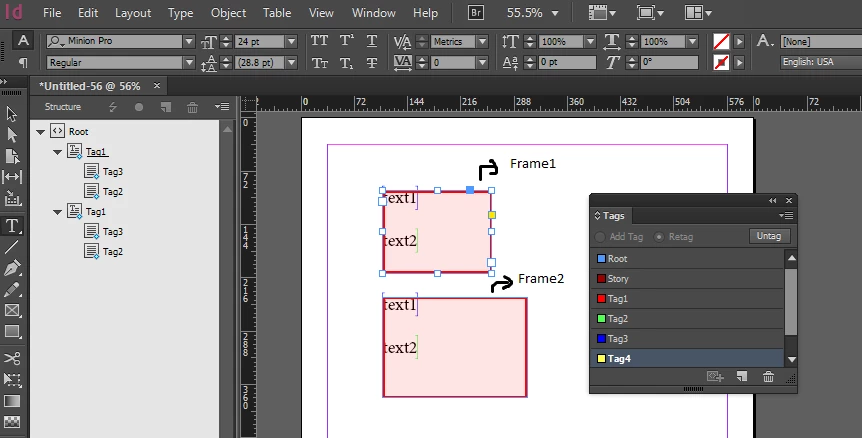
Now I need to replace the XML tag on Frame1 with "Tag4". But if I try to delete and create a new element, all the Child element will get removed from it.
If I try to rename the Tag1 to some other Tag name, then it will also get renamed on Frame2.
So how can I change the XML element on Frame1 keeping the child Tags intact in the hierarchy??
We can do this in Indesign by clicking on Frame1 and selecting the New tag from Tag hierarchy, I need to know how we can do this using C++.
can some one suggest something?
 AdChoices