
How to Resolve Incorrect Gujarati Ligature Display in InDesign
No matter what I do I cannot get Gujarati text to display correctly in InDesign. There are a certain group of ligatures that simply will not display when using Noto Sans Gujarati or Nirmala.
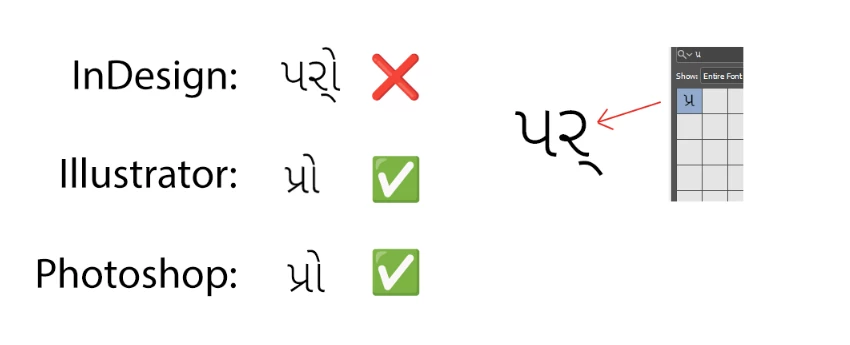
The correct characters appear in the Type > Glyphs panel, but when I insert the glyph the ligature is split incorrectly. For example, the character for the syllable "pra" પ્ર (0AAA + 0ACD + 0AB0) is being displayed as if the last two Unicode elements were flipped પર્ (0AAA, then 0AB0 + 0ACD).
Adobe World Ready Composer has been run (which does what it is supposed to do for 95% of the ligatures), the text has been set to Gujarati and I've run the indic preferences script. I have scrubbed preferences and reinstalled InDesign. I have deleted all the fonts and installed just one single font weight in case there was some kind of conflict. There are no fonts in the InDesign projects 'Fonts' folder.
This problem does not happen in Photoshop or Illustrator, which display the text as expected.
I'm on InDesign 18.2.1 x64 on Windows 11.
Thank you for any help you can give!
<Title renamed by MOD>


 AdChoices