
Participant
September 30, 2019
Question

How to resolve Missing Fonts issue

  • September 30, 2019
  • 3 replies
  • 1719 views

Upon opening an indd file created by someone else, I'm given the following error:
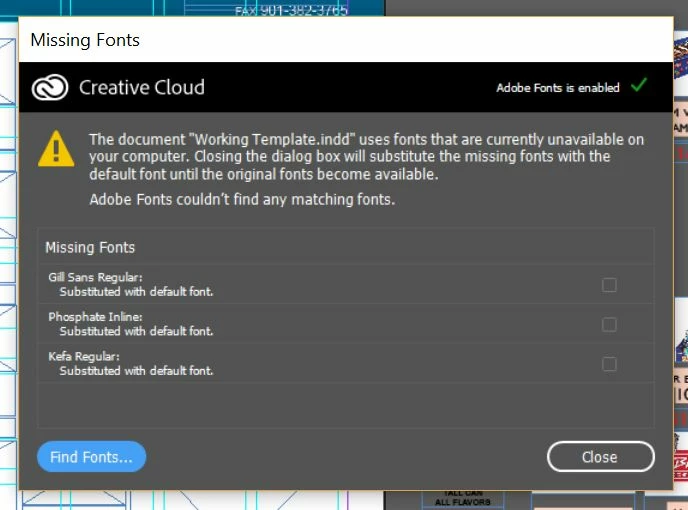


When clicking "Find Fonts" button, this is the result:
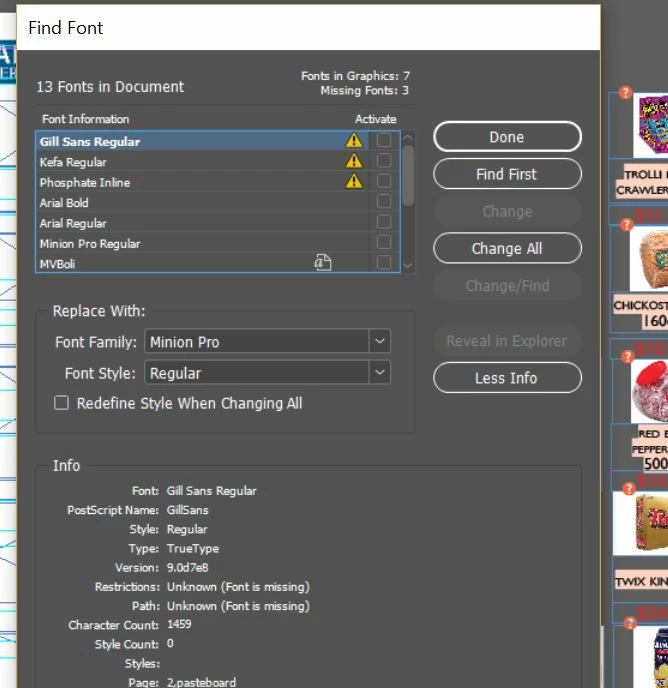


I'm unable to check any of the "Activate" buttons.  None of them are available.

I've downloaded & installed free versions of all three missing fonts to Windows->Fonts as well as Adobe->InDesign->Resources->Required->Fonts.  None of this has solved the issue.


Doesn't seem like fixing a missing font error should be this complex.  Any suggestions?  Thanks in advance.


Adam

    This topic has been closed for replies.

    3 replies

    Bill Silbert
    Community Expert
    Community Expert
    September 30, 2019

    For most fonts there are different versions of them with the same name. For example, if you were to activate the Open Type version of Gill Sans but the version that your job is looking for is the True Type or Postscript version then they would not automatically replace the same named fonts in your document. You can select one of the missing ones and then go to the Replace field and choose the version of Gill Sans that you have with the one that it is asking for and it will replace throughout your document. Be aware, though, that tracking and even leading might not match perfectly. In the case you show in your second screen shot the fonts are probably either the True Type or Postscript versions of Gill Sans because the Open Type versions (the preferred kind of fonts since they are cross platform) usually have either Std or Pro as part of their name. If you check your version of Gill Sans and it has the Std or Pro in the name then that would explain the problem. By the way, I've seen that with Gill Sans in particular that there is not a "clean" substitution in terms of leading and tracking when replacing one version with another.

    soyabmAuthor
    Participant
    September 30, 2019

    Hmmm.  That could be.  Let me investigate & post again shortly.  Thanks Mike!

    Mike Witherell
    Community Expert
    Community Expert
    September 30, 2019

    Installing the missing fonts should have made the problem go away immediately. Maybe it is an older version of the same font name?

    Mike Witherell