

Inspiring
September 2, 2024
Answered

How to right align after specific character?

  • September 2, 2024
  • 1 reply
  • 226 views

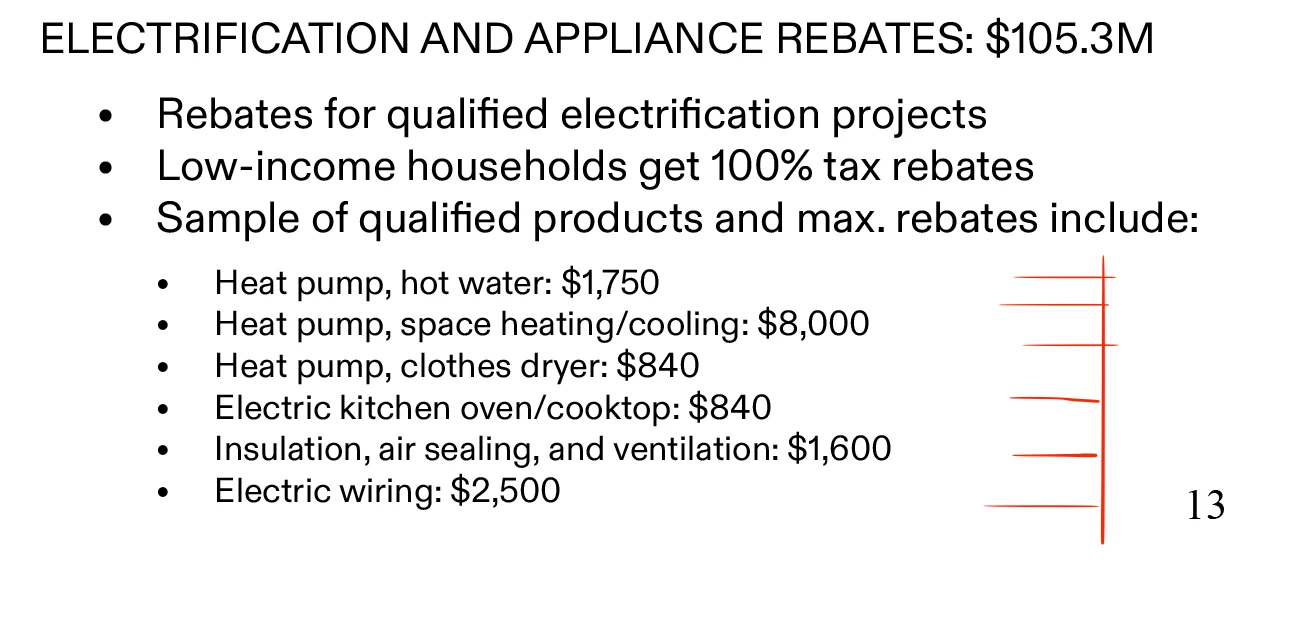
I am trying to right align the numbers which occur after a colon (:) 

And it would be good to add the leading dots too.
 

Thanks.

 

This topic has been closed for replies.
Correct answer Robert at ID-Tasker

You need to insert Tab after the colon, then in applied ParaStyle add right align tab at the right position and set the Leader. 


https://community.adobe.com/t5/indesign-discussions/there-is-extra-space-at-the-end-of-a-text-line-in-indesign/m-p/14816081#M586204 


https://nukefactory.com/tutorials/how-to-create-dot-leaders-in-adobe-indesign/


1 reply

Robert at ID-Tasker
Robert at ID-TaskerCorrect answer
Legend
September 2, 2024

You need to insert Tab after the colon, then in applied ParaStyle add right align tab at the right position and set the Leader. 


https://community.adobe.com/t5/indesign-discussions/there-is-extra-space-at-the-end-of-a-text-line-in-indesign/m-p/14816081#M586204 


https://nukefactory.com/tutorials/how-to-create-dot-leaders-in-adobe-indesign/
