

dublove
Legend
September 15, 2024
Question

How to Round Corners for Paragraph Background Pinstripes in InDesign

  • September 15, 2024
  • 5 replies
  • 1146 views

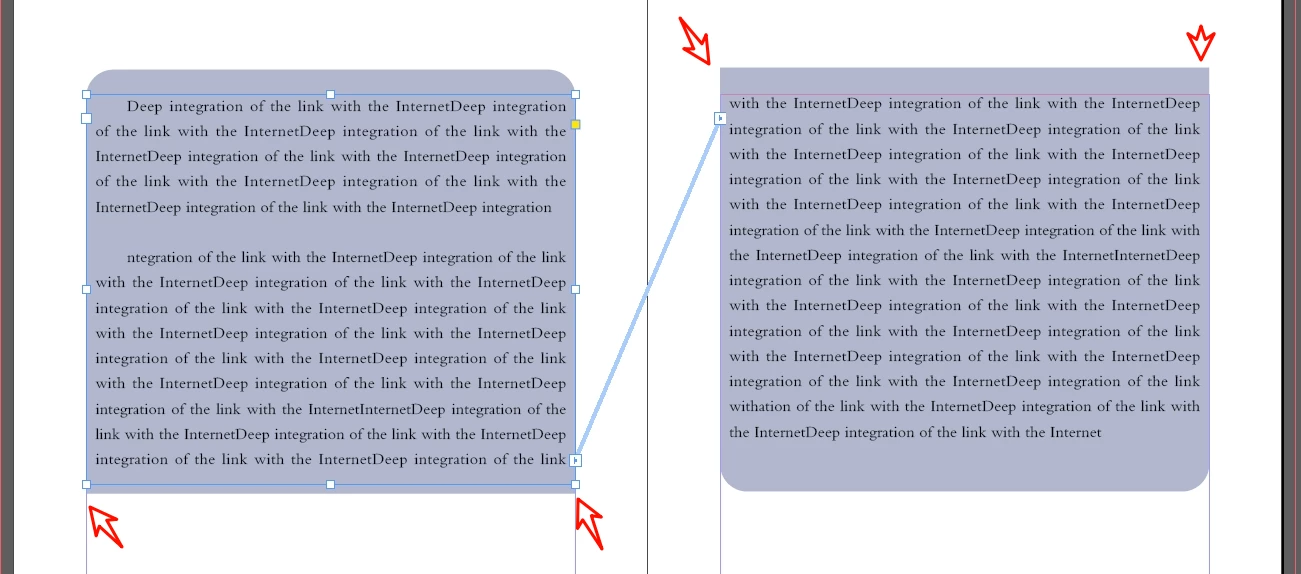
Paragraph pinstripe(backgroud): is there any way to make these two corners automatic rounded corners?

carriage return?

That's too much trouble, there's a lot of it.


<Title renamed by MOD>

5 replies

Community Expert
March 21, 2025

I'm not really sure about the pinstripes thing you're trying to achieve 


But I think I broke/forced InDesign to behave. 


Attached is a sample document.


I was trying to anchor a text frame at the top of the text - and when I did this - both text frames with the same paragraph style went round as requested. 


I deleted the anchored object - and it stays and works as you'd expect. 


All I was trying to do was seeing if an anchored object at the start of the text frame could be anchored in a way that obscured the round edge at the bottom. 

And similarly for the right hand connected page - see if I could anchor an object to the bottom paragraph to align to the top.


But as soon as I anchored the first object on the left page - it seemed to round/straighten out the shading - even when reflowing


But seems to quirk back like a glitch depending on the reflow 


How odd!  

dublove
dubloveAuthor
Legend
March 21, 2025

Hello Eugene Tyson.
Thank you very much.


The attachment cannot be downloaded.

tip: Invalid parameter specified.

I may have figured it out, but would still like to see your example.

Community Expert
March 21, 2025

Yeh I will need to access the computer I made it on which was Mac but not near that now. 


I'm on windows laptop at the moment - lets give it a go 


This is very bizarre behaviour


You can see the anchored object it's anchored at the very first line. 

Earlier it worked on the mac by anchoring to the bottom of the frame - maybe that still works. 

But as soon as I put it at the top with a Negative Inline amount - it forces the roundness... 


Weird


rob day
Community Expert
Community Expert
September 15, 2024

carriage return?


Yes. Paragraph shading is a Paragraph format, so you would have to end the paragraph with a return.


An Object Style applied to the text frame might be better:


dublove
dubloveAuthor
Legend
September 16, 2024

Hi rob day~

Thank you very much.

Controlling with object styles is a good way to do this.


It's just that I have other paragraphs in the same text box that don't need underlining.

I remember what I used to do:
Hit a carriage return at the very top, or bottom of the page to make a paragraph.

It's all a pain in the ass.


Mike Witherell
Community Expert
Community Expert
September 15, 2024

Add this to your paragraph style: Turn on Keep Options > Keep Lines Together > At Start/End of Paragraph: 2 and 2

I don't know why it works, but it works.

Mike Witherell
dublove
dubloveAuthor
Legend
March 20, 2025

@Mike Witherell 

Do you have an example would like to share?

Thank you.

quote

Add this to your paragraph style: Turn on Keep Options > Keep Lines Together > At Start/End of Paragraph: 2 and 2

I don't know why it works, but it works.


By @Mike Witherell


Scott Falkner
Community Expert
Community Expert
September 15, 2024

Not that I can see. Odd, since there is an option for paragraph rules. Click on image for enlargement.


If you look carefully at the corners you will see the shading has sharp corners at the bottom but the rules do not. 

It looks like you will need to create two (or maybe three) styles: one for paragraphs that don’t span column breaks, and one for those that do (or perhaps one for the paragraph at the bottom of the column and one for the paragraph at the top of the column. You will have to insert paragraph breaks where necessary and the alternate style.


Alternatively you can use paragraph rules instead of shading and turn on “Display Border if Paragraph Splits Across Frames/Columns,” which is what I did in the above example.

dublove
dubloveAuthor
Legend
September 15, 2024

My example is two text boxes.
The first one at the end of the text box and the second one at the beginning.
I'm using a paragraph background.

Lukas Engqvist
Community Expert
Community Expert
September 15, 2024

If it is a paragraph flowing from the one to the other, then not having it rounded is a more clear signal to the reader that they are in the middle of the text. If the corners are in the middle of a paragraph this is reasonable.
If  you add a return at the end of frame one it will mean you get round corners in the right column. 
Another alternatives is to have the frame itself with the same rounding and, use "clip to frame" 

Willi Adelberger
Community Expert
Community Expert
September 15, 2024

Create a paragraph style.