

M.Hasanin
Inspiring
August 1, 2021
Answered

How to run Script UI Palette(s) Based Script without using jsx Launcher ?

  • August 1, 2021
  • 1 reply
  • 949 views

Hi Experts,

Every time i need to launch my Palette Based Script i need to call it from a Launcher (Here i Have 2 Palettes)  :


//---------------------------------------------------------
//Making Palettes Windows
//---------------------------------------------------------
#targetengine "session1";
//#target InDesign 
var w = new Window("palette", {independent:true});
var gqmanager = new Window("palette");
................................................etc


So I need another Script to Launch My Main Script, and I wrote the Launcher as following (and save it as jsx file beside the jsxbin of my script :


//-------------------------------------------------------
// 'Script JSXBIN Launcher
//-------------------------------------------------------

  
// 1. My persistent engine (if needed)
#targetengine "session1";
 
// 2.My jsxbin code as a literal string in evalFile
$.evalFile(File($.fileName).path + "/" + escape("FGAS1460.jsxbin"));


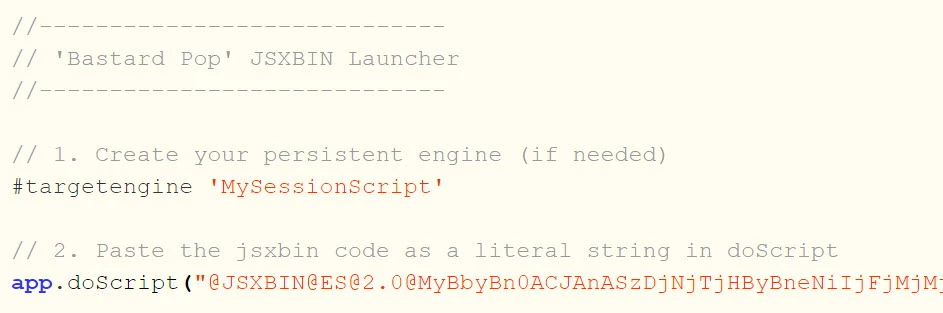
So my Final Script Look Like the following :

but some one told me i can get rid from it? but i didn't understand him, he actually wrote the solution in shape of C++ , so it was hard to understand! ?, please help me in simple way , this will be much easier in distributing the script. Thanks all in Advance.
This topic has been closed for replies.
Correct answer M.Hasanin

Thanks a lot @Manan Joshi   for your reply, but i need something more simple to final user, the problem is not me, i accept the launcher , in the end i found this method and it works :

you can read more information here :

https://www.indiscripts.com/post/2010/04/binary-javascript-embedment-cs4-cs5 


1 reply

Community Expert
August 2, 2021

Hi @M.Hasanin,

How about creating a menu entry via a startup script which on click launches your palette. You can search the forum for menu creation samples.

-Manan

-Manan
M.Hasanin
M.HasaninAuthorCorrect answer
Inspiring
August 2, 2021

Thanks a lot @Manan Joshi   for your reply, but i need something more simple to final user, the problem is not me, i accept the launcher , in the end i found this method and it works :

you can read more information here :

https://www.indiscripts.com/post/2010/04/binary-javascript-embedment-cs4-cs5 


Mohammad Hasanin
Community Expert
August 2, 2021

So instead of using eval you used doScript instead, how does this make a difference to the end user except eliminating an entry for her/him in the scripts panel. This is all related to script developer in my assessment and if the extra entry is the matter of concern for your user, then you could have placed the FGAS1460.jsxbin script outside the script panel's hot folder as you are already referring the script file using its path so you can refer whichever file you want.

Do let me know if I am still misinterpreting what is needed.

-Manan

-Manan