Participant
January 4, 2025
Answered

How to save locally rather than to the Adobe Cloud? [was: iCloud]

  • January 4, 2025
  • 4 replies
  • 1644 views

Some years ago I used to work with InDesign. Now I am trying the updated program for free. I  want to save my new files on the computer, I am not at all interesed to store it in the Cloud. Why does  the system force me to save it  in the cloud?  


Correct answer Barb Binder

Hi @rigmor_anna_6020:


This is a macOS screen shot so will look different if on Windows, but you will have two save locations:
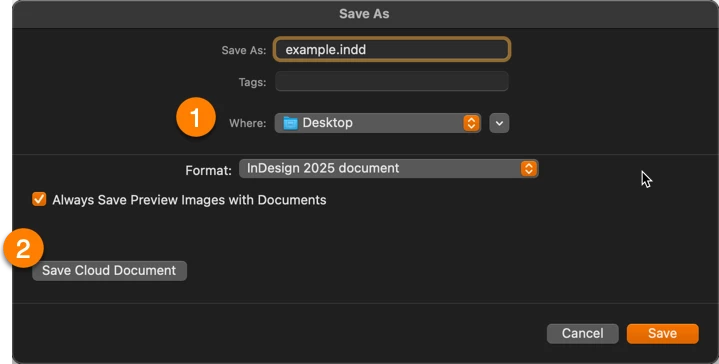
 

1. Save locally in the location of your choice (I'm showing my desktop)

2. Save on Adobe's cloud drive as a Cloud Document


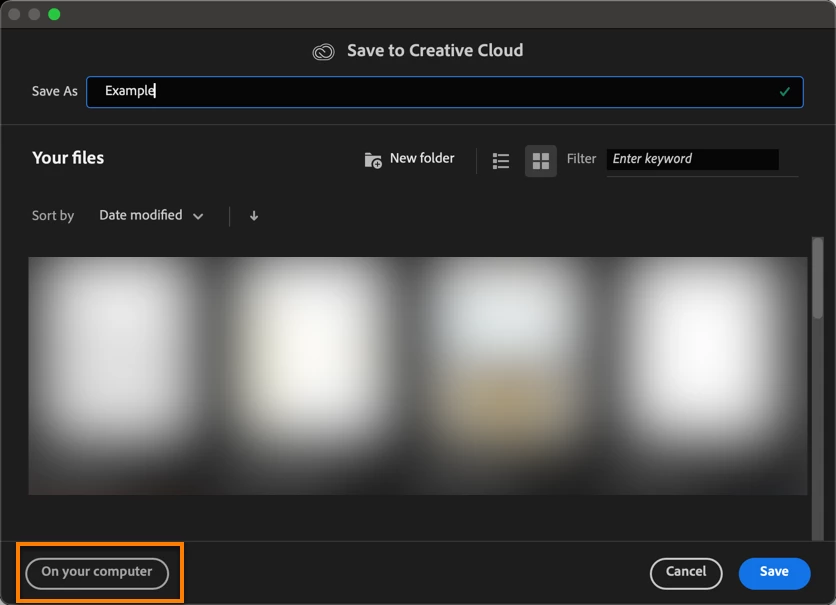
However, the first time you save you will see a different dialog box, prompting you to save as a Cloud Document (and encouraging it, truthfully) which may be the source of your confusion. And then InDesign remembers how you saved or opened your most recently accessed document and will continue to present you with the same experience until you select otherwise. Choose On Your Computer to get the options shown in my screen shot, above.


~Barb

4 replies

Barb Binder
Community Expert
Community Expert
January 4, 2025

Kids are the best!  Come back if you have more questions (that he can't answer). 😉


~Barb

~Barb at Rocky Mountain Training
Participant
January 6, 2025
Thank you Barb Binder, for being willing to help me! This is the problem: Some years ago I worked a lot with Adobe InDesign CS6. Four days ago, I decided to ask for a 7 day free trial for the Adobe InDesign «updated program/new version», to find out if I was able to use it or not. I imported my last InDesign CS6 work (a book with text and photos) to check the compatibility. I had no problems using the program. The problem was this: I first decided to save my InDesign files in the cloud. Then I decided to save them on my mac, because it felt - and feels - more secure for my use. I was unable to find out where to go to make this work. After some time, I found the answer, it was to uninstall InDesign, and then re-install. So I did. I chose to save InDesign on the computer and then I started working. After a couple of hours, I wanted to give my work a new name via Save as. The dialog box occured. But it was impossible to save my files on my computer, instead I had to choose to save it in the cloud. After doing so, I was able to work again. The next day the InDesign program could not open. So I uninstalled InDesign, and installed it again. Luckily, I could use it. But the next morning - today - I was unable to open the InDesign program. The Adobe box would briefly show on my screen, only to disappear without displaying my file. What am I doing wrong? It feels like if the InDesign program forces me to save my files in the Sky. I am 75 years old, and I am trying to make it easy for myself by saving my works on the computer. I have a few days more to decide whether I shall buy InDesign, or not. I am using a MacBook Air, M2, 2022. Of course I cannot use In Design if it forces me to uninstall and re-install the program on a daily basis.

Or maybe it is impossible to work further on with the book I created in InDesignSC6 some years ago?

Regards, Rigmor Anna
Robert at ID-Tasker
Legend
January 6, 2025

@rigmor_anna_6020


You are most likely installing version 2025 - which is very buggy - try installing previous version - 2024.


https://helpx.adobe.com/uk/download-install/using/install-previous-version.html


Barb Binder
Community Expert
Barb BinderCommunity ExpertCorrect answer
Community Expert
January 4, 2025

Hi @rigmor_anna_6020:


This is a macOS screen shot so will look different if on Windows, but you will have two save locations:


1. Save locally in the location of your choice (I'm showing my desktop)

2. Save on Adobe's cloud drive as a Cloud Document


However, the first time you save you will see a different dialog box, prompting you to save as a Cloud Document (and encouraging it, truthfully) which may be the source of your confusion. And then InDesign remembers how you saved or opened your most recently accessed document and will continue to present you with the same experience until you select otherwise. Choose On Your Computer to get the options shown in my screen shot, above.


~Barb

~Barb at Rocky Mountain Training
Participant
January 4, 2025
Thank you, I think it works now. Looks like the file has found its way to the desktop of my computer. My son came home and helped me out. I’m currently on a free trial and considering purchasing InDesign.


Regards, Rigmor Anna
Robert at ID-Tasker
Legend
January 4, 2025

@rigmor_anna_6020


iCloud is from Apple - nothing to do with Adobe. 


@rigmor_anna_6020 wrote:

[...] Why does  the system force me to save it  in the cloud?  


BobLevine
Community Expert
Community Expert
January 4, 2025

There are no free updates to InDesign. It has been a subscription based application for more than 10 years and prior versions haven't had updates since then.


No version has forced you to save anywhere. That is your option to make. Unless you provide some real information nobody is going to be able to help you.

Peter Spier
Community Expert
Community Expert
January 4, 2025
quote

There are no free updates to InDesign. It has been a subscription based application for more than 10 years and prior versions haven't had updates since then.


By @BobLevine


Are there not still free trials for the new versions, though?