
Inspiring
June 28, 2022
Answered

How to search All Documents

  • June 28, 2022
  • 3 replies
  • 605 views

Hi All,

I have one doubt. Please help me.

I am using the below code for find the text in document:

app.findTextPreferences=NothingEnum.NOTHING;
app.findTextPreferences.findWhat = "Sample text for finding";
var findCount = app.activeDocument.findText();
alert(findCount.length);


I don't know to find the all opened document. See below screenshot for more details:
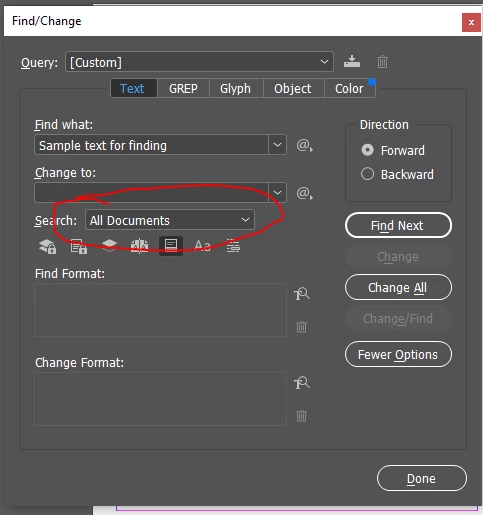


Thanks,
Magesh


This topic has been closed for replies.
Correct answer m1b

Hi all, have you tried

app.findText()

- Mark

3 replies

m1b
Community Expert
m1bCommunity ExpertCorrect answer
Community Expert
June 28, 2022

Hi all, have you tried

app.findText()

- Mark

Inspiring
June 29, 2022

Thanks Mark

Your answer has met my need.

Community Expert
June 28, 2022

Hi Magesh,

inspect what findCount really is.

It's an array of arrays.

The outer array contains one array for every open document.

You have two documents open, so inspect:


findCount[0].length

findCount[1].length


That should give you a better answer.


Regards,
Uwe Laubender
( Adobe Community Professional )

brian_p_dts
Community Expert
Community Expert
June 28, 2022

To put it all together: 

app.findTextPreferences=NothingEnum.NOTHING;
app.findTextPreferences.findWhat = "Sample text for finding";
var findCount = app.documents.everyItem().findText();
var sum = 0;
for (var i = 0; i < findCount.length; i++) { sum += findCount[i].length; }
alert(sum);
brian_p_dts
Community Expert
Community Expert
June 28, 2022

Through the magic of everyItem():

app.documents.everyItem().findText();
Inspiring
June 28, 2022

Thanks for your immediate reply!

I am update the code like below:


app.findTextPreferences=NothingEnum.NOTHING;
app.findTextPreferences.findWhat = "Sample text for finding";
var findCount = app.documents.everyItem().findText();
alert(findCount.length);


Now get only the document count. See below for more details: