Bedazzled532
Inspiring
March 22, 2023
Answered

How to select Arabic wtih Harkaats (diacritics) only?

  • March 22, 2023
  • 6 replies
  • 2841 views

Hi all,


I have a huge text mixed with Arabic text with and without the diacritics. Below is the sample text:


==== Sample Text ===

سورۂ آل عمران کی آیت ۱۰۳ میں دشمنوں اور خون کے پیاسوں کے دلوں میں محبت و الفت کا جذبہ پیدا کرنے والے نے بطور احسان فرمایا ہے۔
وَاذْکُرُوْا نِعْمَتَ اللّٰہِ عَلَیْکُمْ اِذْ کُنْتُمْ اَعْدَآئً
فَاَلَّفَ بَیْنَ قُلُوْبِکُمْ فَاَصْبَحْتُمْ بِنِعْمَتِہٖ اِخْوَانًا ج
’’اللہ کے اس احسان کو یاد کرو جو اس نے تم پر کیا ہے۔ تم ایک دوسرے کے دشمن تھے، اس نے تمہارے دل جوڑ دئیے اور اس کے فضل و کرم سے تم بھائی بھائی بن گئے۔‘‘

=== End ===


I want to select only the Arabic text. How could I do that with grep ? Actually the above text contains Urdu and Arabic matter. Issue is that both Urdu and Arabic are using the same Unicode values to its difficult to tackle it.


I did write something long time back but I need something simpler. Here is what I wrote almost 2 years back

======== my code (Its a single code. Used in Grep Style and Find Replace) =========

(\w+\p{mn}\w*){2,}\x{0020}{0,}|\b\x{0641}\x{0650}?[\x{06cc}|\x{0649}]\x{0652}?\b|\b\x{0644}\x{064e}\x{0622}\b|\b\x{0644}[\x{064e}|\x{0652}]?\x{0627}[\x{064e}|\x{0653}|\x{0670}]?\b|\b\x{0644}\x{0651}\x{064e}\x{0627}[\x{0653}]?|\b\x{0644}\x{0651}\x{064b}\x{0627}\b|\b\w[\x{064e}-\x{0650}]\x{0644}\x{0627}\b|\b\x{0648}[\x{064e}-\x{0650}\x{0652}]\b|\b\x{0648}\x{0651}[\x{064e}-\x{0650}\x{064b}-\x{064d}]\b|\b\x{06c3}[\x{064e}-\x{0650}]\b|\b\x{06c3}[\x{064b}-\x{064d}]\b|\b\x{06c1}[\x{064f}\x{0650}\x{0656}\x{0657}]\b|\x{0020}?\x{0627}?\x{0644}\x{0644}\x{06c1}[\x{064e}-\x{0650}]\b|\b[\x{06d6}-\x{06ed}]\b|\x{0600}|\x{06dd}

========================================================


A simple solution would be very much helpful. 


<Title renamed by moderator>
This topic has been closed for replies.
Correct answer Peter Kahrel

I was wondering about the same, Marc -- I know as little about Arabic as you!


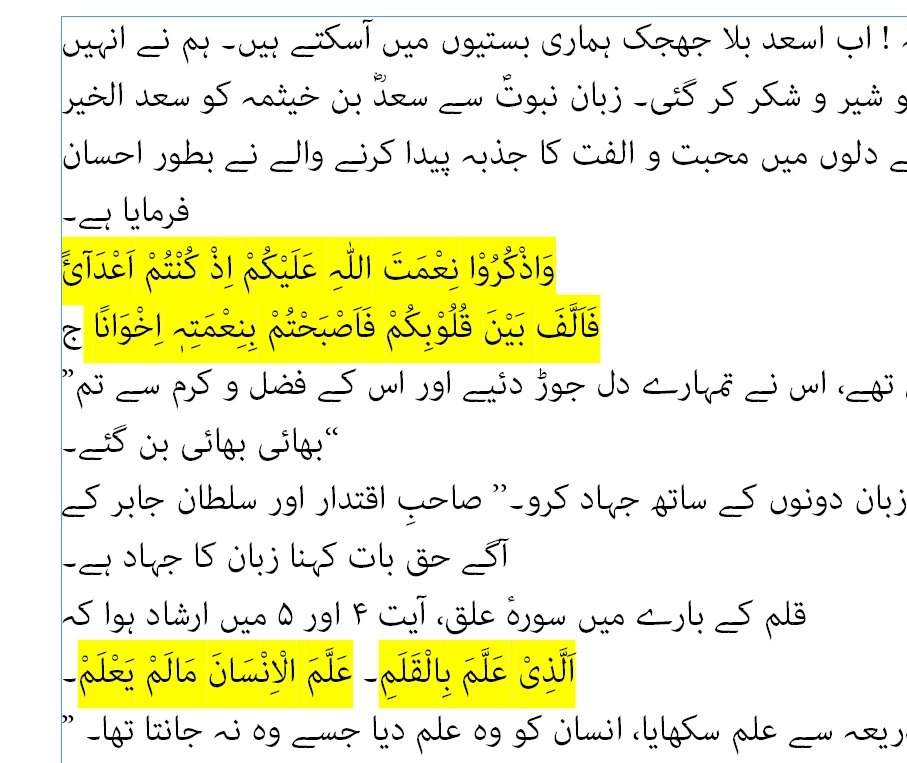
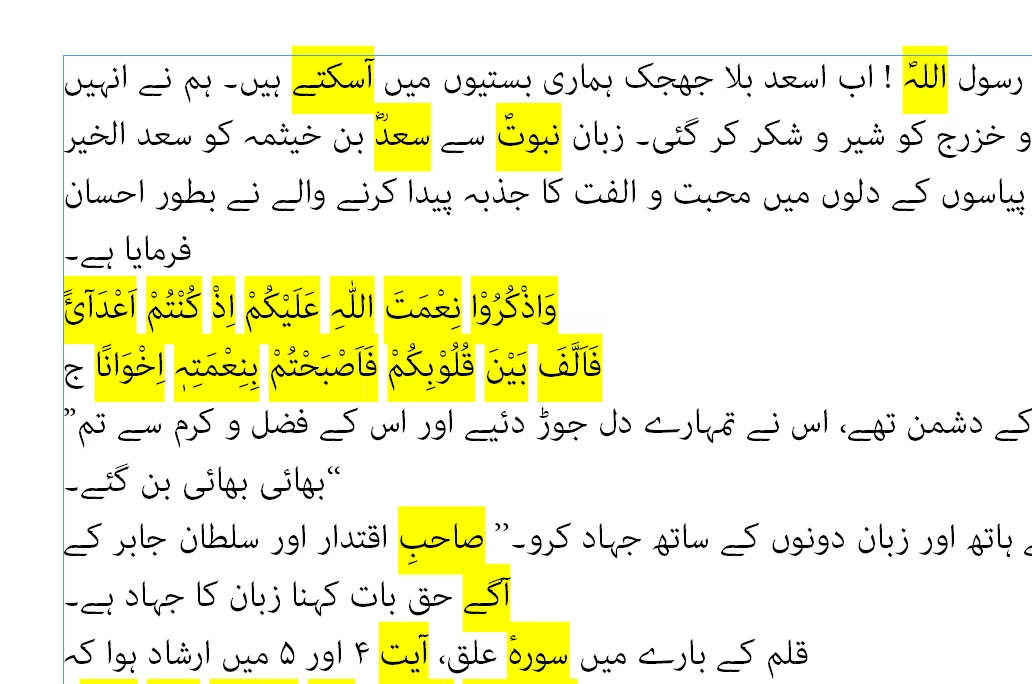
here are two problems with the queries tried out here. The first is that apparently Urdu uses some Arabic diacritics, so that the queries that centre around \p{mn} capture Urdu words as well:


Secondly, by centring the queries around diacritics, (single-letter) words that don't contain a diacritic aren't captured, see e.g. the last glyph in the second line od Arabic in the screenshot, above.


So far @Bedazzled532's (cumbersome) original query appears to work best:


By the way, @Bedazzled532, when you want to assess the results of a query this script is useful:

https://creativepro.com/files/kahrel/indesign/grep_editor.html

It highlights all the matches; the screenshots shown here were taken from the script's captures.


Peter


6 replies

Peter Kahrel
Community Expert
Peter KahrelCommunity ExpertCorrect answer
Community Expert
March 27, 2023

I was wondering about the same, Marc -- I know as little about Arabic as you!


here are two problems with the queries tried out here. The first is that apparently Urdu uses some Arabic diacritics, so that the queries that centre around \p{mn} capture Urdu words as well:


Secondly, by centring the queries around diacritics, (single-letter) words that don't contain a diacritic aren't captured, see e.g. the last glyph in the second line od Arabic in the screenshot, above.


So far @Bedazzled532's (cumbersome) original query appears to work best:


By the way, @Bedazzled532, when you want to assess the results of a query this script is useful:

https://creativepro.com/files/kahrel/indesign/grep_editor.html

It highlights all the matches; the screenshots shown here were taken from the script's captures.


Peter


Bedazzled532
Inspiring
March 27, 2023

@Peter Kahrel Thanks a lot for your effort Peter.


You are right Peter. My original Grep query is working better but problem is that its too difficult to memorize and identify the unicodes while writing and editing the grep query and if I type Arabic characters, the GREP text box in Find What dialog box changes the apperance due to RTL and LTR.


Thanks once again for the wonderful Grep editor script. It will definately help.


Regards


Marc Autret
Legend
March 27, 2023

Hi @Bedazzled532 


Sorry that I can't help, I am totally incompetent in Arabic 😞

But there are two things I would like to clarify for my own culture:


1. In a word like this one,

it seems (to me) that the first letter, آ, is formed of ا (U+0627 ARABIC LETTER ALEF) combined with  ٓ (U+0653 ARABIC MADDAH ABOVE), which is a diacritical mark. So diacritics may appear anywhere in a word, right?


2. In a word like this one,


there is no diacritical marks at all (all characters are in the basic abjad alphabet), does this imply that this word strictly belongs to the Urdu language?


Regarding your original question, what is unclear to me in the first place is, what formal condition weighs on diacritical marks within a word so we can conclude it is an Arabic (vs. Urdu) word?


Best,

Marc

Bedazzled532
Inspiring
March 27, 2023

@Marc Autret Hi Marc

Thanks for the reply.

The word in point no 1 is in Urdu language. Urdu also uses Madda diacritic, most of the time on the word alef. In fact it uses other diacritics but they are generally not written. Most of the time you will see that Urdu uses diacritics on alef.


Word in point number 2 is an Arabic word but used in Urdu also. Normally when an arab write something they dont use these diacritics. But when we asian write these words, we need help of these diacritics to prounounce its correctly. The other fact is that Urdu language borrows from Arabic and Persian. So we know the meaning and pronounciation of the word used in point 2. Hence no diacritics. This is also the answer to your 3rd question.


I belong to India and we use diacritics mostly when we recite/write  Al-Quran or book of Hadiths.


Here my scope was Al-Quran and Hadiths only.


Thanks & regards

Peter Kahrel
Community Expert
Community Expert
March 26, 2023

Agreed, that's odd. Could you post your text sample? I'm intrigued.

Bedazzled532
Inspiring
March 26, 2023

@Peter Kahrel I have attached idml file. I have pasted few lines of text in Urdu and Arabic(center aligned)

Font used is Adobe Arabic

Peter Kahrel
Community Expert
Community Expert
March 24, 2023

You placed \p{mn} in a lookahead, which means that those marks thermselves aren't matched. What if you looked for \w+\p{mn}\w+ instead?

Bedazzled532
Inspiring
March 25, 2023

@Peter Kahrel Even I thought the same that it wont affect diacritics if I use Look ahead. To try that, I did a find and changed itgs color to Red. I tried your code and my code and both works the same, which is weird. In my code it should not change the color of diacritics but it is changing it. 

I have attached output of your and my code. Both are working same.

Peter Kahrel
Community Expert
Community Expert
March 24, 2023

I'm not entirely sure how this works -- could you explain? Your expression says "a string of word characters followed by a non-spacing mark (\p{mn}) followed by any word characters. How does that distinguish Arabic from Urdu?

Bedazzled532
Inspiring
March 24, 2023

@Peter Kahrel Actually I am looking for a word and through \p{mn} I am looking for a diacritics after that word. If there is a diacritic on it then it means its an Arabic matter otherwise it an Urdu matter.

As per Dhafir Photo's GREP Quickbook, the code \p{mn} looks for Arabic Diacritics. Screenshot attached.


If you look at the bold lines in the sample which I originally posted, you will see that they have diacritics on them and other lines do not. 


Using the above code some urdu words will also match but as I said its not 100% code, so I will have to accept it.


If this code can be modified further, I would really appreciate help.

Regards


Peter Kahrel
Community Expert
Community Expert
March 22, 2023

Arabic only: [\x{0600}-\x{06FF}]+

You want to add spaces and maybe some other characters, simply add them to the list. E.g., here \h (horizontal space) was added: [\h\x{0600}-\x{06FF}]+

Bedazzled532
Inspiring
March 22, 2023

@Peter Kahrel Thanks for the help. Unfortunately the code is selecting all the text. If you see the sample which I provided, I need only the 2 bold lines to be selected as they are in Arabic Language. Rest of the matter is in Urdu Language.


Regards

Peter Kahrel
Community Expert
Community Expert
March 22, 2023

If Urdu uses (some/only) standard Arabic characters then there's not much you can do to select only Arabic.


Isn't it a similar problem as having a text with French and English, and you want to select just English? Both languages use virtually the same character set, so from the characters only you won't be able to select just English (or French).