

dublove
Legend
September 11, 2025
Answered

How to Select some cells in a table column except the header and footer rows using a script?

  • September 11, 2025
  • 3 replies
  • 824 views

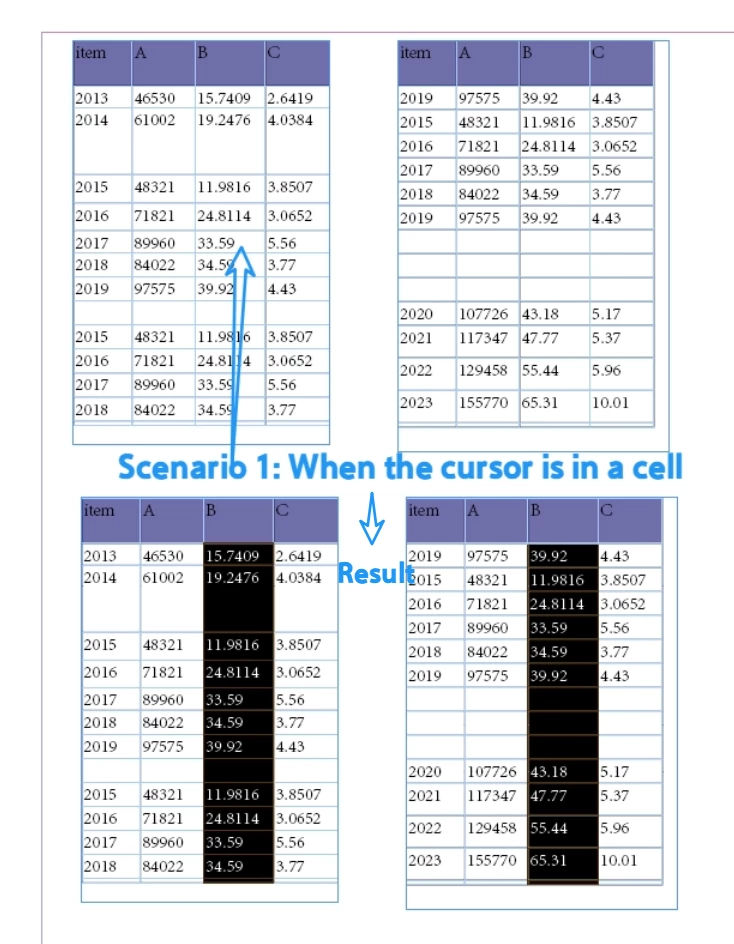
Scenario 1: When the cursor is in a cell, select the entire column of the table (excluding the table header and footer).


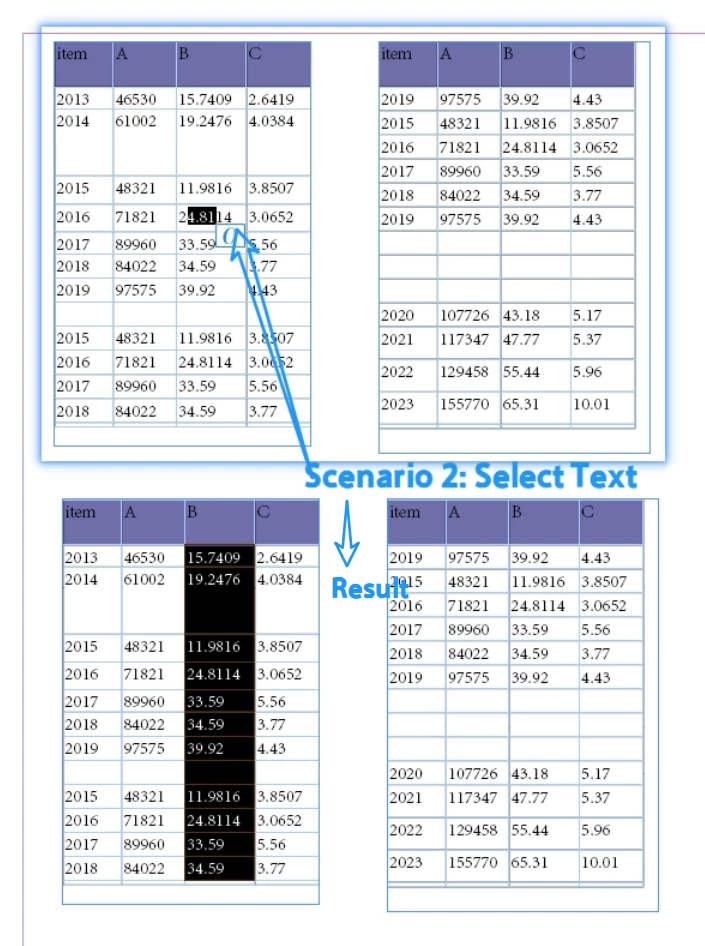
Scenario 2: When text is selected within a cell, executing the script will select all cells in this column of the current frame (excluding the header and footer rows).

@Robert at ID-TaskerLong time no see. What big things have you been up to lately?
He wrote a piece of code that selects based on matching styles, but sometimes the cell styles might differ, so it doesn't work.

app.doScript("main()", ScriptLanguage.javascript, undefined, UndoModes.ENTIRE_SCRIPT, "To Layout! …");
function main() {
    // Place the Cursor in any Cell:
    var myCell = app.selection[0].parent;
    var myCellStyle = myCell.appliedCellStyle;
    var myColumnCells = myCell.parentColumn.cells;
    var C = myColumnCells.length, c;
    var myCounter = 0;
    var StartRow = 0;
    var EndRow = 0;
    for (c = 0; c < C; c++) {
        //        alert(c);
        if (myColumnCells[c].appliedCellStyle === myCellStyle) {
            if (StartRow) {
            }
            else {
                StartRow = c;
            };
        }
        else {
            if (StartRow) {
                EndRow = c;
                break;
            };
        };
    };
    if (StartRow > 0 && EndRow == 0) {
        EndRow = c;
    };
    if (StartRow > 0 && EndRow > 0) {
        app.select(myCell);
        app.select(myCell.parent.cells.itemByRange(myColumnCells[StartRow], myColumnCells[EndRow - 1]));
    };
};
Correct answer Laubender

@dublove said: "This is merely an initial state check: if(item.constructor.name==“Text”). It's not the final result.
The desired outcome is that, in this state, after running the script, the text box's column should be selected."


Hi @dublove ,

maybe I was confused a bit and did not read all you said properly.

So I'm asking if the following statements describe what you want to start with:


Scenario 1:

The user did a text selection in a table cell, but only one insertion point long; so to say, the "cursor sits in the cell".

Action: Select all body cells of that column. Regardless if the table rows are running through one or a number of text frames.


For this case use this code:

//SCENARIO 1:

if
(	
	app.selection[0].insertionPoints.length == 1
	&& 
	app.selection[0].parent.constructor.name == "Cell"
)
{
	var table = app.selection[0].parent.parent;
	var headerRowCount = table.headerRowCount;
	var footerRowCount = table.footerRowCount;

	app.select
	(
		app.selection[0].parent.parentColumn.cells.itemByRange
		( 
			headerRowCount , 
			-( footerRowCount + 1 ) 
		)
	);
};


Scenario 2

The user did a text selection in a table cell, but this time one or more characters.

Action: Select all body cells of that column that are positioned in the current text frame.


//SCENARIO 2:

if
(	
	app.selection[0].insertionPoints.length > 1
	&& 
	app.selection[0].parent.constructor.name == "Cell"
)
{

	var textFrame = app.selection[0].insertionPoints[0].parentTextFrames[0];

	var rangeOfCells = 
	app.selection[0].parent.parentColumn.cells.everyItem().getElements();

	var cellsToSelect = [];

	for( var n=0; n<rangeOfCells.length; n++ )
	{
		if
		( 
			rangeOfCells[n].rowType == RowTypes.BODY_ROW 
			&& 
			rangeOfCells[n].insertionPoints[0].parentTextFrames[0] == textFrame
		)
		{
			cellsToSelect[ cellsToSelect.length++ ] = rangeOfCells[n];
		}
	};

	app.select( cellsToSelect[0] );

	for( var n = 1 ; n < cellsToSelect.length; n++ )
	{
		app.select( cellsToSelect[n] , SelectionOptions.ADD_TO )
	};

};

Regards,
Uwe Laubender
( Adobe Community Expert )


3 replies

LaubenderCommunity ExpertCorrect answer
Community Expert
September 13, 2025

@dublove said: "This is merely an initial state check: if(item.constructor.name==“Text”). It's not the final result.
The desired outcome is that, in this state, after running the script, the text box's column should be selected."


Hi @dublove ,

maybe I was confused a bit and did not read all you said properly.

So I'm asking if the following statements describe what you want to start with:


Scenario 1:

The user did a text selection in a table cell, but only one insertion point long; so to say, the "cursor sits in the cell".

Action: Select all body cells of that column. Regardless if the table rows are running through one or a number of text frames.


For this case use this code:

//SCENARIO 1:

if
(	
	app.selection[0].insertionPoints.length == 1
	&& 
	app.selection[0].parent.constructor.name == "Cell"
)
{
	var table = app.selection[0].parent.parent;
	var headerRowCount = table.headerRowCount;
	var footerRowCount = table.footerRowCount;

	app.select
	(
		app.selection[0].parent.parentColumn.cells.itemByRange
		( 
			headerRowCount , 
			-( footerRowCount + 1 ) 
		)
	);
};


Scenario 2

The user did a text selection in a table cell, but this time one or more characters.

Action: Select all body cells of that column that are positioned in the current text frame.


//SCENARIO 2:

if
(	
	app.selection[0].insertionPoints.length > 1
	&& 
	app.selection[0].parent.constructor.name == "Cell"
)
{

	var textFrame = app.selection[0].insertionPoints[0].parentTextFrames[0];

	var rangeOfCells = 
	app.selection[0].parent.parentColumn.cells.everyItem().getElements();

	var cellsToSelect = [];

	for( var n=0; n<rangeOfCells.length; n++ )
	{
		if
		( 
			rangeOfCells[n].rowType == RowTypes.BODY_ROW 
			&& 
			rangeOfCells[n].insertionPoints[0].parentTextFrames[0] == textFrame
		)
		{
			cellsToSelect[ cellsToSelect.length++ ] = rangeOfCells[n];
		}
	};

	app.select( cellsToSelect[0] );

	for( var n = 1 ; n < cellsToSelect.length; n++ )
	{
		app.select( cellsToSelect[n] , SelectionOptions.ADD_TO )
	};

};

Regards,
Uwe Laubender
( Adobe Community Expert )


rob day
Community Expert
Community Expert
September 13, 2025

Hi Uwe, I think the 2nd script is what @dublove  is looking for, and might also want it to work for an insertion point inside the cell? So maybe the first if can be:


if(app.selection[0].parent.constructor.name == "Cell")
{...
Community Expert
September 13, 2025

Hi Rob,

well yes. But I'm really not sure what exactly is meant by "when the cursor is in a cell".


Regards,
Uwe Laubender
( Adobe Community Expert )

Community Expert
September 12, 2025

Hi @dublove ,

I guess that "Scenario 1: When the cursor is in a cell, select the entire column of the table (excluding the table header and footer)." means, that you selected a single insertion point in the text of a cell. Scenario 2 in principle is the same, but the number of insertion points of the selection is bigger than 1.


So try this code below:

if
(	
	app.selection[0].insertionPoints.length == 1
	&& 
	app.selection[0].parent.constructor.name == "Cell"
)
{
	app.select(app.selection[0].parent.parentColumn);
};

if
(	
	app.selection[0].insertionPoints.length > 1
	&& 
	app.selection[0].parent.constructor.name == "Cell"
)
{
	var table = app.selection[0].parent.parent;
	var headerRowCount = table.headerRowCount;
	var footerRowCount = table.footerRowCount;

	app.select
	(
		app.selection[0].parent.parentColumn.cells.itemByRange
		( 
			headerRowCount , 
			-( footerRowCount + 1 ) 
		)
	);
};


Regards,
Uwe Laubender
( Adobe Community Expert )

dublove
dubloveAuthor
Legend
September 12, 2025

@Laubender 

You have selected the entire column.
It cannot include headers or footers.
This is the first scenario.

There is also a second scenario: only selecting columns within the current frame.

rob day
Community Expert
Community Expert
September 12, 2025

only selecting columns within the current frame


A table is treated as a single character in a text frame's contents, so there’s no obvious way to determine where a table breaks across linked text frames. Here tf is the text frame at the tables insertion point and the script returns a count of 1 character


var tf = app.selection[0].parent.parent.parent;
alert("This table’s parent text frame contains " + tf.characters.length + " character")


If I expand the first text frame to include the line after the table:


rob day
Community Expert
Community Expert
September 11, 2025

Your sample document contains 2 tables (not 4) each split across 2 text frames. A script can select cells, but only in one table at a time:


var t = app.documents[0].stories.everyItem().tables.everyItem().getElements()
alert("This document contains " + t.length + " Tables")


dublove
dubloveAuthor
Legend
September 12, 2025

Hi @rob day 

In my example, a document contains two tables.
The top one shows the state before the operation, while the bottom one displays the result after the operation.

There are two possible operations:
When the cursor is in a cell, I want to select the entire column in the table (excluding the header and footer rows).
The other operation is: when text is selected, execute a script to select the column in the current text box (not the entire table).